Last updated: November 19, 2026
Quick Answer: choose the Bitcoin network that matches the destination address and the receiving platform’s deposit instructions. In practice, that usually means one exact network name, one exact address format, and one final screen that repeats both before you confirm. If the instructions are unclear, stop and verify with the platform or a qualified professional.
If you’re staring at a withdrawal screen and asking which Bitcoin network to use, the right answer is the network that matches the bitcoin address you’re sending to.
Pick the same blockchain network the destination wallet or exchange expects, or the withdrawal can fail or land somewhere you can’t easily access.
The sections below will show you how to check the address, the exchange withdrawal screen, and the confirmations before you confirm.
Key Takeaways
- Match the withdrawal network to the destination address, not to the coin name alone.
- A Bitcoin withdrawal network mismatch is a setup problem, not something to ignore.
- The safest practical check is to compare the destination address format and the exchange’s network labels before sending.
- Confirmations matter because a transaction is not treated as final until the network records it; if you are unsure, consult the platform’s support or a qualified professional.
- If the destination exchange lists only one supported network, use that one or stop and verify first.
This is information, not financial advice. Crypto rules, limits, and exchange policies vary by country and change often, so a qualified adviser or the exchange’s own support pages should be used for your own situation. See the Bitcoin.org address overview and Coinbase Help for platform-specific guidance.
Who this applies to, and what you need before you start
This applies if you already have a bitcoin address, a withdrawal screen open, and at least one wallet or exchange where you plan to send the coins. It assumes you know the difference between a coin name and a network name, but not much more.
The Bitcoin withdrawal network is the route your exchange uses to move the transaction across a blockchain. If the send screen offers only one Bitcoin option, that still needs checking against the destination. A wrong choice here is not a small formatting error. It can change how the transaction is processed.
What you need in front of you:
- The destination bitcoin address
- The exchange withdrawal screen
- The network name shown by the destination wallet or exchange
- The transaction details page, if the send is already in motion
Here’s the catch: a page can say “Bitcoin” while still using different address types or network labels behind the scenes. That’s why a good check is not “does it say BTC?” but “does this exact address and network pair belong together?”
If the destination is an exchange account, the exchange’s deposit page usually shows the accepted network. If the destination is your own wallet, the wallet app usually names the supported address types. For background on exchanges and wallets, the hub page on Crypto exchanges and wallet operations is the better next stop. See also the Bitcoin whitepaper and Ledger Academy for general wallet and network background.
Which Bitcoin network should I choose for a withdrawal?
You should choose the network that the receiving wallet or exchange explicitly supports for that address type. That is the short answer, and it is the one that prevents the most trouble; if you are unsure, consult the platform’s support or a qualified professional.
Picture this: you’ve copied a bitcoin address, opened the withdrawal form, and now you see several network labels. You may be tempted to pick the cheapest-looking option or the first one in the list. The address format, the receiving platform, and the network label have to line up.
Common Bitcoin-related network labels can include:
- Bitcoin
- BTC
- Bitcoin (native SegWit), if the platform uses that wording
- Other address-format labels tied to the same asset on the same or a related network
The term confirmations means how many blocks the network has added after your transaction. More confirmations generally mean the transfer is further along in the chain’s record. The receiving platform may wait for a specific number before crediting the funds. For more on this, see the Bitcoin developer documentation and Kraken support.
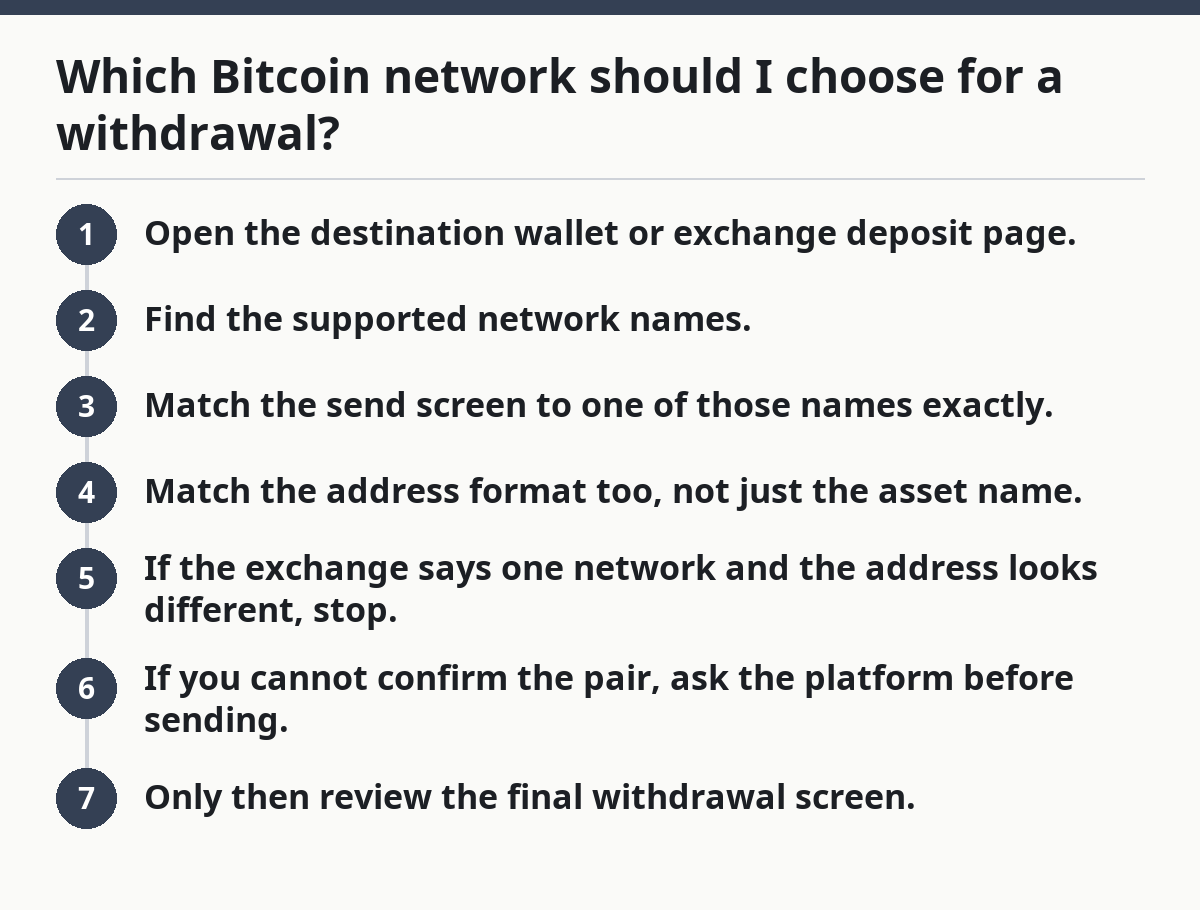
A useful rule is simple:
- Open the destination wallet or exchange deposit page.
- Find the supported network names.
- Match the send screen to one of those names exactly.
- Match the address format too, not just the asset name.
- If the exchange says one network and the address looks different, stop.
- If you cannot confirm the pair, ask the platform before sending.
- Only then review the final withdrawal screen.
A mismatch can mean the deposit does not credit normally, or that recovery depends on support and the exact platforms involved. That is why “close enough” is not good enough.
What to check on the address itself
The address is your strongest clue, and it is usually the first thing to verify. Bitcoin addresses can have different starting patterns, depending on the format the wallet uses. The exact format matters because some platforms only accept certain types.
Check these points:
- The address is for Bitcoin, not another coin
- The receiving platform recognizes the exact format
- The withdrawal screen shows the same network label
- The copy-pasted address still matches after you paste it
If the platform labels the network differently from the address you were given, treat that as a warning. A 1-character paste error is enough to cause a problem. Big mistake.
How to check the withdrawal network before you confirm
You should verify the destination, the network label, and the address format before you press confirm. That is the cleanest way to avoid a Bitcoin withdrawal network mismatch.
Picture this: the amount is filled in, the fee is shown, and the final button is one click away. This is the moment to slow down. A 30-second check here can save a long support thread later.
Use this process every time:
- Open the destination deposit page first. Confirm the receiving wallet or exchange lists Bitcoin and shows a supported network name. If the page lists only one network, that is the one to use. If it lists none, stop.
- Copy the bitcoin address directly. Use copy-and-paste, not typing. Then paste it into a plain text field or the withdrawal form and compare the first and last 4 characters. If they do not match, the address is wrong.
- Match the network label to the destination. If the exchange withdrawal screen says “Bitcoin,” “BTC,” or a more specific Bitcoin network label, it has to match the destination instructions. If the labels conflict, that is a problem.
- Check for memo, tag, or extra field warnings. Bitcoin transfers usually do not use a destination memo the way some other assets do. If the platform asks for an extra field, read the page carefully before proceeding.
- Review the fee and minimum withdrawal amount. The amount must clear the platform’s minimum and leave enough for the network fee. If the form blocks the send, the size may be wrong or the balance may be too low.
- Look at the confirmation notice. The screen should show the exact address, amount, and network one last time. If any one of those fields changes after you approve, cancel and recheck.
- Save the transaction ID. If the platform gives you a transaction ID or hash, copy it right away. If the send later needs support, that number is the trail. If there is no ID after confirmation, the transaction may not have been broadcast yet.
A good withdrawal screen does not leave you guessing. It shows the address, network, fee, and amount in one place before the final click. If it does not, treat that as a problem with the process, not with your caution; when in doubt, consult the platform’s support or a qualified professional.
The truth is, a lot of wallet mistakes happen because people trust the coin name and ignore the network name. That is backwards. The network label is what tells the platform how to route the transfer.
What happens if the network and address do not match?
A mismatch can make the deposit fail, stall in review, or require support help to recover. The exact result depends on the sending exchange, the receiving platform, and the address type involved.
Picture this: you sent bitcoin to the wrong network label or used the wrong address type. The transaction may still appear on a blockchain explorer, but the receiving platform may not credit it automatically. That does not mean the coins are gone by default. It means the situation is now platform-specific and slower.
Common outcomes include:
- The receiving exchange rejects the credit
- The funds sit in a state that needs manual review
- Support asks for the transaction hash, sending address, and destination address
- Recovery may depend on whether the platform controls the keys for the destination address
The consequence is time, not just stress. It can take days of back-and-forth, and some platforms may not be able to help at all if the send was made to an unsupported network or wrong address type.
What to do instead:
- Stop sending more to the same destination until the first transfer is understood.
- Gather the transaction hash, destination address, and screenshots.
- Check the destination’s support page for network mismatch instructions.
- Contact support with the exact network name used on the withdrawal screen.
Do not assume a blockchain transaction can be “edited” after it leaves the exchange. It cannot. That is why the pre-send check matters so much.
When to stop and verify instead of sending
You should stop if any of these situations appears, because they mean the network choice is not clear enough yet.
Picture this: the withdrawal screen is ready, but one detail feels off. That is the right moment to pause, not to hope. Bitcoin withdrawals are simple only when the destination instructions are explicit.
The destination lists more than one network, and you cannot tell which address format matches: the platform’s guidance is incomplete — check the deposit page or support before sending.
The exchange uses one label, but the wallet app shows a different one for the same address: the naming may hide a format difference — verify the exact supported address type first.
You are copying from a screenshot or chat message, not the wallet itself: the address could be stale or altered — open the source page again and copy fresh.
The withdrawal form warns about unsupported networks: the platform is telling you it may not process the send — do not guess.
You need the coins to arrive fast and the screen is still unclear: rushing raises the chance of a mismatch — wait until the route is confirmed.
The receiving account belongs to an exchange with strict credit rules: that platform may require a specific network and may not auto-credit mistakes — use the deposit instructions exactly.
The best result is boring: the destination page names one accepted network, the withdrawal screen matches it, and the address format fits that same choice. Anything less is a reason to stop.
Common Bitcoin withdrawal mistakes and what they cost
The most common mistake is treating the network as a formality. It is not. It changes how the transaction is interpreted and whether the destination can credit it easily.
Picture this: you are moving fast, the balance is visible, and the interface looks familiar. That is when people skip the one check that matters most. Familiar screens still make unfamiliar mistakes.
Common errors:
- Choosing the first Bitcoin option on the list. The cost is a possible mismatch. The fix is to match the destination’s deposit instructions, not the top of the menu.
- Ignoring address format. The cost is a failed or delayed credit. The fix is to compare the address type with the network label.
- Typing the address by hand. The cost is a one-character error. The fix is copy-and-paste, then recheck the first and last characters.
- Assuming all exchanges use the same network names. The cost is confusion during checkout. The fix is to use the exact wording shown by that platform.
- Skipping the preview screen. The cost is approving a bad send. The fix is to inspect the final screen with the exact address, amount, and network.
- Not saving the transaction hash. The cost is slower support if something goes wrong. The fix is to store the ID before closing the page.
A lot of beginner articles stop at “double-check everything.” That is too vague. The specific checks that matter are the destination network label, the address format, and the confirmation screen.
When standard guidance does not apply
Standard guidance breaks down when the destination platform gives incomplete instructions or when the withdrawal screen uses a label you have not seen before. In those cases, the right move is to verify outside the form.
Picture this: a wallet says it supports Bitcoin, but the deposit page does not show the network you expected. Or the exchange names a more specific Bitcoin format, and you have never used it before. That is not the moment to improvise.
Use a modified approach if:
- The destination only supports one Bitcoin deposit route
- The wallet app shows several Bitcoin address formats
- The exchange has region-specific rules
- The account is new and may have withdrawal restrictions
- The address was generated by a payment request that could expire
In those cases, do not rely on memory. Reopen the receiving page, read the exact network line, and check any warning text below it. If the platform has a help article for that deposit method, read it before sending. A 2-minute check is better than a 2-day support case.
One more edge case: if you are moving coins between your own wallets, the same network rule still applies. Ownership does not fix a bad route. The address and network still have to match.
How long the check takes, and what a good result looks like
The network check should take only a few minutes, and the result should leave no ambiguity. If you need a long chain of guesses, the setup is not ready.
Picture this: you have the exchange withdrawal screen open, the destination wallet visible, and the address copied. A good outcome is simple. The same network name appears in both places, the address format fits, and the final confirmation screen repeats the same details.
A good result usually looks like this:
- One network name on the deposit page
- The same network name, or the same Bitcoin format label, on the send page
- A pasted address that matches what you copied
- A confirmation screen that repeats the exact destination
- A transaction hash after submission
That is the standard you want. Not a guess. Not a hope. A match.
If any one of those pieces is missing, stop and verify before sending. The answer to “which Bitcoin network should I use?” is never “whatever seems fastest.” It is “the one the destination says it accepts.”
Drafted with AI; not yet reviewed by a person.