Last updated: November 19, 2026
Key Takeaways
- Paper is the fastest simple backup, but it is also the easiest to damage.
- Metal is stronger against heat and water because the medium itself is more durable.
- A password manager can work for a seed phrase in limited cases, but it is not the default I’d recommend to beginners.
- Paper is quickest; metal is most durable; password managers are most convenient.
Your seed phrase backup options compared are paper, metal, and password managers, and the right one depends on whether you fear fire, theft, or human error more.
Quick answer: metal is the most durable physical backup, paper is the simplest first backup, and a password manager fits only some digital-first setups.
The sections below settle durability, access, inheritance, and which backup fails in what way.
This article compares Seed phrase backup options compared: paper, metal, and password managers in practical terms.
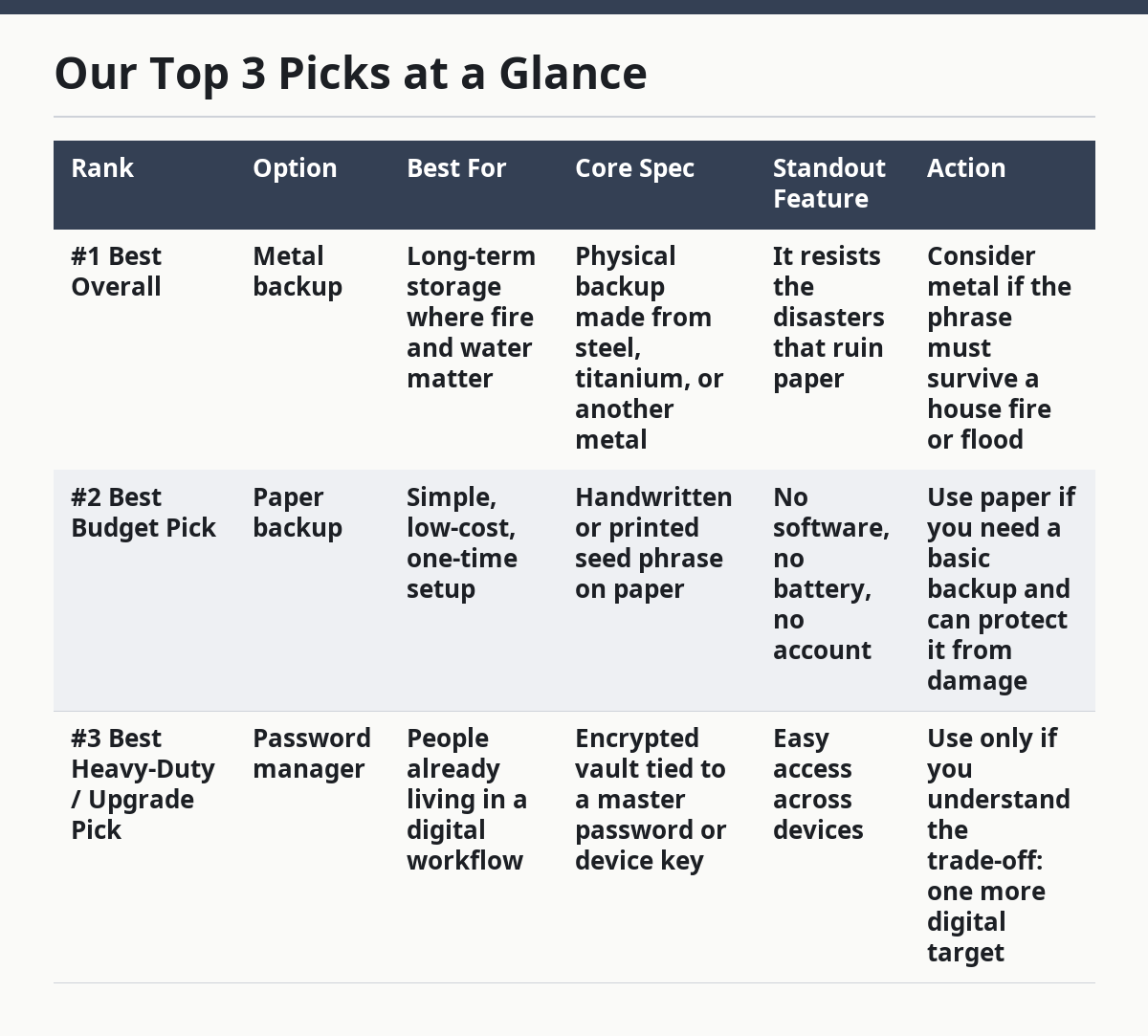
Our Top 3 Picks at a Glance
| Rank | Option | Best For | Core Spec | Standout Feature | Action |
|---|---|---|---|---|---|
| #1 Best Overall | Metal backup | Long-term storage where fire and water matter | Physical backup made from steel, titanium, or another metal | It resists the disasters that ruin paper | Consider metal if the phrase must survive a house fire or flood |
| #2 Best Budget Pick | Paper backup | Simple, low-cost, one-time setup | Handwritten or printed seed phrase on paper | No software, no battery, no account | Use paper if you need a basic backup and can protect it from damage |
| #3 Best Heavy-Duty / Upgrade Pick | Password manager | People already living in a digital workflow | Encrypted vault tied to a master password or device key | Easy access across devices | Use only if you understand the trade-off: one more digital target |
| Product / Option | Best For | Core Spec | Standout Feature | Action |
|---|---|---|---|---|
| Metal backup | People who want physical resilience | Heat- and water-resistant material | Does not tear, smudge, or fade like paper | Choose if disaster damage is your main fear |
| Paper backup | Low-complexity backups | Handwritten or printed phrase on paper | Fast to make and easy to read | Choose if you need a simple backup now |
| Password manager | Digital-first users | Encrypted vault protected by a master password | Can sync across devices | Choose only if you can manage digital account risk |
I write about wallet security, backup failure modes, and recovery planning, so the difference between a storage method and a recovery risk is the part I pay attention to first.
Paper is the easiest backup, and the easiest to ruin
Paper wins if you want the fastest, least technical backup, because it needs no special tool and no learning curve.
Here’s the catch: it is also the most fragile option in a fire, flood, leak, or even a bad drawer.
A paper backup can work fine for a short-term or low-value setup, but it depends on you keeping it dry, legible, and hidden.
Picture this: you’ve just generated a wallet, and you want the backup done before you close the laptop and walk away. Paper is the quickest path from “I need a copy” to “I have one,” and that matters when people delay backups because the process feels annoying. A pencil and a card can do the job. So can plain printer paper.
Paper also has a hidden upside: it is simple for heirs to find if the instructions are clear. A labeled envelope in a known place is easier to explain than a locked app no one can open. But that same simplicity cuts both ways. If anyone else finds it, they may be able to spend the funds without breaking encryption or guessing a password.
- Main strength: easy to make, easy to read, easy to duplicate.
- Main weakness: water, fire, ink fade, and physical wear can destroy it.
- Best use case: a backup you can store in a dry, protected place and update by hand when needed.
- Bad use case: a backup that must survive years in a basement, car, or unprotected drawer.
Who should skip this: anyone who wants the backup to survive heat, water, or long neglect should look at metal backup instead.
Buy this if: you want a basic backup for a beginner wallet and can keep the paper dry and private.
Skip this if: you need one copy to survive a fire, flood, or years of rough storage.
Metal backup is the most durable physical option
Metal wins when your main fear is physical damage, because metal plates, capsules, or tiles do not behave like paper under heat, water, or time.
That does not make it magic. It only means the backup medium is harder to destroy than a sheet of paper.
If the phrase matters enough to protect against house-level damage, metal backup is the strongest physical choice.
Picture this: you’re thinking past the next month and into the next decade. A metal backup asks more from you up front, but it answers a different threat model. The letters or words are typically stamped, etched, or assembled into a metal body, which gives you a backup that won’t smear when wet and won’t disintegrate because the ink ran.
The trade-off is convenience. Metal takes more effort to set up, costs more to prepare than paper, and can still be lost, stolen, or misplaced like anything else. It also does nothing against the wrong person finding it. A thief does not need to burn a metal plate to use it; they just need the phrase.
- Main strength: durable against common physical disasters.
- Main weakness: higher setup effort and the same theft risk as any physical copy.
- Best use case: a long-term backup for larger balances or for storage in a place that might face heat or water.
- Bad use case: someone who wants a cheap, quick, disposable copy.
Metal also matters for inheritance planning. If a spouse, child, or executor may need the phrase after you’re gone, a metal backup can survive years better than paper, but only if the location and access instructions are documented clearly. Without that, “durable” just means “durable and undiscoverable.”
Who should skip this: beginners who need the fastest possible first backup may be better served by paper backup until they understand their wallet setup.
Buy this if: you want a physical backup that can handle damage better than paper and you can store it carefully.
Skip this if: you need something cheap, easy, and temporary while you learn the process.
Is a password manager safe for a seed phrase?
A password manager can be safe for a seed phrase in a narrow set of cases, but it is not the default choice I’d hand to most beginners.
The reason is simple: it turns a physical backup problem into a digital account problem.
That means the seed phrase depends on the security of the vault, the master password, device access, and the provider’s own design.
Picture this: you already use a password manager for logins, you know how to protect the master password, and you keep strong device security. In that world, storing a seed phrase in an encrypted vault can feel convenient. It can also make inheritance and access easier if you already maintain a digital handoff plan.
The weakness is obvious once you say it out loud: if the account is compromised, the backup is exposed. If you lose access to the vault and the recovery path fails, the phrase can become hard to reach when you need it most. A password manager also concentrates risk. One account now holds multiple secrets, which is efficient and dangerous at the same time.
- Main strength: easy access from multiple devices and less chance of a lost paper slip.
- Main weakness: account compromise, sync problems, or lockout can put the seed phrase at risk.
- Best use case: a careful, digital-first user who already understands vault security and device hygiene.
- Bad use case: anyone who wants the seed phrase to stay offline.
A password manager is also a poor fit if the whole point of your backup plan is to avoid digital failure modes. If your concern is malware, phishing, cloud sync issues, or a compromised email account, a digital vault adds another layer of attack surface instead of shrinking it.
Who should skip this: people who want an offline-only backup should choose metal backup or paper backup instead.
Buy this if: you already rely on a password manager, use strong authentication, and want easy digital access.
Skip this if: you want the seed phrase to stay off the internet entirely.
The honest side-by-side
Paper wins on speed; metal wins on durability; password managers win on convenience.
The right pick depends on which failure you want to avoid most: destruction, theft, or lockout.
This is the part many generic guides flatten into “just make backups.” That misses the real decision.
Picture this: you have three copies in mind, and each one solves a different problem. One is easy to make, one is hard to destroy, and one is easiest to search when you need it. The comparison below is the part that matters before you commit.
| Criteria | Paper | Metal | Password manager | Winner for [condition] |
|---|---|---|---|---|
| Fire resistance | Poor | Stronger | Depends on device/account access | Metal, for fire risk |
| Water resistance | Poor unless sealed well | Stronger | Digital risk instead of water risk | Metal, for floods and leaks |
| Setup effort | Very low | Moderate | Low to moderate | Paper, for speed |
| Theft risk | Physical theft | Physical theft | Account theft or vault compromise | No clear winner; all need protection |
| Ease of reading later | Good if stored well | Good if stamped clearly | Good if vault access works | Password manager, for fast retrieval |
| Inheritance planning | Easy if labeled and documented | Better for long-term storage | Can be easier if estate access is set up | Metal, for physical longevity |
| Offline status | Offline | Offline | Online or device-linked | Paper and metal, for offline storage |
| Durability over years | Weak | Strong | Depends on account health | Metal, for long storage |
| Human error during backup | Easy to miswrite words | Easier to verify if made carefully | Easy to mis-store or forget master password | Paper, if the user wants a simple manual copy |
The key difference is not just material strength. It is where the failure happens. Paper and metal fail physically; password managers fail digitally. That matters because a backup should fail in a way you can still recover from.
For a lot of readers, the real question is not “Which is best?” It is “Which risk am I actually taking?” If you fear house damage, metal is the clear front-runner. If you fear forgetting steps and want a cheap backup today, paper is the shortest path. If you live in a password-manager-heavy workflow and can keep the vault protected, a digital copy may fit your habits.
Which one should you choose?
Choose metal backup if you want the strongest physical protection and expect the phrase to sit unused for a long time. Choose paper backup if you need the simplest possible first copy and can store it safely right away. Neither if you want a backup you never have to think about again; that assumption is how people lose funds.
Picture this: you’re standing between three options and you want the plain answer, not a lecture. The answer is that metal is the best all-around physical choice, paper is the best starter option, and a password manager only makes sense when digital access is already part of your security routine. No method removes all risk.
Here’s the practical split:
- Choose metal if you worry about fire, water, or long-term wear more than setup time.
- Choose paper if you need a fast, low-cost backup and you can keep it protected from damage.
- Choose a password manager if you want digital convenience and you understand the account-risk trade-off.
- Do not rely on a password manager alone if your goal is an offline-first backup.
The part a lot of readers miss is inheritance. If another person may need access later, the backup method has to be paired with written instructions. A perfect backup in the wrong place is still a lost backup.
When this choice changes
The overall answer flips in a few cases, and those cases matter more than brand loyalty or personal habit.
A different threat model can make the “usual” winner the wrong choice.
That is why there is no universal winner here.
Picture this: you have a larger balance, you travel often, or you expect someone else to handle your affairs later. Those situations change the job of the backup. The material is only part of the plan.
- You live with fire or flood risk. Metal moves ahead of paper by a wide margin because damage resistance becomes the main requirement.
- You are setting up a tiny test wallet. Paper is enough if the goal is to learn the process and keep the setup simple.
- You already depend on a password manager for daily life. The digital option may fit your routine better than a physical method, as long as you accept the extra attack surface.
- You need inheritance access. Metal or paper with clear instructions usually beats a vault no one else can open.
The surprise here is that the “best” option can change after one question: who needs to reach the seed phrase later? If the answer is only you, the choice is about your habits. If the answer is someone else too, the choice becomes a documentation problem as much as a storage problem.
Where beginners usually go wrong
Beginners usually focus on where to store the seed phrase and ignore how the backup fails.
That mistake turns a backup into a liability.
The fix is simple: match the method to the damage you fear most.
Picture this: you have the phrase copied, but you haven’t thought about legibility, location, or who can find it. That is where the real mistakes happen. A paper copy in a drawer can disappear. A metal copy can still be stolen. A password manager can be locked behind one bad password.
The safer approach is to choose the backup you can actually maintain, then document where it is and who should know about it.
For more on wallet recovery and backup design, see the Ethereum wallet security docs and the NIST Digital Identity Guidelines. If you want a broader home-storage angle, the FEMA flood guidance is also relevant.
Drafted with AI; not yet reviewed by a person.