Last updated: November 19, 2026
A Bitcoin transaction is confirmed when a block explorer shows it inside a mined block and the confirmation count is at least 1. If the transaction still sits in the mempool with 0 confirmations, it is unconfirmed, even if your wallet already says “sent.”
Key takeaways
- A transaction ID, or txid, is the lookup key you use in a block explorer.
- “Confirmed” means the transaction was included in a block, not just broadcast to the network.
- “Pending,” “unconfirmed,” and “0 confirmations” usually point to the same state.
- More confirmations mean the transaction is deeper in the chain and harder to reverse.
- If a wallet and an explorer disagree, the explorer is the better check for status.
How do I check a Bitcoin transaction?
You check a Bitcoin transaction by looking it up in a block explorer and reading the confirmation count and status label. The shortest path is to copy the transaction ID from your wallet, paste it into a block explorer, and look for a block height, a timestamp, and a confirmation number.
-
Open a block explorer in your browser and use its search bar.
Choose a Bitcoin explorer, not a general crypto dashboard, so the results match Bitcoin’s network. -
Copy the transaction ID from your wallet or exchange withdrawal record.
A txid is usually a long string of letters and numbers, and one exact character matters. -
Paste the transaction ID into the explorer search field.
The page should load one transaction record, not a list of unrelated activity. -
Read the confirmation count on the transaction page.
If the explorer shows 1 or more confirmations, the transaction is confirmed; if it shows 0, it is still unconfirmed. -
Check the status line for labels such as “confirmed,” “unconfirmed,” “pending,” or “in mempool.”
These labels tell you where the transaction sits in the network and whether it has entered a block yet. -
Open the block details if the explorer gives you a block hash or block height.
A transaction with a block entry is confirmed because it has been included in mined Bitcoin data. -
Compare the result with your wallet, then trust the explorer for the final status.
Wallets sometimes lag behind the network by a short period, so a fresh explorer view is the cleaner check.
A plain check like this takes less than a minute once you have the txid. The one thing you should not do is guess from the wallet balance alone, because balance updates can lag the network by a block or two.
What does confirmed mean in Bitcoin?
Confirmed means the transaction has been included in a valid block on the Bitcoin blockchain. That is the core test, not whether the coins appear in a wallet, not whether the recipient has spent them, and not whether a website says the payment is “processing.”
A Bitcoin transaction starts as a broadcast message. It then waits in the mempool, which is the pool of unconfirmed transactions, until a miner includes it in a block. Once that happens, the explorer usually changes the status from unconfirmed to confirmed and shows at least 1 confirmation.
That number can rise as more blocks are added after the block that contains your transaction. Each new block increases the confirmation count by 1. Many explorers also show the block height, which is the position of that block in the chain.
This matters because confirmation is the line between “the network has seen the payment” and “the network has locked it into chain history.” For everyday checking, 1 confirmation is the first sign that the transaction is confirmed. For higher-value transfers, people often wait for more confirmations before treating the payment as final.
A generic wallet label can be misleading here. A wallet may call a transfer “sent” as soon as it broadcasts the transaction, but that is not the same as confirmed. The explorer is the better source for the network state.
Which status labels should I trust?
You should trust the explorer’s confirmation count first, then use the status label as a plain-language hint. The labels are not always identical across explorers, but they usually point to the same few states.
| Explorer label | What it usually means | What to check |
|---|---|---|
| Confirmed | The transaction is in a block | Confirmations are 1+ |
| Unconfirmed | The transaction is not in a block yet | Confirmations are 0 |
| Pending | The explorer is waiting for block inclusion | Look for mempool status |
| In mempool | The transaction is sitting in the unconfirmed pool | Wait for a mined block |
| Failed / rejected | The explorer did not accept the transaction as valid | Recheck the txid and source |
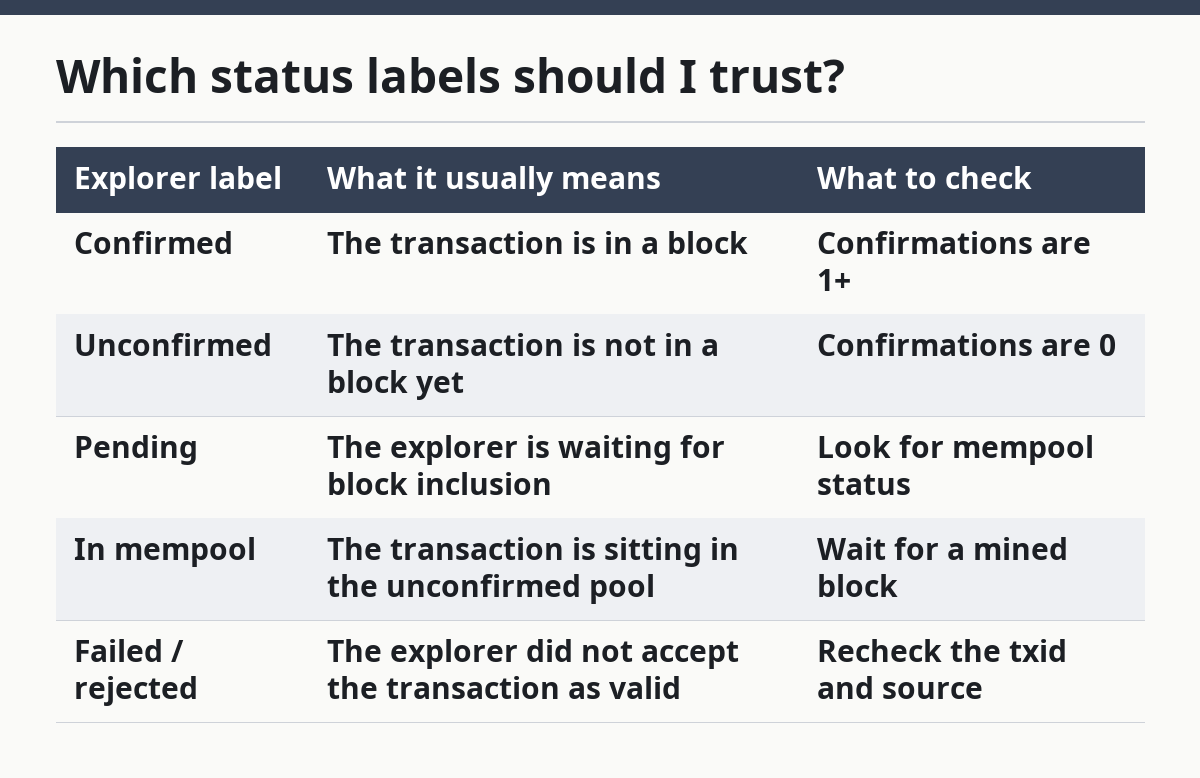
The exact wording depends on the explorer. One site may use “pending,” another may use “unconfirmed,” and a third may show only the count. The count is the part that matters most because it is the clearest signal that the transaction has been included in the chain.
A label alone is not enough if the explorer is slow to refresh. Some pages update less often than others, and a wallet can also show stale data. If the label and the count conflict, treat the count and block data as the stronger signal.
What does the mempool tell me?
The mempool tells you that the transaction has been broadcast but not yet placed into a block. If a Bitcoin transaction is in the mempool, it is still unconfirmed, even when every field on the explorer looks valid.
A mempool entry means the network has seen the transaction and nodes are holding it while miners decide what to include next. That is normal for a transaction with 0 confirmations. The transaction can sit there for a short time or longer, depending on network conditions and the fee attached to it.
The useful part of the mempool view is the status, not the drama. If you see the transaction in the mempool, you know it has not reached final confirmation yet. If you do not see it at all, the problem may be a wrong txid, a wallet sync delay, or a transaction that was never broadcast in the first place.
This is also where people get tripped up by wording. “Pending” sounds temporary, but it can last longer than expected. In practice, pending just means the same thing as unconfirmed in this context: no block has claimed the transaction yet.
A mempool status is not the same as failure. It often just means “wait.” The transaction can move from mempool to block inclusion without any action from you.
How many confirmations mean it is final?
A Bitcoin transaction is treated as more final as the confirmation count rises, but the exact number depends on the risk you are managing. One confirmation proves inclusion in a block, while each additional confirmation makes that transaction harder to replace or reorganize.
This is why people talk about 1 confirmation, 3 confirmations, or more. The number is a practical risk signal, not a magic switch. A small payment may be accepted after fewer confirmations, while a larger transfer may call for more caution.
Finality in Bitcoin is never a single moment in the same way a card payment clears at a cash register. Instead, it becomes stronger over time as more blocks are added. That is the trade-off built into the system: early acceptance is faster, but later acceptance is harder to undo.
If you are only trying to check status, the simplest rule is enough. 0 confirmations means unconfirmed. 1 or more confirmations means confirmed. If you need stronger certainty, look at the growing confirmation count rather than the wallet’s generic “complete” label.
This page is part of the site’s on-chain transaction troubleshooting and confirmations hub, which covers the broader status checks around Bitcoin transaction confirmation status.
What mistakes cause confusion?
The most common mistake is checking the wallet screen instead of the block explorer. A wallet can show “sent” or “processing” while the network still shows 0 confirmations, and that gap leads people to assume the payment is confirmed too early.
Another mistake is using the wrong transaction ID. A copied hash with one missing character can pull up nothing or the wrong record, and that wastes time fast. If the explorer search returns an empty page, the first thing to recheck is the txid, not the confirmation count.
A third mistake is reading “pending” as a problem by itself. Pending often just means the transaction is still in the mempool. That status is common and does not mean the transaction is broken.
A fourth mistake is assuming that all explorers use the same words. One may say “unconfirmed,” another may say “in mempool,” and a third may show only block height. The labels differ, but the same basic facts still matter: whether the transaction is in a block and how many confirmations it has.
A fifth mistake is treating one confirmation as a finality guarantee for every case. One confirmation is a clear status change, but not every situation needs the same level of certainty. For a small transfer, it may be enough; for a larger one, you may want to wait for more blocks before you relax.
What should I do if the transaction is still unconfirmed?
If the transaction is still unconfirmed, the first move is to wait and refresh the explorer after the next block. Bitcoin blocks are added over time, and a transaction in the mempool can move to confirmed status without any action from you.
Then check whether the explorer actually finds your txid. If the txid is missing, the issue may be a copy error, a wallet sync delay, or a transaction that has not been broadcast the way you expected. If the txid is present and the count is still 0, the transaction simply has not entered a block yet.
A useful habit is to read three fields together: status label, confirmation count, and block data. Those three usually tell the full story. If all three point to the same answer, you can trust the result.
Do not use this page to try to speed up the transaction or cancel it. Those are different problems with different steps. This page is only about checking whether the transaction is confirmed and what that status means.
FAQ
How many confirmations does a bitcoin transaction need?
A bitcoin transaction needs at least 1 confirmation to be called confirmed. More confirmations increase confidence because the transaction sits deeper in the chain, but the exact number a person waits for depends on the situation and the amount involved.
Why is my bitcoin transaction still unconfirmed?
Your bitcoin transaction is still unconfirmed because it has not been included in a block yet. In explorer terms, that usually means 0 confirmations and a mempool status. That can happen even when the transaction is valid and already broadcast.
What does pending mean on a block explorer?
Pending means the transaction has been seen but not yet locked into a block. On many explorers, pending is just another way to say unconfirmed or in mempool. The key detail is the confirmation count: if it is 0, the transaction is not confirmed yet.
Drafted with AI; not yet reviewed by a person.