Last updated: November 19, 2026
Open the block explorer, paste the transaction hash, and check that the network, sending address, receiving address, amount, timestamp, and confirmation count all match what you expected. If one of those items does not line up, the transaction may be on the wrong network, sent to the wrong address, or still waiting to settle.
Who is this for?
This is for anyone who has a crypto transaction ID, wallet address, or receipt and wants to confirm what the chain shows. It assumes the reader already has the transaction hash or can open the wallet that sent or received the funds, and knows which network the transfer was supposed to use, such as Bitcoin or Ethereum.
This is information, not financial advice. If a transfer touches taxes, business records, custody, or a large amount of money, a qualified adviser should be consulted for the reader’s own situation. The checks below are for verification, not for deciding whether a transfer was a good idea.
A block explorer is a public search tool for on-chain data. It lets the reader inspect a transaction on the network itself instead of relying on a wallet app screenshot or a customer support message. For a broader checklist on on-chain issues, the hub on transaction troubleshooting and confirmations is the right next stop.
Key takeaways
- The fastest check is to search the transaction hash in the correct block explorer for the correct network.
- The most common mistake is comparing the wrong chain, not the wrong transaction.
- A good verification checks address, amount, timestamp, and confirmation count together.
- A block explorer can show that a transaction exists without proving the funds reached the intended person off-chain.
- If the details do not match, the right move is to stop and inspect the network and addresses again.
How do I check a crypto transaction?
You check a crypto transaction by matching the on-chain record against the transfer you expected. Start with the hash, then confirm the sending address, receiving address, amount, network, timestamp, and confirmations on the explorer.
-
Open the block explorer for the correct network.
Use a chain-specific explorer, not a random search engine result, because Bitcoin, Ethereum, and other networks do not share the same transaction record. A mismatch here means the rest of the check can look “wrong” even when the transfer is fine. -
Paste the transaction hash into the search field.
A transaction hash is the unique ID the network assigns to that transfer. If the explorer returns no result, the hash may be incomplete, copied with a hidden space, or from a different chain. -
Confirm the network shown on the page.
The explorer should display the expected chain name, such as the one the wallet used to send the funds. If the page shows a different network, the transaction may have been sent on the wrong chain or looked up in the wrong explorer. -
Check the sending address exactly.
The sending address should match the wallet that was supposed to initiate the transfer. If the explorer shows a different address, the money came from another source or the wrong record was opened. -
Check the receiving address exactly.
The receiving address should match the destination wallet or exchange deposit address you expected. A one-character difference can mean the funds went somewhere else, and some address formats make mistakes hard to spot. -
Compare the amount shown on-chain.
The amount on the explorer should match the transfer amount after accounting for the network’s display format, such as whole units or the smallest unit shown by the explorer. If the amount is smaller or larger than expected, the transaction may include a fee, a partial send, or an extra output. -
Review the timestamp and block time.
The timestamp shows when the network recorded the transaction, and the block time shows when it was included in a block. If the time is far off from the wallet history, you may be looking at the wrong transaction or the wrong chain. -
Check the confirmation count.
Confirmation count tells you how many blocks were added after the transaction was included. A low count means the transfer is newer and less settled than one with more confirmations, while a zero or missing count usually means it has not been included yet. -
Match the final status with the wallet record.
The wallet or exchange should show the same hash, amount, and destination if it is using the same network record. If the wallet says completed but the explorer does not show the same details, stop and recheck the network and address before acting on it.
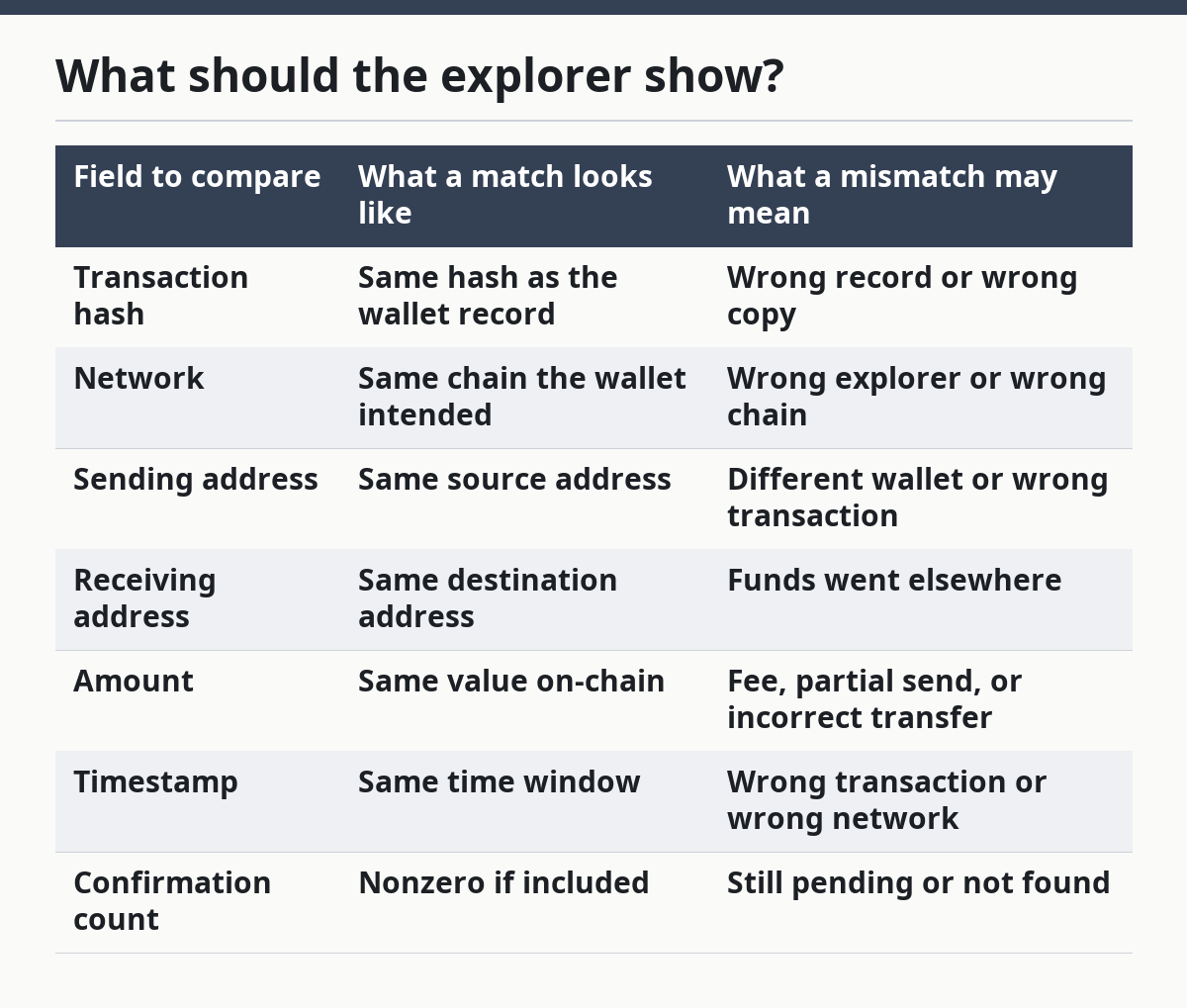
What should the explorer show?
The explorer should show a single transaction record with the same core details you were expecting. The useful fields are the hash, network, sending address, receiving address, amount, timestamp, and confirmation count.
Some explorers also show fee data, block number, and input/output breakdowns. Those details help when a transfer has multiple outputs or when a wallet batches several sends into one transaction, which is common on some networks. If the page lacks the basics above, it is not the right record.
A clean match is not just “the hash exists.” The hash can exist on the wrong chain, with the wrong recipient, or with a different amount. That is why the comparison has to include at least 6 fields, not one.
| Field to compare | What a match looks like | What a mismatch may mean |
|---|---|---|
| Transaction hash | Same hash as the wallet record | Wrong record or wrong copy |
| Network | Same chain the wallet intended | Wrong explorer or wrong chain |
| Sending address | Same source address | Different wallet or wrong transaction |
| Receiving address | Same destination address | Funds went elsewhere |
| Amount | Same value on-chain | Fee, partial send, or incorrect transfer |
| Timestamp | Same time window | Wrong transaction or wrong network |
| Confirmation count | Nonzero if included | Still pending or not found |
What can make the check fail?
The check can fail if the transaction was sent on the wrong network, the hash was copied badly, or the wallet is showing a local record that has not appeared on-chain yet. A mismatch in just one field is enough to stop the check.
A common problem is using the right hash on the wrong explorer. Another is comparing the wallet’s “sent” screen with a transaction that was created but never broadcast. A third is reading the receiving address from a deposit note instead of the actual address string.
Explorer formats also differ. Some show token transfers inside a transaction, while others focus on the base coin transfer. If the reader is checking a token transfer, the explorer may show the right transaction but a different-looking amount because the token and the network fee are separate entries.
When should I stop and check something else?
Stop when the explorer record does not match the wallet record in a way that matters. On a money transfer, forcing the result is worse than pausing for a careful second look.
The network does not match: the transaction may have been sent on the wrong chain — check the wallet’s network setting before assuming the transfer failed.
The receiving address differs by even one character: the destination is not the one you intended — treat it as a separate transfer and verify the full address string.
The hash returns no result: the transaction may not be on-chain yet, or the hash may be wrong — copy it again and confirm there are no hidden spaces.
The amount is off: the transfer may include fees, a split output, or a token-versus-coin mismatch — compare the explorer’s field labels before drawing a conclusion.
The confirmation count is zero or missing: the network has not fully included the transaction — wait and recheck later, or inspect the wallet’s broadcast status.
The timestamp is far outside the expected window: the record may be from a different attempt — look for the correct hash in the wallet history.
If a transfer involves an exchange deposit, payroll, business payment, or a tax-sensitive record, a qualified adviser or the platform’s support team may be the right next step. I cannot tell the reader how to treat a specific transfer without the full facts.
What mistakes do people make most often?
The most common mistake is checking the wrong network first. A Bitcoin transfer will not verify correctly on an Ethereum explorer, and a chain mismatch can waste 10 or 20 minutes before the real issue becomes obvious.
Another mistake is trusting only the amount. The amount can look right while the address is wrong, which is why the address check matters just as much as the number. A third mistake is reading a screenshot instead of the live explorer page, which hides the confirmation count and current timestamp.
People also forget that a transaction hash is specific to one chain and one record. If a wallet app shows a pending send and then a second successful send, the first hash may never produce the result the reader expects. The correct move is to compare the full record, not one field in isolation.
When does the standard check need adjustment?
The standard check needs adjustment when the transaction contains more than one output, when a wallet batches sends, or when the transfer is a token movement rather than a base-coin send. In those cases, the explorer may show more than one line of value, and the reader has to compare the right output to the right destination.
Explorer displays also vary by chain. Some show confirmations plainly, while others place the status deeper in the page. Some show address labels or contract addresses, which can help, but labels are not proof on their own.
If the transfer used a custodial exchange address, the on-chain destination may not look like a personal wallet at all. That does not automatically mean the transfer is wrong. It means the explorer records the actual chain destination, while the platform’s internal accounting may sit elsewhere.
What if the result still looks wrong?
If the result still looks wrong, the reader should stop trying to “make it fit” and recheck the source record. The safest next step is to compare the wallet history, the exact network, and the copied hash side by side.
A good verification process does not need a long tool list. It needs a correct chain, a correct hash, and a careful comparison of 5 or 6 details. If those do not line up, the answer is usually that the reader is looking at the wrong record, not that the block explorer is broken.
What details should I compare on a block explorer?
Compare the hash, network, sending address, receiving address, amount, timestamp, and confirmation count. Those are the fields that tell you whether the on-chain record matches the transfer you expected. If even one of them is off, the transfer needs a second look.
Can a block explorer show a failed transaction?
A block explorer can show a transaction record, but that does not always mean the transfer completed as intended. Some transactions appear with failure status, zero value movement, or a revert note, depending on the chain and explorer.
The exact display depends on the network and the type of transaction. If the status is unclear, the safest move is to compare the explorer record with the wallet’s transaction details and confirm the network first.
Do I need the wallet address or hash?
The transaction hash is usually the fastest way to find one exact record, while the wallet address helps when the hash is missing. If the reader has both, the hash is the cleaner starting point because it points to one transaction instead of many.
An address is useful for checking history, but it can return a long list of transfers. For a single payment, the hash is more precise, and the address is the backup when the hash cannot be found.
Drafted with AI; not yet reviewed by a person.