Last updated: November 19, 2026
Key Takeaways
- Sending crypto means your wallet signs a transaction, broadcasts it to a network, and waits for confirmation.
- Crypto wallets manage transactions by building a signed message, sending it to the network, and then watching the chain until status changes.
- Wallet setup changes the answer because custodial, self-custody, and hardware wallets offer different control, recovery, and failure risks.
- You avoid wrong-chain mistakes by matching the asset, network, and address format before approval.
Crypto wallet operations and transaction management is about sending, receiving, tracking, and recovering crypto without making a mistake that costs money.
This guide to Crypto wallet operations and transaction management shows the wallet steps, the transaction checks, and the failure points that matter most. In this guide to Crypto wallet operations and transaction management, the core answer is simple: verify the route before you send.
If you need a quick number, the practical workflow below has 7 checks before a transfer.
This guide on Crypto wallet operations and transaction management helps you compare wallet types, confirm fees, and avoid wrong-chain errors.
Information only, not financial advice. Crypto rules, fees, and tax treatment vary by country; a qualified adviser or local professional should check your own situation.
What actually happens when you send crypto?
Sending crypto means your wallet signs a transaction, broadcasts it to a network, and waits for the chain to confirm it. If the address, network, or fee is wrong, the transfer can fail, stall, or land on the wrong chain.
Picture this: you’re about to send USDC from a wallet app to an exchange, and the app shows three things that matter more than the rest — the address, the network, and the fee. Miss one, and the money can still leave your control. That is why the first job is not “click send.” It is “verify the route.”
In practice, wallet operations break into a few parts:
- Key control — who holds the seed phrase or private key.
- Asset selection — the coin or token you are moving.
- Network choice — Bitcoin, Ethereum, Solana, Tron, and so on.
- Fee setting — fixed, dynamic, or custom gas.
- Confirmation tracking — pending, confirmed, failed, or replaced.
A wallet is a signing tool, not a storage vault, so the keys matter more than the app label. Your funds live on the blockchain; the wallet holds the keys that let you move them. That means transaction mistakes are usually about control, not about “the wallet being bad.”
On the flip side, a wallet can also make life easier if it shows the transaction hash, nonce, gas estimate, and address book clearly. That is the difference between guessing and checking.
Quick check: if you can’t explain the network, fee, and destination address in one breath, you’re not ready to hit send.
How crypto wallets manage transactions step by step
Crypto wallets manage transactions by building a signed message, sending it to the network, and then watching the chain until the status changes. If you understand the sequence, the scary part gets smaller.
Picture this: you’re using MetaMask, Rabby, Trust Wallet, Coinbase Wallet, or a hardware wallet app, and you want the exact path from tap to confirmation. The path is usually the same, even when the buttons look different. First the wallet prepares the transaction. Then it asks for your approval. Then the blockchain accepts or rejects it.
Here is the working sequence most beginners need:
-
Open the wallet and choose the asset.
Make sure you’re on the correct account, especially if one wallet app shows several addresses. -
Paste or scan the destination address.
Never trust memory for 42-character addresses. If the wallet supports QR codes, use them only when the source is trusted. -
Check the network match.
USDC on Ethereum is not the same route as USDC on Arbitrum or Tron. The wrong network is a classic way to delay funds. -
Review the fee and timing.
Wallets may show a slow, standard, or fast option. Some chains use gas; others use a small fixed network fee. -
Sign the transaction.
This is the point of no return for your approval, even if the chain still has to confirm it. -
Save the transaction hash.
A hash is the receipt you use to track status in a block explorer such as Etherscan, Blockchain.com, or Solscan. -
Confirm receipt on the destination side.
Exchanges and custodial platforms often wait for a set number of confirmations before crediting a deposit. -
Check for stuck or replaced transactions.
On chains like Ethereum, a low-fee transaction can sit pending until it is replaced or dropped.
Here’s the catch: wallet apps can make this feel casual, but blockchain settlement is strict. If you send to the wrong address, there is no “undo” button on most networks.
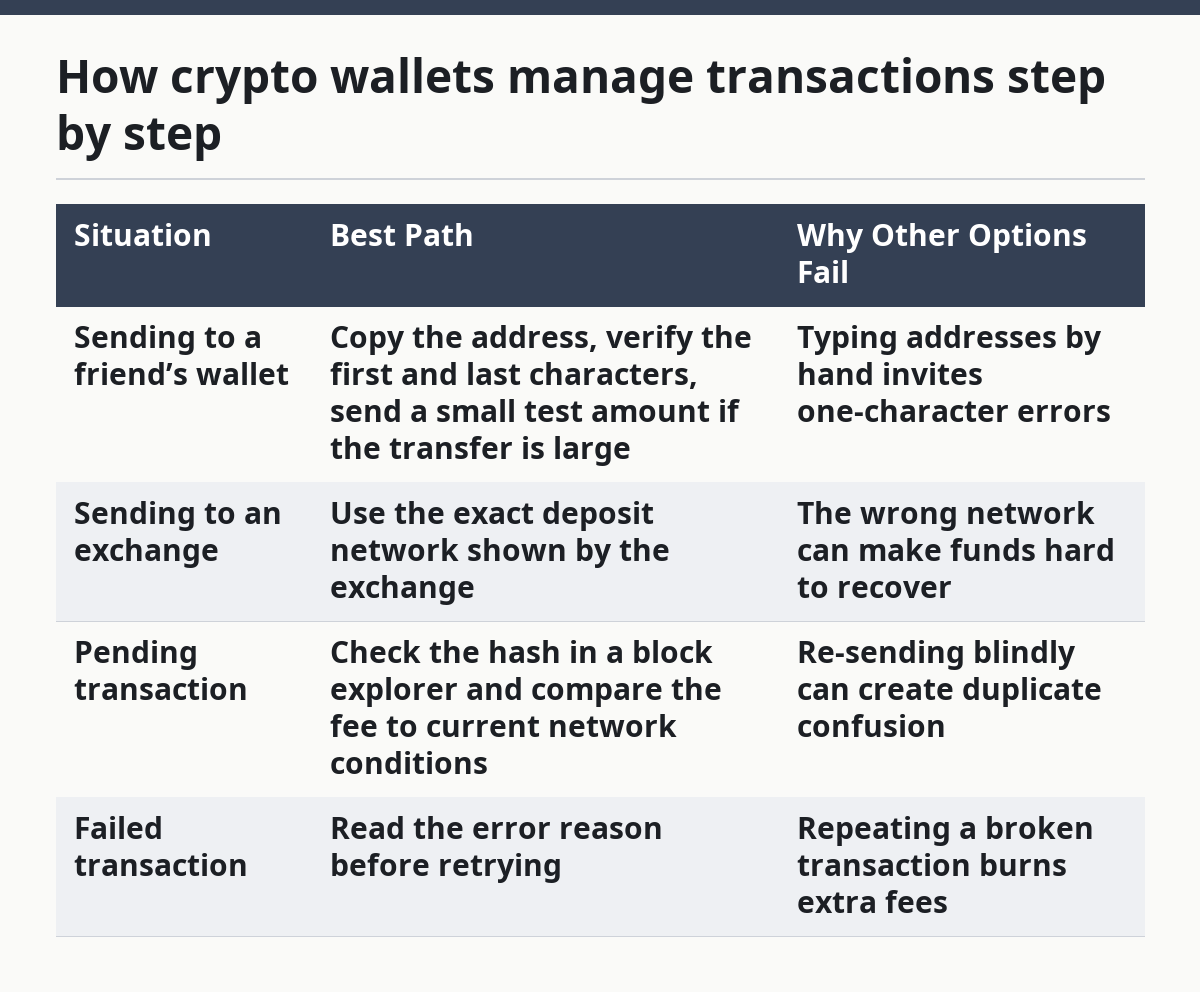
| Situation | Best Path | Why Other Options Fail |
|---|---|---|
| Sending to a friend’s wallet | Copy the address, verify the first and last characters, send a small test amount if the transfer is large | Typing addresses by hand invites one-character errors |
| Sending to an exchange | Use the exact deposit network shown by the exchange | The wrong network can make funds hard to recover |
| Pending transaction | Check the hash in a block explorer and compare the fee to current network conditions | Re-sending blindly can create duplicate confusion |
| Failed transaction | Read the error reason before retrying | Repeating a broken transaction burns extra fees |
Which wallet setup changes the answer?
The wallet setup changes the answer because custodial wallets, self-custody wallets, and hardware wallets give you very different control, recovery, and failure risks. If you use the wrong model for your situation, transaction management gets messy fast.
Picture this: you’re choosing between a phone app that holds your keys, an exchange account that holds them for you, and a hardware device that signs offline. The “right” choice depends less on hype and more on how often you move funds, how much you can tolerate if a login fails, and whether you want direct control.
A simple way to sort it out:
- Custodial wallet or exchange account: the service holds the keys.
- Self-custody hot wallet: you hold the keys in a software wallet on your phone or browser.
- Hardware wallet: the keys stay on a physical device, while the app helps you view and send.
Each one changes transaction management:
- Custodial is easier for password recovery and account support, but you depend on the platform’s controls and withdrawal rules.
- Self-custody hot wallets are fast and flexible, but seed phrase loss can be permanent.
- Hardware wallets add an extra approval step and reduce online exposure, but they are slower and easier to misconfigure if you are careless with the companion app.
The practical trade-off is this: the more direct your control, the more direct your responsibility. That is not a slogan. It is how wallet operations work.
If you want a neutral source for basic wallet security concepts, the U.S. Federal Trade Commission explains common crypto scams and control risks, and Ethereum.org’s wallet security guidance covers wallet basics and self-custody concepts.
Quick check: if you would not be comfortable recovering funds without customer support, self-custody may be the wrong starting point.
How do you avoid sending to the wrong chain or address?
You avoid wrong-chain mistakes by matching the asset, network, and address format before you approve the transfer. If any one of those three does not line up, stop.
Picture this: you’re moving a token that exists on more than one network, and the wallet shows multiple route options. That is where beginners get burned. The token name looks the same, but the rails are different.
Use this checklist before every send:
-
Match the token and network shown by the destination.
If the exchange says “ERC-20 only,” do not assume a similar token on another chain will work. -
Check the address format.
Bitcoin, Ethereum, and Solana addresses do not look the same. A valid address on one chain can be useless on another. -
Use a test transfer for high-value moves.
A small first send is slower, but it is cheaper than a full loss. -
Confirm memo or tag requirements.
Some exchanges require a memo, destination tag, or payment ID. Missing that detail can trap a deposit even when the address is right. -
Watch for address poisoning and clipboard tricks.
Malware can swap copied addresses. Compare more than the first four and last four characters when the amount matters. -
Know the recovery limits.
Some mistakes can be fixed by support; others cannot. Recovery depends on the chain, the destination wallet, and whether the receiving platform controls the address.
On the flip side, sending to your own wallet does not make the process risk-free. A wrong network transfer between your own addresses can still become a headache.
The standard advice can fail when people treat “same asset” as the same as “same chain,” so check that distinction carefully and, if the transfer is important, consult a qualified professional or the receiving platform before you proceed. USDT, USDC, ETH, and wrapped tokens can exist across several networks, and that is where most confusion starts.
Quick check: if the destination page mentions a network, memo, or tag, your job is to match it exactly, not approximately.
What do you do when a transaction is stuck or pending?
A transaction is usually stuck because the fee is too low, the network is busy, or the wallet is waiting on a nonce sequence. If that sounds technical, the fix is still practical: check the transaction hash first, then the fee market, then the wallet’s replace or cancel options.
Picture this: you’re watching a transfer sit in “pending” for 20 minutes, then an hour, then longer. The mistake many people make is clicking random buttons and hoping the chain forgets. That is the wrong instinct.
Use this recovery path instead:
-
Find the transaction hash.
Copy it from the wallet history and paste it into the right block explorer. -
Check the current status.
Look for pending, confirmed, dropped, replaced, or failed. -
See whether the fee is low compared with current network conditions.
On congested chains, a cheap fee can sit unconfirmed. -
Use the wallet’s replace or speed-up feature if available.
Some wallets let you send a new transaction with the same nonce and a higher fee. -
Avoid creating a second unrelated transaction if the wallet warns about nonce conflicts.
That can make the sequence harder to clear. -
Wait if the network is simply busy.
Some transactions resolve once the backlog drops. -
Ask the destination platform about its confirmation policy.
Exchanges often need several confirmations before they credit a deposit. -
If the wallet gives an error, read the exact wording.
“Insufficient funds for gas” is not the same as “nonce too low,” and the fix is different.
A pending transaction is not always a problem, because sometimes it is just waiting in line. But if the fee was far below the current network level, the wallet may need a manual replacement.
Quick check: if the hash exists but the status has not changed, the next move is diagnosis, not panic.
The 3 conditions that change everything
These three conditions change the right answer: the chain you are using, the value you are moving, and who controls the destination. If any one of them shifts, the same transaction plan may no longer fit.
Picture this: you’re sending the same token three different ways — to a friend, to an exchange, and to your own cold storage. The button looks the same each time, but the risk is not the same.
1) Chain rules
Bitcoin, Ethereum, Solana, Tron, and layer-2 networks handle transactions differently. Some use UTXO models, some use account-based models, and some need special fee handling. If you are on Ethereum, gas matters. If you are on Bitcoin, fee rate and confirmation time matter.
2) Value size
A small transfer can be a test. A large transfer deserves a slower, more careful process. When the amount is large, a test send and a double check of the address are worth the extra steps.
3) Destination control
Sending to your own wallet gives you more room to fix mistakes. Sending to an exchange, payment service, or merchant means you must follow their exact deposit rules. If they require a memo or specific chain, your wallet setup has to match that.
Use this decision table:
| Condition | Best Path | Why Other Options Fail |
|---|---|---|
| Simple peer-to-peer send | Verify address, network, and fee; then send a small test if the amount is meaningful | Skipping checks is how mistakes happen |
| Large transfer | Split the move into test amount first, then main transfer after confirmation | A one-shot transfer magnifies every error |
| Exchange deposit | Follow the exchange’s listed network and memo rules exactly | “Close enough” can leave funds uncredited |
There is no universal shortcut here. A fixed habit, like checking the network twice, often beats a clever trick.
Quick check: if the transaction involves a large amount, an exchange, or a chain you rarely use, slow down and use the stricter path.
Edge cases where normal advice breaks down
Normal advice breaks down when the wallet, chain, or receiver has special rules that override the usual send-and-check flow. If one of these scenarios fits, the fix changes.
Picture this: you’re dealing with a wallet action that looks routine, but the chain or platform has one extra rule hidden in the fine print. That single rule can change the whole process.
-
Sending to a smart contract instead of a normal wallet
What changes: contracts may reject transfers they do not expect, or require an app-specific method.
What to do instead: read the contract or app instructions before sending, and avoid guessing. -
Using a wallet on multiple devices
What changes: the same wallet seed can show the same addresses, but transaction history may not sync the same way in every app.
What to do instead: confirm the account index and network on each device before approving anything. -
Bridging assets between networks
What changes: a bridge adds another party and another step, so a simple send becomes a multi-stage process.
What to do instead: check the bridge name, the source chain, the destination chain, and the final asset format. -
Recovering from a lost phone
What changes: the device is gone, but the seed phrase or backup may still restore access.
What to do instead: restore only through a trusted wallet app and never type the seed phrase into a random site. -
Airdrops, dust, or spam tokens
What changes: unknown tokens can appear in your wallet without being safe to interact with.
What to do instead: do not approve random token permissions just because something appears in your balance list. -
Tokens with transfer fees or hooks
What changes: some tokens burn part of the transfer or trigger extra logic on send.
What to do instead: read the token’s rules first, because the amount you send may not equal the amount that arrives.
These are the cases where “just use the wallet like a bank app” fails. Crypto wallets are stricter and less forgiving than most people expect.
Quick check: if the send involves a bridge, a contract, a recovered wallet, or a token you do not recognize, use the edge-case path instead of the normal one.
What a solid transaction workflow looks like in real life
A solid transaction workflow is the same every time: verify, test, send, record, and confirm. If you build that into your routine, wallet operations stop feeling random.
Picture this: you’re making a transfer that matters, and you want a repeatable process rather than a lucky guess. The workflow is boring on purpose, and that is useful.
Use this 7-step routine:
-
Open the correct wallet and account.
Check the address on-screen before anything else. -
Confirm the asset and chain.
Never assume the wallet is still on the same network you used yesterday. -
Copy the destination from the source, not from memory.
For exchange deposits, use the exact page from the exchange. -
Review the fee and the memo or tag.
If a memo is required, add it before you sign. -
Send a small test if the amount is meaningful.
This is especially useful when the destination is new. -
Store the hash and screenshot the confirmation page.
That gives you a record if support needs it. -
Check the destination after the expected confirmation time.
If the funds do not appear, use the hash to trace the transfer.
A good workflow also includes basic hygiene:
- keep backups in at least two secure places, if that fits your risk plan
- use hardware wallet approval for higher-value self-custody
- review token approvals from time to time
- separate spending wallets from long-term storage when practical
The best part? You do not need perfect knowledge to avoid most errors. You need a stable habit and a refusal to rush the last screen.
For wallet security and transfer basics, the Consumer Financial Protection-style guidance from the FTC and Ethereum.org’s wallet docs are good starting points. For chain-specific transaction status, use the official block explorer for the network you are on. Also see Bitcoin.org wallet guidance and Solana docs on wallets for network-specific basics.
Quick check: if your current process depends on memory, you need a written routine.
FAQ: the questions people ask right after their first mistake
How do I know if I used the wrong network?
You usually know when the receiving side does not credit the deposit, or when the transaction looks valid on one chain but not on the destination platform. The fix depends on the chain and the receiving service’s recovery policy. Some mistakes can be recovered by support; some cannot.
Can I cancel a crypto transaction?
Sometimes, but not always. On chains like Ethereum, a pending transaction may be replaceable if your wallet supports nonce replacement and you submit a new transaction with a higher fee. Once a transaction is confirmed, it is usually not reversible.
Why is my wallet showing a different balance than the blockchain explorer?
The wallet may be hiding tokens, showing stale data, or using the wrong network view. Check the address in a block explorer first, then compare the chain and account. A mismatch often comes from the wallet display, not from the chain itself.
Do I need a hardware wallet for transaction management?
No, but hardware wallets change the risk profile because the private key stays off the internet-connected device. They are often better for larger balances or for people who want stricter approval steps, but they add setup friction and can be misused if the seed phrase is not backed up correctly.
What should I do if I lost my phone?
Restore the wallet only with your seed phrase or other supported backup method in a trusted wallet app. If you do not have the backup, access may be gone. Never enter a seed phrase into a website or a chat window.
Drafted with AI; not yet reviewed by a person.