Last updated: November 24, 2026
Quick Answer: use the TXID in a block explorer, then check confirmations, fee, and destination address. In this article on How to Track a Bitcoin Transaction After Sending It: Related Questions, the key number is simple: 0 confirmations means pending, and 1 or more confirmations means the transaction is on-chain.
Key takeaways
- The TXID is the main handle for a Bitcoin payment after it leaves your wallet.
- A block explorer shows whether the payment is unconfirmed, confirmed, or still waiting in the mempool.
- If the wallet says “sent” but the explorer shows no TXID yet, the transaction may not have broadcast.
- The fee matters because low-fee transactions can sit for a long time before miners include them.
- If the address or amount looks wrong, the explorer can help you verify what actually went on-chain.
What do you need first?
You need the transaction ID, the receiving address, or both before you can track a Bitcoin transaction well. If you have neither, start inside the wallet you used to send the payment and open the transaction history. For the topic How to Track a Bitcoin Transaction After Sending It: Related Questions, this is the first place to look.
- Open the wallet app or exchange withdrawal page where you sent the Bitcoin.
- Find the outgoing transaction in the history list.
- Copy the TXID, sometimes called the transaction hash.
- Copy the receiving address too, if the app shows it.
- Paste the TXID into a block explorer such as Blockstream Explorer or mempool.space.
- Check the status line: unconfirmed, confirmed, or dropped.
When this works, you should see a long alphanumeric hash and a page that lists inputs, outputs, fee, size, and confirmations. If the wallet gives you only “pending” and no TXID after several minutes, the wallet may still be trying to broadcast the payment.
A good habit is to keep the TXID and the receiving address together in one note. That makes it easier to compare the explorer page with the wallet record if something looks off. If you want a source for the transaction format, the Bitcoin Core documentation explains how transactions are built and relayed, and Blockstream Explorer and mempool.space both display the same on-chain record in different layouts. See Bitcoin Core documentation at https://bitcoincore.org/en/doc/ and Blockstream Explorer at https://blockstream.info/.
Quick check: If you can copy a 64-character hash from your wallet, you are ready for the explorer step.
How do you track a Bitcoin transaction after sending it?
You track a Bitcoin transaction after sending it by looking up its TXID in a block explorer and reading the confirmation status. If the payment is still in the mempool, the explorer will show it as unconfirmed; if miners have included it in a block, the explorer will show at least 1 confirmation.
- Copy the TXID from the wallet or exchange withdrawal screen.
- Open a block explorer in your browser.
- Paste the TXID into the search box.
- Open the result that matches your hash exactly.
- Check the confirmation count and the time the transaction entered the mempool.
- Compare the destination address on the explorer with the address you intended to pay.
If the explorer shows your transaction but the recipient says they have not seen it, the payment may still be unconfirmed. If the explorer shows several confirmations and the address is correct, the Bitcoin has been broadcast and recorded on the chain.
This is where many people go wrong: they check only the wallet balance and ignore the chain data. A wallet can lag behind, while the explorer shows the network state. For this topic, the best short answer is still the same: TXID first, explorer second.
Quick check: If the explorer page shows your exact TXID and a confirmation count, you have tracked it correctly.
What does the status mean?
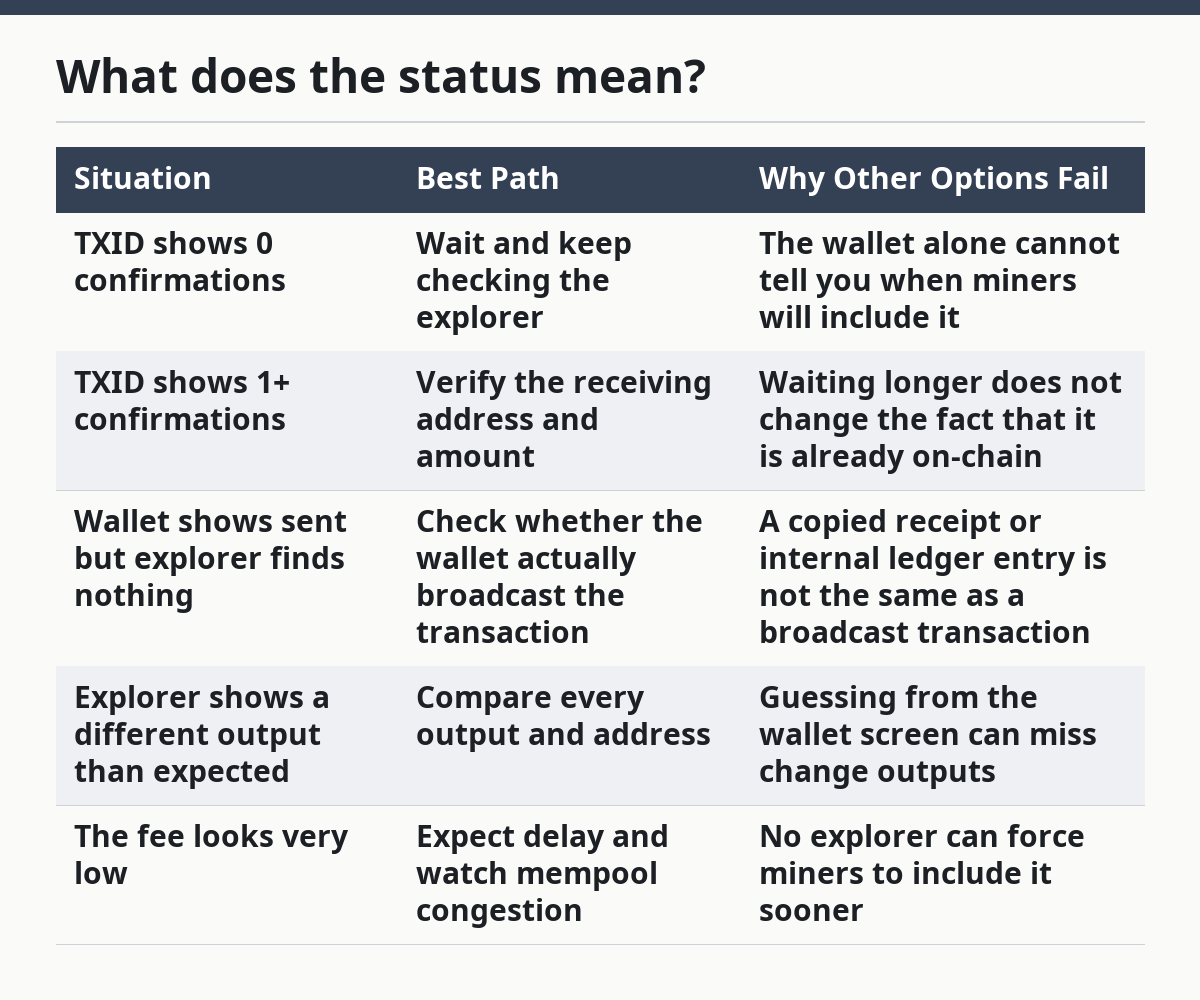
The status tells you whether the transaction is still waiting, has been confirmed, or may have been replaced or dropped. If the transaction has 0 confirmations, it is still waiting in the mempool; if it has 1 or more, miners have included it in a block.
| Situation | Best Path | Why Other Options Fail |
|---|---|---|
| TXID shows 0 confirmations | Wait and keep checking the explorer | The wallet alone cannot tell you when miners will include it |
| TXID shows 1+ confirmations | Verify the receiving address and amount | Waiting longer does not change the fact that it is already on-chain |
| Wallet shows sent but explorer finds nothing | Check whether the wallet actually broadcast the transaction | A copied receipt or internal ledger entry is not the same as a broadcast transaction |
| Explorer shows a different output than expected | Compare every output and address | Guessing from the wallet screen can miss change outputs |
| The fee looks very low | Expect delay and watch mempool congestion | No explorer can force miners to include it sooner |
A confirmed transaction is easier to explain than an unconfirmed one. Unconfirmed means the Bitcoin network has seen it, but the chain has not locked it in yet. If the wallet uses replacement features, a later version of the transaction may take its place before confirmation. Bitcoin Core’s documentation and the mempool.space fee view are useful references for this part of the process.
Quick check: If you see 0 confirmations, treat the payment as pending; if you see 1 or more, treat it as recorded. If you are unsure because the payment involves replacement, a custodial wallet, or an exchange, consult support or a qualified professional and verify the status with the wallet or exchange record. For background, see mempool.space at https://mempool.space/ and Bitcoin Core documentation at https://bitcoincore.org/en/doc/.
What if the wallet says sent but you cannot find it?
If the wallet says sent but no explorer can find the TXID, the transaction may never have been broadcast. In that case, check whether the wallet still shows the payment as pending, failed, or unsigned.
- Reopen the wallet and find the transaction record.
- Confirm that you copied the TXID exactly, with no missing characters.
- Try a second explorer to rule out a display issue.
- Check whether the wallet says the transaction is still broadcasting or building.
- Look for a resend, cancel, or replace option only if the wallet explicitly offers one.
- Contact the wallet or exchange support if the payment was a withdrawal and still lacks a TXID after a reasonable wait.
If the wallet created the transaction but failed to broadcast it, the network cannot confirm it because it never saw it. That is different from a confirmed transaction that is simply slow. A missing TXID is the key clue.
This matters more on exchanges, where an internal withdrawal record can appear before the on-chain broadcast happens. The on-chain record is what the explorer can track.
Quick check: If no explorer finds your TXID at all, the issue is likely broadcast, not confirmation.
When is the standard advice wrong?
The standard advice is wrong when the payment is not a normal on-chain Bitcoin transfer. If you are dealing with a Lightning payment, an exchange-to-exchange internal transfer, or a wallet that hides transaction details, the explorer path changes.
- Confirm whether the payment was on-chain Bitcoin or Lightning.
- If it was Lightning, ask the wallet or invoice screen for the payment status instead of a TXID search.
- If it was an exchange internal transfer, check the exchange ledger first.
- If the wallet uses a child-pays-for-parent or replace-by-fee flow, watch for a later transaction version with the same inputs.
- If the payment used a shared wallet or custody service, match the address and amount carefully before assuming the first result is yours.
- If the transaction was sent to your own wallet, verify whether the wallet created a change output back to you.
A block explorer is useful, but it cannot explain every custody layer above the chain. That is why a beginner can see “sent” in one app and “nothing” in another.
This section matters for readers searching How to Track a Bitcoin Transaction After Sending It: Related Questions after a Lightning payment. Lightning does not work like a normal on-chain transfer, so the explorer may not show what they expect. For Lightning-specific background, see the Lightning Network documentation at https://lightning.network/ and the Bitcoin Wiki overview at https://en.bitcoin.it/wiki/Lightning_Network.
Quick check: If there is no TXID, or the payment was Lightning, the normal explorer method is the wrong tool. If the case is unclear, consult the wallet provider or exchange support before assuming the payment is lost.
Which explorer should you use?
You should use any reliable block explorer that shows TXID, confirmations, inputs, outputs, and timestamps. If one site loads slowly or gives an odd result, check the same TXID in another explorer before you panic.
| Explorer choice | Best for | Trade-off |
|---|---|---|
| Blockstream Explorer | Clean transaction pages and direct TXID lookup | A single site can still have brief delays or display issues |
| mempool.space | Clear mempool and fee view | Good for status, but the page can feel dense for a first-time user |
| A wallet’s built-in explorer link | Fastest from the transaction screen | Some wallets hide details or lead to a less complete view |
The best choice depends on what you need. If you want the most readable status page, use one of the public explorers. If you want to confirm the wallet’s own record, use the built-in link first, then cross-check it on a second site.
For fee pressure and wait time, mempool information is often the part people miss. A transaction can be valid and still wait because the fee was too low for current network conditions. For an external reference, mempool.space tracks fee pressure and Blockstream Explorer shows the raw transaction data.
Quick check: If one explorer looks odd, compare the same TXID on a second explorer before drawing conclusions.
What should you do if it is stuck for hours?
If it is stuck for hours, first check whether it is still unconfirmed or already replaced by a newer version. A transaction that stays at 0 confirmations for a long time usually needs patience, a fee check, or wallet-specific action.
- Open the TXID page and note the confirmation count.
- Check the fee rate if the explorer shows it.
- Look for signs of replacement or double-spend handling in the wallet.
- See whether the receiving wallet requires more than 1 confirmation before showing funds.
- Wait if the transaction still appears valid and unconfirmed.
- Escalate to support only if the wallet lost the TXID or the record changed unexpectedly.
A stuck transaction is not necessarily a failed one. Low fee pressure can leave it sitting in the mempool until miners have room for it. If the wallet supports fee bumping, it may show an option tied to the original transaction. The Bitcoin Core documentation covers fee-related transaction behavior, and mempool.space can show whether network conditions are crowded.
This is one place where the wrong advice causes trouble. Telling someone to “just wait” is useless if the transaction was never broadcast. But telling them to resend can be worse if the original payment is still live and the wallet is using replacement logic.
Quick check: If the TXID still exists and the explorer shows 0 confirmations, the problem is delay, not disappearance.
What are the edge cases?
The normal advice breaks down in a few specific cases, and those cases change what you should do instead. If any of these applies, stop assuming the explorer alone will answer everything.
- Situation: You sent Bitcoin from an exchange. What changes: The exchange may show a withdrawal before the chain broadcast. What to do instead: Check the withdrawal status inside the exchange first, then use the TXID if one is issued.
- Situation: You sent Lightning instead of on-chain Bitcoin. What changes: There may be no public TXID to track. What to do instead: Check the invoice, payment status, or wallet confirmation screen.
- Situation: The wallet shows a received amount that is smaller than expected. What changes: Change outputs can make the chain view look unfamiliar. What to do instead: Match the destination address, not just the total amount.
- Situation: The transaction was replaced or fee-bumped. What changes: The first TXID may no longer be the final one. What to do instead: Look for a later version with the same inputs.
- Situation: The recipient says they have nothing yet. What changes: Their wallet may require 1 or more confirmations before crediting funds. What to do instead: Compare the explorer’s confirmation count with the recipient wallet’s policy.
- Situation: The wallet app is offline or syncing slowly. What changes: Its screen may lag behind the chain. What to do instead: Trust the explorer for the chain state, then refresh the wallet later.
These are the moments that create most of the confusion. The chain can be right while the wallet is behind, or the wallet can be right while the explorer is showing a pending record. The fix is to identify the payment type first.
Quick check: If your case involves an exchange, Lightning, or a replaced transaction, treat it as an edge case, not a normal send, and consult support if the status is unclear.
Can I track it without the recipient’s wallet?
Yes, you can track it without the recipient’s wallet as long as you have the TXID. The blockchain record does not need the other person’s app to be visible, because the TXID is enough to search the transaction on a public explorer.
- Open your wallet or exchange withdrawal history.
- Copy the TXID for the outgoing payment.
- Paste it into a public block explorer.
- Read the destination address and the confirmation count.
- Use the explorer time stamp to compare against when you sent it.
If you do not have the TXID, you may still be able to track the payment by searching the exact receiving address or matching the date and amount inside your wallet history. That is slower and less certain, which is why the TXID is the better handle.
For readers who want an outside reference on how Bitcoin transactions are structured, the Bitcoin Core documentation and public block explorer pages such as Blockstream Explorer and mempool.space are useful starting points. They show the same basic on-chain record in slightly different layouts.
Quick check: If you have the TXID, the recipient’s wallet is optional; if you do not, tracking gets harder fast.
What is the easiest way to check a Bitcoin transaction after sending it?
The easiest way is to copy the TXID from your wallet and paste it into a block explorer. If the page shows 0 confirmations, the payment is still pending; if it shows 1 or more, the network has recorded it.
Why can I see the transaction in my wallet but not on the blockchain?
That usually means the wallet recorded the send but the transaction has not been broadcast, or it is still waiting to propagate. If there is no TXID, the explorer cannot find it yet.
How long does a Bitcoin transaction take to show up?
There is no fixed time that fits every payment. A transaction can appear in seconds, stay unconfirmed for a while, or sit in the mempool longer if the fee is low or the network is busy.
What if the transaction has 0 confirmations for a long time?
If it still has 0 confirmations, keep checking the explorer and the wallet for replacement or fee-bump signs. If the TXID exists and the payment is valid, the issue is delay rather than loss.
Drafted with AI; not yet reviewed by a person.