Last updated: November 20, 2026
Quick answer: 1 open crypto order can usually be changed only before it fills, and many exchanges only let you edit the unfilled part. In How to Change a Crypto Order Before It Fills, the safest rule is simple: check whether the order is still open, then use the exchange’s edit or cancel-and-replace flow if it is available. Some exchanges document this in their own help centers, including Coinbase Help and Kraken Support. If the order is already partially filled, most platforms will not let you change the full order; you usually cancel the remaining quantity and place a new order for the rest. This guide is informational only; for your own situation, consult a qualified adviser or the exchange’s support team before you act.
Key takeaways
- A crypto order can be changed only while it is still open and the exchange supports edits.
- Price changes are usually the easiest change; size changes get harder once part of the order fills.
- If the order is partially filled, the unfilled remainder may need a cancel-and-replace action.
- Market orders are usually not the right kind of order to adjust, because they are meant to execute right away.
- The order book matters because your new price has to meet current liquidity, not yesterday’s price.
Who can change an open crypto order?
You can change an open crypto order if you still control the order status and the exchange shows an edit option before any fill happens. This often applies to a limit order, which is an order to buy or sell at a set price or better, not a market order, which is built to execute at the best available price right away.
This page is for a person who already has an open order on a crypto exchange and wants to know whether to edit it, cancel it, or leave it alone. It assumes the reader already knows the order exists in the order book, which is the exchange’s live list of buy and sell orders, and can see its status on the trading screen. If the order is already gone, completed, expired, or locked by the exchange, the answer changes fast.
The main thing to watch is whether the exchange still shows the order as open. If the status says open, working, or pending, a change may be possible. If the status says filled, partially filled, canceled, rejected, or expired, the edit path is usually closed or limited. Different crypto exchanges use different labels, so the exact wording matters.
Some situations need extra care because a simple edit may not do what you expect. A large order sitting near the top of the order book can move the price, and a partial fill can leave a smaller leftover order with a different risk profile. If the exchange does not support the edit you want, the usual fallback is cancel and replace.
How do you change a crypto order before it fills?
You change a crypto order before it fills by opening the order, editing the field the exchange allows, and confirming that the new order still matches your plan. The basic workflow is the same on most crypto exchanges, but the menu labels and button order can differ.
- Open the trading screen and find the open order.
- Check the status field and confirm it says open, working, or pending rather than filled or canceled.
- Select the edit or amend option next to that order.
- Change only the field the exchange permits, usually price or size, and keep the new value within the exchange’s own tick size or lot size rules if they are shown.
- Review the order details for the new price, new size, and side of the trade before you confirm.
- Submit the change and wait for the updated order to reappear in the order book.
- Verify the status again after submission and make sure the remaining quantity is what you intended.
- Cancel the order and replace it with a fresh one if the exchange rejects the edit or if the edit button is missing.
The important check is whether the platform actually updates the same order or silently creates a new one. A problem usually shows up as a rejected change, a duplicate order, or a remaining quantity that no longer matches your original plan. If the exchange does not give a clear confirmation screen, stop and confirm the status in the order history before taking another action. FINRA and CFTC materials both stress that order type and execution details can change the outcome.
Can you edit the price and size?
You can sometimes edit both the price and the size, but many exchanges treat those changes differently. Price edits are more common on open limit orders, while size edits may be blocked once any part of the order has already matched in the order book. Check the platform’s own rules before you assume both fields are editable, and if the screen is unclear, ask the exchange’s support team or a qualified professional.
A price edit changes the level at which your order sits in the market. For a buy order, a lower price can put you farther from execution; for a sell order, a higher price can do the same. A size edit changes how much crypto is still available to fill. If the order has 2 parts and 1 part already filled, the remaining quantity is often the only part you can still change or replace.
Here is the practical difference:
| Change | Often allowed on open orders? | Common drawback | When it becomes harder |
|---|---|---|---|
| Edit price | Yes, on many exchanges | The order may move away from the current market | When the order is already in the book and close to a fill |
| Edit size | Sometimes | The exchange may reject the change if part of the order is filled | After any partial fill |
| Cancel and replace | Usually yes | You lose the original order and start over | If the market moves while you reset the order |
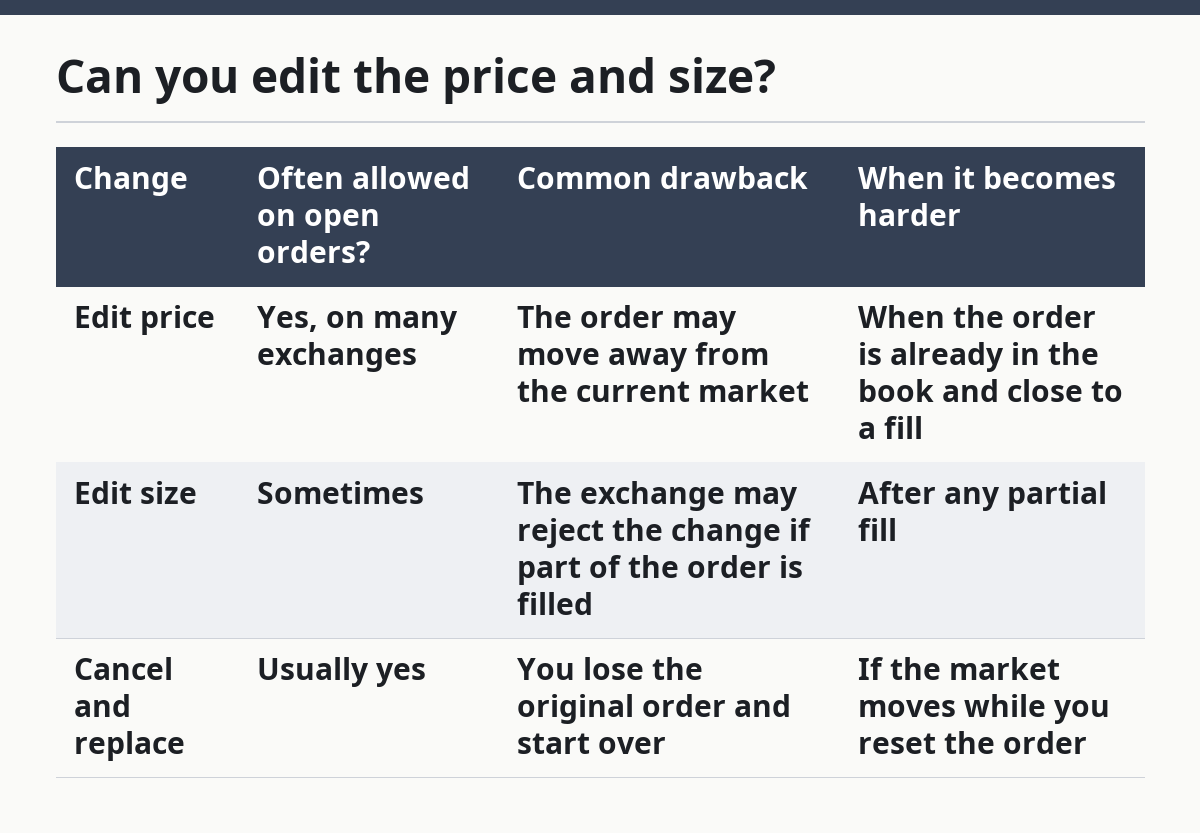
The trade-off is simple: a clean edit keeps the same order alive, but a cancel-and-replace gives you a fresh setup. If the order book has moved, a fresh setup may be the only way to avoid a stale price. If the exchange is slow or the market is moving fast, the order can fill while you are in the middle of the change.
What happens if the order is partially filled?
A partially filled order means some of the order has already matched, and the rest may still be open. That matters because many exchanges will not let you edit the filled part, only the remaining quantity.
In practice, a partial fill usually leaves two questions: what filled, and what is still working. The filled portion is done and cannot be edited. The leftover amount may still be changed if the exchange allows it, but many traders choose to cancel the remainder and enter a new order so the size and price are clear. That is common when the remaining amount is small or the market has moved away from the original price.
The risk is that a partial fill can make the rest of the order behave differently from the original plan. Your average execution price may shift, and the leftover quantity may no longer fit your target. If the exchange shows partial fill in the status field, read that as a warning that a simple edit may not be available.
A good check is the order history line for that exact order. It should show how much filled, how much remains open, and whether the exchange still accepts changes. If the screen is unclear, do not assume the edit applied to the full order. On a crypto exchange, unclear order status is a reason to pause, not guess.
When should you stop editing and cancel instead?
You should stop editing and cancel instead when the exchange or the order status makes the edit unreliable. That can be the safer move when the platform is no longer treating the order as fully open, but you should still check the exchange rules and, if needed, get professional guidance before you act.
The order is already partially filled: only the leftover amount may still be changeable — cancel the remaining quantity and place a new order if you need a clean size or price.
The status says filled or canceled: the order is no longer open — no edit is available, so the only option is a new order if you still want exposure.
The exchange rejects the amendment: the platform does not support that change — cancel and reenter the order with the terms you want.
The edit screen hides the price or size field: the exchange is limiting what can be changed — use cancel and replace instead of forcing the issue.
The market has moved far from your original order book level: the old price may no longer reflect current liquidity — cancel the stale order and decide again from the live book.
The order is a market order: it is designed for immediate execution, not adjustment — if you need control over price, a different order setup is usually required.
The consequence of staying with a broken edit path is confusion, duplicate exposure, or a miss on the price you meant to set. A clean cancel-and-replace is slower, but it reduces the chance that the exchange does something you did not intend.
What mistakes do people make?
People usually make the same few mistakes, and each one has a cost. The fix is often a simple check before the final confirm button.
A common mistake is editing without checking the order status first. If the order already filled or partially filled, the edit may fail or apply only to the leftover amount. The better move is to read the status line before touching the price or size.
Another mistake is assuming every crypto exchange handles amendments the same way. Some allow price edits on open limit orders, while others do not. The correct alternative is to use the exchange’s own order screen and accept its rules instead of expecting a universal standard.
A third mistake is changing the number too fast and skipping the confirmation screen. That can send the wrong size or leave the wrong price in place. Slow down for one extra check of the final order summary.
A fourth mistake is forgetting the order book changed while the order sat open. A price that made sense 10 minutes ago may now sit too far from the market. The better alternative is to compare your order price with the current book before editing.
A fifth mistake is treating a partial fill like a full open order. That can lead to editing the wrong quantity or thinking the whole trade is still adjustable. The correct path is to separate the filled part from the unfilled remainder.
What if the exchange does not let you modify it?
If the exchange does not let you modify it, the usual answer is cancel and reenter the order with the new terms. That is the standard fallback when the platform does not support direct amendment.
This happens often enough that it is worth expecting. Some exchanges support price changes on one order type but not another, and some limit edits once the order has been live for a short time or has any fill on it. The exact rule is exchange-specific, so the screen on your account is the authority here. For a broader view of account tasks and trading flow, see the related guides on exchange account actions and trading workflows.
If the platform offers no edit function, do not try to work around it with repeated clicks or duplicate submissions. That can create confusion in the order book and make it harder to track what is actually live. One canceled order and one clean replacement is usually easier to manage than two half-finished attempts.
How do you know the change worked?
You know the change worked when the order history, open orders list, and current order book all show the same result. The new price or size should appear where the old one was, and the status should still show the order as open if it has not filled.
A good result has three parts. The amended details match what you entered. The order remains live only in the amount you expect. There is no duplicate order with the old terms still sitting on the exchange. If the platform shows both the old and new order, the change did not work the way you wanted.
A bad result is easy to spot if you look closely. The order disappears without explanation, shows a reject message, or appears twice. Any of those means you should stop and check the exchange’s order history before doing anything else. That is especially important when prices move quickly, because a second action can create a second problem.
Can you edit a crypto order after placing it?
You can often edit an open crypto order after placing it, but only if the exchange supports amendments and the order has not already filled. If the order is partially filled, the exchange may limit changes to the remaining amount. The exact rule depends on the platform, so the open order status is the first thing to check.
What happens if an order is partially filled?
A partially filled order means part of the order has executed and the rest may still be open. The filled part is fixed, while the remaining part may be editable or may need to be canceled and replaced. On many crypto exchanges, the cleanest option is to work only with the unfilled remainder.
Do all exchanges let you modify orders?
No, not all exchanges let you modify orders in the same way. Some allow direct edits to price or size, while others require cancel and replace for most changes. The exchange’s own order screen is the best guide, because the rules can differ by order type and by whether any part of the order has filled.
FAQ
How quickly should I act if I want to change an open crypto order?
Act as soon as you notice the need, because an open order can fill at any time. The faster the market moves, the smaller the window to edit safely.
Can I change both the price and the size at once?
Sometimes yes, but not on every exchange. Some platforms let you change one field only, while others support both fields if the order is still open.
What is the safest backup if editing is blocked?
The safest backup is usually cancel and replace, then confirm the new order in the open orders list. If you are unsure, check the exchange help center or ask support before submitting another trade.
Why does the order book matter so much?
The order book shows current liquidity, so it tells you whether your new price is realistic now. A price that was close 10 minutes ago may be stale now.
Drafted with AI; not yet reviewed by a person.