Last updated: November 20, 2026
Quick Answer: Deleting a crypto wallet app usually removes the app’s local data from your phone, not the coins on the blockchain. In What Happens If You Delete a Crypto Wallet App?, the key question is whether you still have the recovery phrase, backup, or hardware device. If you do, you may be able to restore access after reinstalling; if you do not, deletion can turn into an access problem instead of a money problem. For background on wallet recovery phrases, see BIP-39 and Ethereum wallets: https://github.com/bitcoin/bips/blob/master/bip-0039.mediawiki and https://ethereum.org/en/wallets/
Key takeaways
- Your crypto usually lives on the blockchain, not inside the app on your phone.
- Deleting the app often wipes local cache, login tokens, and saved settings from phone storage.
- A wallet backup or recovery phrase matters more than the app itself.
- Reinstalling may restore access only if the same wallet can be rebuilt from the right backup.
- Hardware wallet users may still control funds even after the app is gone, because the keys stay on the device.
- For many wallets, the recovery phrase is 12 or 24 words, and that number matters more than the app icon.
Who this applies to
This applies to anyone using a crypto wallet app on a phone who wants to know what deletion changes before tapping uninstall. It assumes you already know the app name, have the phone in hand, and can check whether a seed phrase, recovery phrase, or wallet backup exists.
It does not apply in the same way to every setup. A self-custody wallet, where you hold the keys, behaves differently from an exchange app that only shows an account balance. The distinction matters because an app can disappear in under 30 seconds, while access to the wallet may depend on 12 or 24 recovery words or a hardware device.
This is the right page for the narrow question “What happens if I delete the wallet app?” It is not the page for lost-wallet recovery, and it is not the page for setting up a wallet from scratch. If the app was tied to a custodial account, a 2FA login, or a company-managed wallet, the account rules may be different from a standard self-custody wallet.
What does deleting the app actually remove?
Deleting the app usually removes the software and its local data from the phone, not the blockchain wallet itself. The phone’s storage can hold session data, cached balances, contact labels, and app settings, but the wallet address and transaction history still exist on-chain.
That is why a wallet app can be reinstalled without changing the coins. A common wallet standard is BIP-39, which defines the recovery phrase format used by many wallets, and Ethereum wallets are often built around the same basic idea of a recoverable key set rather than a balance stored in the app. See the BIP-39 spec on GitHub and the Ethereum wallets overview for the underlying model: https://github.com/bitcoin/bips/blob/master/bip-0039.mediawiki and https://ethereum.org/en/wallets/
The key point is simple: the app is a tool, not the vault. If you delete the tool, the vault is still where it was, but you may have removed your easiest way to open it.
What happens to your coins?
Your coins do not disappear when the app disappears, because crypto is recorded on the blockchain rather than inside the phone app. What can happen is that your ability to sign transactions from that wallet may be lost if the phone held the only copy of the keys and you do not have the seed phrase or wallet backup.
That difference is easy to miss. The wallet app may show a balance, but the balance is just a view of assets tied to a public address. The private key, or the recovery phrase that can recreate it, is what proves control. If that key material is lost and the app is removed, the coins are still on-chain, but access can be lost from the user side.
Here is the cleanest way to think about it:
| Situation | What deletion changes | What usually remains |
|---|---|---|
| App deleted, seed phrase saved | Local app data is removed | Wallet can often be restored in the same or another compatible app |
| App deleted, no backup saved | Local app data is removed | The blockchain record remains, but access may not |
| Hardware wallet still exists | Phone app is gone | Keys stay on the hardware device |
| Exchange-style login app deleted | Phone app is gone | Account may still exist with the provider’s login system |
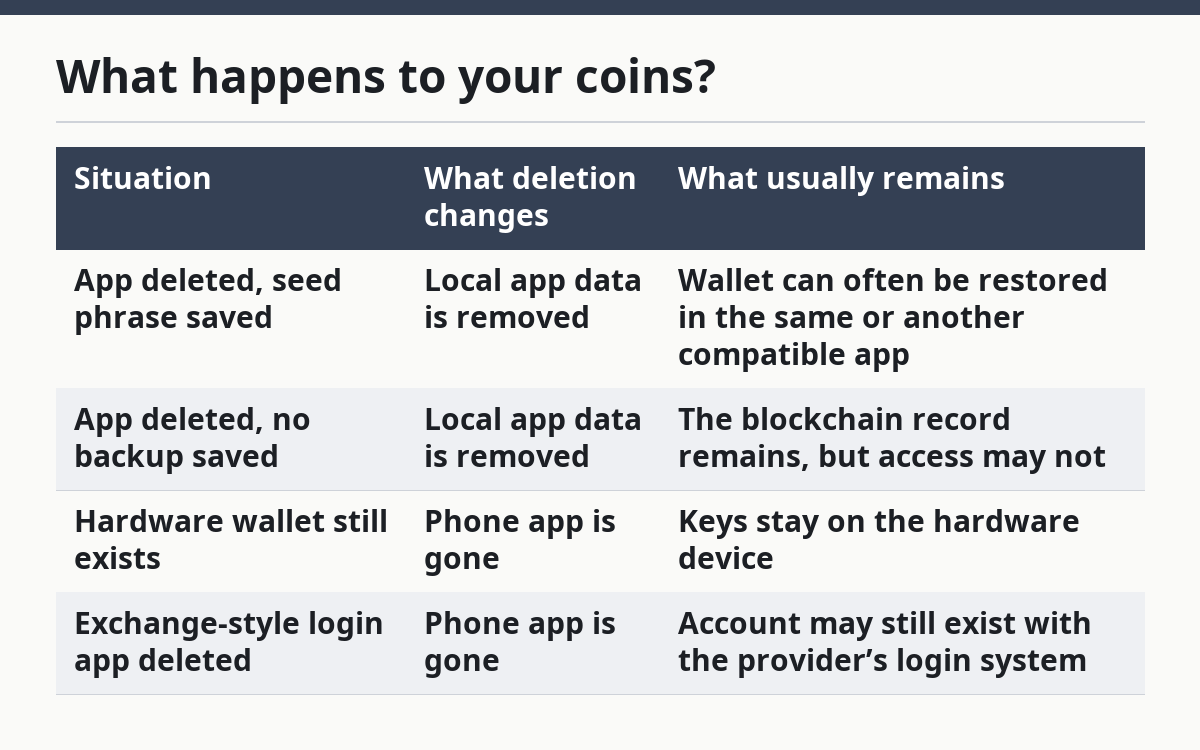
The trade-off is obvious: deleting the app can be harmless if the backup is solid, but risky if the backup was never made or cannot be found.
What should you check before deleting it?
Check the backup, the account type, and the phone’s storage before you uninstall anything. A careful check takes a few minutes and can save hours later.
- Open the wallet app and confirm the wallet type. Check whether it is self-custody, exchange-based, or hardware-wallet connected. If the app shows a recovery phrase section, that is a sign the app uses a seed phrase model; if not, the login may work differently. A mismatch here means the later restore steps may not apply.
- Find the recovery phrase or seed phrase. Look for 12, 18, or 24 words, because those are common recovery phrase lengths in many wallet systems. Verify that every word is readable and in the exact order shown. If the phrase is incomplete, the backup is not dependable.
- Check for a wallet backup file or cloud backup. Some apps create a backup in phone storage or a connected account. Verify where that backup lives and whether it is encrypted. If needed, consult the wallet provider or a qualified professional, because secure folders and device backup settings can vary by phone and app; Apple and Google both document device backup options and storage behavior in their support materials: https://support.apple.com/guide/iphone/backup-iphone-iph3ecf67d29/ios and https://support.google.com/android/answer/2819582
- Confirm whether the wallet is linked to a hardware wallet. A hardware wallet keeps the keys on a separate device and may only use the app as a display. If that device exists and works, deleting the phone app may not end access; if the device is missing, do not assume the phone app was the only issue.
- Record the wallet address. Copy the public address from the app before deletion so you can verify it later after reinstalling. If the address cannot be checked, you lose an easy way to confirm you restored the same wallet.
- Check the phone’s storage and app permissions. Review whether the app stored photos, files, or local notes related to the wallet. If the phone uses secure folders or device backup, confirm whether those are included. Hidden storage can make a later uninstall less clean than expected.
- Test the backup only if the setup allows it safely. Some wallets let you verify the recovery phrase without wiping the app; others do not. If the app offers a verification step, use it before deletion. If verification is not possible, do not guess that the phrase is right.
If any one of those checks fails, the problem is not the deletion itself but the missing recovery path. That is the point where the user should slow down rather than press uninstall and hope.
Can you reinstall and get your wallet back?
Yes, sometimes you can reinstall the app and restore the same wallet, but only if you still have the right recovery phrase, backup, or linked hardware device. Reinstalling the app alone does not recreate the wallet by magic.
The restore process usually depends on the same wallet type you started with. A self-custody wallet often asks for the seed phrase during setup, while an exchange-style app may ask for a username, password, and a second factor such as an authenticator code. If the app was connected to a hardware wallet, the hardware device remains the source of control, and the phone app is only the interface.
The same app does not always mean the same wallet. A wallet restored with the wrong phrase can open a different address, which looks normal at first but does not control the funds you expect. That is why address checks matter before and after reinstalling.
When should you stop and check more carefully?
Stop and review the setup again when any of these situations apply, because each one changes what deletion means.
The app never showed a recovery phrase: this may mean the wallet uses another account model or the phrase is stored elsewhere — check the app’s help pages before uninstalling.
The only backup is a screenshot on the same phone: this backup may disappear with the app or the device — move the phrase to a safer record before continuing.
The wallet is tied to a hardware device you do not have with you: the phone app may not be enough on its own — wait until the hardware wallet is available.
The wallet is also used for exchange logins or 2FA codes: deleting the app can break more than wallet viewing — confirm what the app controls before removing it.
The phone is shared or managed by work or family: another backup, account policy, or profile setting may exist — check who owns the device and the storage first.
You are unsure whether the balance is in a custodial account or self-custody wallet: the deletion consequences are different — identify the account type before acting.
These are the situations where a simple “just reinstall it” answer can be too thin and can lead to avoidable confusion.
What mistakes do people make?
The biggest mistake is assuming the app itself holds the money. That leads to panic on one side and careless deletion on the other. The correct view is that the app is access software, while the keys or login method decide control.
A second mistake is copying only part of a recovery phrase. Missing even one word, or writing the words in the wrong order, can make the backup useless. The better alternative is to record the full phrase exactly as shown, then verify it before the app is removed.
A third mistake is deleting the app before checking whether the wallet is connected to a hardware device. The phone can look like the only access point when it is not. The safer alternative is to confirm where the keys live first.
A fourth mistake is trusting a cloud note, screenshot, or email draft as if it were a proper backup. The better alternative is to use whatever backup method the wallet itself supports and confirm that it can be read later.
A fifth mistake is reinstalling a wallet app and entering a phrase without checking the address afterward. That can restore a different wallet that still looks familiar. The correct alternative is to compare the restored address with the one you saved before deletion.
What if the wallet app is linked to a hardware wallet?
If the app is linked to a hardware wallet, deleting the app usually removes only the phone interface, not the keys on the hardware device. The hardware wallet remains the device that signs transactions, and the phone app is often just a viewer or connector.
That setup changes the risk picture. The app can be reinstalled later, but the hardware wallet still has to be present and opened when you want to use it again. If the hardware device is lost, damaged, or unavailable, deleting the app may not be the main problem at all.
This is also where people confuse “account access” with “wallet access.” A hardware wallet can keep control of the funds even when the software disappears, while the app alone cannot sign anything without that physical device. For more on how wallets and keys work, see Coinbase’s wallet basics and the Ethereum wallets overview: https://www.coinbase.com/learn/crypto-basics/what-is-a-crypto-wallet and https://ethereum.org/en/wallets/
FAQ
Are my coins gone if I delete the app?
No, deleting the app does not usually remove the coins from the blockchain. What can disappear is the local access method on your phone, including saved settings and cached data. If you still have the recovery phrase, backup, or hardware device, the wallet may be recoverable later.
Can I reinstall and get my wallet back?
Yes, if you still have the correct recovery phrase, backup, or linked hardware wallet. Reinstalling the app by itself is not enough; the restore method has to match the wallet type. If the wallet was self-custody, the seed phrase is usually the key piece.
Does deleting the app erase the blockchain wallet?
No, deleting the app does not erase the blockchain wallet itself. The wallet address and transaction history remain on-chain, because they are not stored only on the phone. The app mainly removes the local interface and whatever data the phone kept for convenience.
Drafted with AI; not yet reviewed by a person.