Last updated: November 20, 2026
Quick answer: in most cases, you can tell how to tell whether a crypto transaction failed or was rejected in 3 checks: wallet message, transaction hash, then block explorer status. A failed crypto transaction usually reached the chain and then reverted, while a rejected transaction usually never made it on chain at all. Check the wallet message first, then the transaction hash, then the block explorer status, because those three clues often settle the question in under 5 minutes.
Key takeaways
- A rejected transaction often stops at the wallet, before the network accepts it.
- A failed transaction usually appears on a block explorer with a hash, then shows a revert or failed status.
- Gas fee, nonce, and smart contract errors are the clues that separate one case from another.
- A wallet error message is not the same thing as an on-chain failure.
- This is information, not financial advice; for your own situation, a qualified adviser or qualified professional should be consulted.
Who this applies to
This applies to anyone who sent a crypto transaction and now sees a warning, a stuck status, or no confirmation after a few minutes. It assumes you already have the wallet app, the transaction hash if one was created, and access to a block explorer for the chain you used, such as Ethereum mainnet or another EVM chain.
This does not cover how to cancel a pending crypto transaction, speed up a slow bitcoin transaction, or calculate a bitcoin transaction fee. Those are different problems. For broader context on troubleshooting and confirmations, the hub on on-chain transaction troubleshooting and confirmations is the right companion page. See also the related guide on how to cancel a pending crypto transaction, how to speed up a slow bitcoin transaction, and how to calculate a bitcoin transaction fee.
The main split is simple: if the wallet rejected the send before broadcasting, there may be no hash and no network record. If the chain accepted the transaction and then the smart contract reverted, the transaction can still fail on chain and still consume gas fee. That difference matters because the fix path is different in each case.
How do I tell if it failed or was rejected?
You tell by checking the wallet, the hash, and the explorer in that order. A rejected transaction usually stops at the wallet or node layer, while a failed transaction usually has an on-chain record with a failed or reverted status.
Start with the message you saw. If the wallet said something like “insufficient funds,” “gas estimation failed,” or “nonce too low,” the send may have been rejected before it fully broadcast. If the wallet generated a transaction hash, the next stop is a block explorer such as Etherscan-style explorers for the chain you used. For Ethereum, the Ethereum.org transaction docs explain how transactions are signed, sent, and confirmed, and Etherscan shows the status once a hash exists.
Then compare what the explorer shows. A transaction that appears with a status like failed, reverted, or error has reached the chain. If no hash exists and no explorer record appears after a reasonable wait, the transaction was likely rejected or never broadcast.
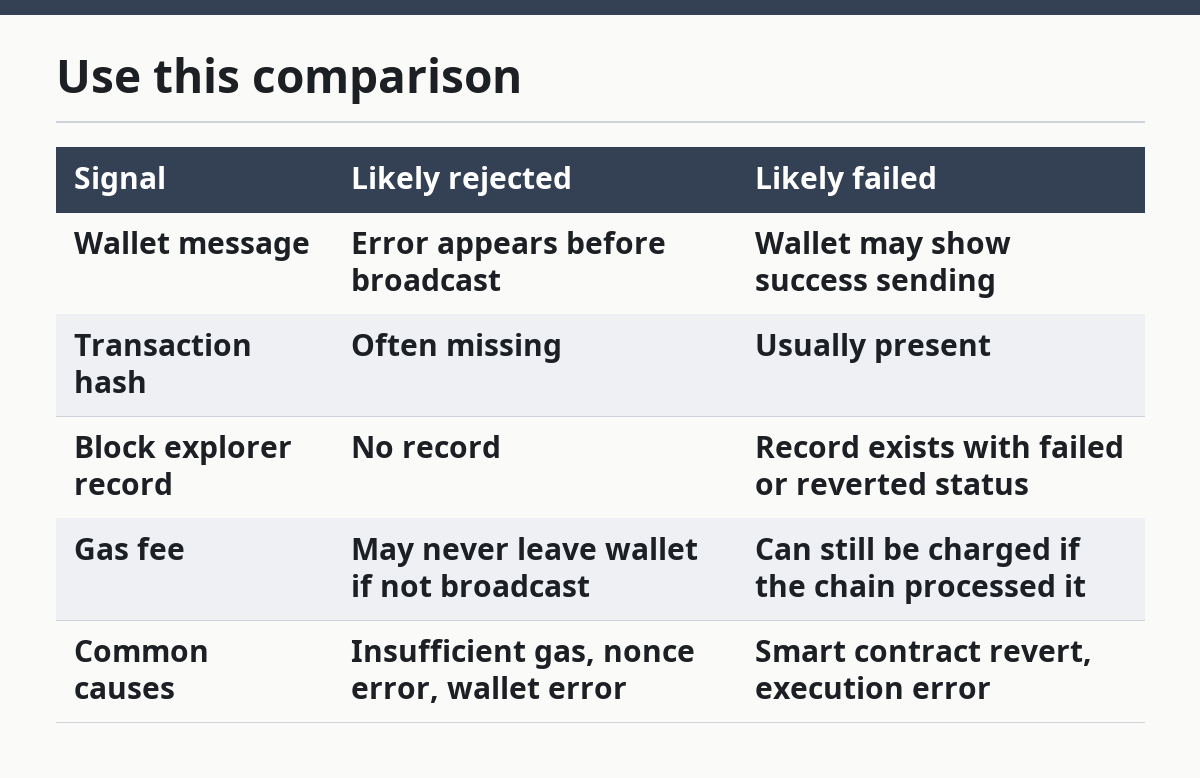
Use this comparison
| Signal | Likely rejected | Likely failed |
|---|---|---|
| Wallet message | Error appears before broadcast | Wallet may show success sending |
| Transaction hash | Often missing | Usually present |
| Block explorer record | No record | Record exists with failed or reverted status |
| Gas fee | May never leave wallet if not broadcast | Can still be charged if the chain processed it |
| Common causes | Insufficient gas, nonce error, wallet error | Smart contract revert, execution error |
What should I check first?
Check the wallet error message first because it usually tells you whether the problem happened before broadcast. A clear message is often the best clue, especially when the wording includes gas fee, nonce, or estimate failure.
Open the transaction detail screen in your wallet and look for three things: a hash, a timestamp, and any red or orange error text. A hash means the wallet attempted to send the transaction. No hash means the wallet may have blocked it locally or the network never accepted it. If the wallet says “submitted” but the explorer never finds it, that points more toward broadcast or network issues than a completed on-chain failure.
If the message mentions insufficient gas, the transaction may have been rejected because the wallet could not estimate enough gas for the call. If it mentions nonce too low, the wallet tried to use an old sequence number and the network refused it. If the message names a smart contract, that is a strong hint that execution itself failed rather than the send being blocked outright.
How do I read the transaction hash?
You read the transaction hash by searching it on the correct block explorer for the same chain and wallet address. The hash is the transaction’s ID, and a matching record is strong evidence that the network saw it.
Paste the hash into the explorer search bar and check whether it returns one exact transaction. Then verify the chain, the wallet address, and the status line. If the explorer returns no match at all, the transaction may never have left the wallet or may have been sent on a different chain than the one you are checking.
A matched hash with a failed or reverted status means the transaction was rejected by execution, not by your wallet. A hash with a confirmed status means the send worked, even if the app still showed an error. If the hash exists but the details page shows no token transfer or contract result, that can still be a failed smart contract call rather than a simple transfer.
What do gas fee and nonce mean here?
Gas fee is the network payment for computation, and nonce is the transaction sequence number for that address. Those two fields explain many rejected and failed crypto transaction cases.
Gas problems often appear as “insufficient funds for gas” or “gas estimation failed.” That usually means the wallet could not reserve enough to pay for the transaction’s expected execution. The send may be blocked before broadcast, or the chain may accept it and still revert during execution if the contract logic breaks.
Nonce problems show up when the transaction number is out of order. If the nonce is too low, the network may reject the transaction because an earlier one already used that number. If the nonce is too high, the transaction can sit in limbo until the missing earlier transaction exists. That can look like a failure from the wallet side even when the chain has not processed it yet.
When does a smart contract revert?
A smart contract reverts when its code decides the transaction should not complete. On Ethereum and other EVM chains, a revert rolls back the contract action, but it can still leave a failed transaction on chain and still use gas.
Common reasons include sending the wrong token amount, missing an approval, calling the wrong function, or hitting a contract rule that blocks the action. The explorer may still show a transaction hash, a failed status, and sometimes a revert reason. That is very different from a wallet rejection, where the transaction never reaches execution.
A generic wallet transfer to a normal address often does not involve a contract revert. A swap, mint, or token interaction usually does. If the wallet shows a failure on a token interaction, the explorer details matter more than the app’s single-line error banner. For contract failures, the Ethereum contract interaction docs and the explorer’s execution details are often more useful than the wallet pop-up.
What signs mean I should stop and check something else?
You should stop treating it as a simple failed send when the clue points to a different problem entirely, and you may want to consult a qualified professional if the issue involves a large value or complex contract. The wrong fix can send you in circles for 10 minutes or longer.
No transaction hash appears: The wallet likely stopped the send before broadcast — Check the wallet error text and nonce first, not the explorer.
The explorer shows a different chain: The transaction went to another network — Switch to the correct chain before judging the status.
The wallet says “insufficient gas”: The send may have been blocked by funding or estimation — Review the gas fee field and the asset balance.
The explorer shows “reverted”: The chain processed the call but the contract rejected it — Read the revert message and the contract action, not just the wallet banner.
The nonce is out of sequence: Later transactions can look stuck or failed — Check earlier pending transactions from the same address.
The address is correct but the token is not: You may be looking at the wrong asset contract — Verify the token contract address, not only the wallet balance.
If none of these fits and the wallet gives only a generic wallet error, that is a sign to stop guessing and inspect the exact transaction details on the explorer. On a high-stakes money issue, a qualified adviser can help you interpret the broader financial impact, especially if the transaction involved a large value or a complex contract.
What mistakes do people make?
People most often mistake a wallet rejection for an on-chain failure, and that leads them to search the wrong place for the answer. The fix is to use the hash first, because the hash tells you whether the network even saw the transaction.
Another common error is checking the wrong chain. A transaction on an L2, testnet, or alternate EVM chain can look missing if you search the main chain explorer. The correct alternative is to confirm the network name in the wallet before drawing any conclusion.
A third mistake is ignoring nonce. When one earlier transaction is still pending, the next one can appear broken even if the contract itself is fine. The correct alternative is to inspect the full sequence from the same address, not just the newest item.
A fourth mistake is reading only the wallet pop-up. Wallets compress long contract errors into short messages, and that can hide the actual cause. The correct alternative is to open the explorer details and look for the status, input data, and any revert note.
A fifth mistake is assuming every failure means the same thing. A failed smart contract call, an insufficient gas rejection, and a nonce error are different events with different clues. Treating them as one problem can make diagnosis slower, so it is better to check the exact message and, if needed, consult a qualified professional or the wallet’s support resources.
What if the standard check does not fit?
The standard check needs adjustment when the transaction is on a non-Ethereum chain, when the wallet uses a custom RPC, or when the transaction has already been replaced by a new nonce. In those cases, the explorer may not show the result the way a basic wallet walkthrough suggests.
If the wallet uses a custom RPC, the transaction may appear delayed or absent because the provider is behind the chain. If the transaction was replaced, the hash you copied may be stale and the newest nonce entry is the one that matters. If the chain is not an EVM chain, the terms revert, nonce, and gas can work differently, so the wallet’s wording may be more useful than a generic explorer status.
A direct comparison helps here:
| Situation | What changes | What to trust most |
|---|---|---|
| Custom RPC | Explorer lag or mismatch | Alternate explorer or wallet details |
| Replaced nonce | Old hash no longer tells the full story | Latest transaction for that nonce |
| Non-EVM chain | Different status words and fee rules | Chain-specific docs and wallet status |
| Contract call | More likely to revert than a plain transfer | Explorer execution result |
FAQ
Is a failed transaction always lost?
No, a failed transaction is not always lost in the same way. The chain may record it, the wallet may keep its history, and the asset movement may simply not happen. On some chains, the gas fee can still be spent even when the contract action fails.
Why does a rejected transaction still cost a fee?
A rejected transaction can still cost a fee when the network has already started processing it or the contract execution ran and then reverted. The fee pays for computation, not for success. If the wallet rejected the send before broadcast, there may be no fee at all.
What does reverted mean on ethereum?
Reverted means the smart contract started execution and then undid the action because one of its rules failed. The transaction can still appear on chain with a failed status, and gas may still be charged. It is different from a wallet rejection, which often happens before the network processes the call.
The practical test is still the same: wallet message first, hash second, explorer third. If those three do not line up, the transaction needs closer inspection before any judgment is made.
Drafted with AI; not yet reviewed by a person.