Last updated: November 20, 2026
A crypto wallet backup is valid if it can recreate the same wallet and the same wallet addresses from scratch. The quickest proof is a restoration test: enter the seed phrase or recovery phrase into a wallet you trust, then check that the restored address matches the one you expect.
This is information, not financial advice. Crypto setups vary by wallet and chain, so a qualified adviser should be consulted for your own situation if the stakes are large or the setup is unusual.
Key takeaways
- A backup is not “good” because it looks complete; it is good because it restores the same wallet.
- A valid seed phrase must have the right word order, the right count, and the right wallet address after restore.
- The safest check is an offline recovery test on a device you control.
- If the restored address does not match, treat the backup as suspect until you know why.
- Some wallets use extra steps, such as a passphrase or a specific derivation path, so a mismatch is not always a typo.
Who this applies to
This applies to anyone who already has a seed phrase, recovery phrase, or other wallet backup and wants to know if it actually works. It assumes you can open the wallet app, identify at least one wallet address, and recognize whether the backup is supposed to be 12 words, 18 words, or 24 words.
It does not help if you have no backup at all, if you want to learn how to store one offline, or if you need help recovering a lost wallet from a damaged device. Those are different problems, and mixing them up can cause avoidable mistakes. For background, the wallet access, backups, and recovery hub covers the broader path without repeating the steps here.
A backup check is also not the same as guessing whether a phrase “looks right.” A 12-word seed phrase can still be wrong if one word is out of order or if the wallet expects a passphrase. The standard to care about is not appearance; it is restoration to the same result.
If the wallet holds a large balance, uses a custom derivation path, or was created in a wallet that is no longer installed on your phone, the standard do-it-yourself check may stop being enough. In that case, the safest move is to ask a qualified wallet specialist or adviser to review the setup before you rely on it.
How do you check a crypto wallet backup?
You check a crypto wallet backup by restoring it in a wallet app, confirming the word order, and matching the recovered wallet address against a known address. The point is to prove that the backup rebuilds the same wallet, not just a similar one.
A valid check has three parts: the phrase must be entered exactly, the restore must complete without errors, and the resulting address must match what you expect. On Bitcoin-style wallets, that often means the first receiving address should match under the same derivation path, such as a BIP32/BIP44 path. On Ethereum-style wallets, the same seed can still produce the wrong visible account if the wallet’s account index is different.
For the underlying standards, the BIP39 seed phrase format and the BIP32 derivation model are the key terms to know. The BIP39 spec is here: https://github.com/bitcoin/bips/blob/master/bip-0039.mediawiki. The BIP32 spec is here: https://github.com/bitcoin/bips/blob/master/bip-0032.mediawiki.
How do you test a backup step by step?
You test a backup by restoring it in a separate wallet, then comparing the restored address to the original. Follow the steps below in order, because a skipped step can make a bad backup look valid.
- Open a wallet app that supports recovery phrase import and uses the same standard as the original wallet, such as BIP39, then verify that it offers a restore or import screen before you proceed; if it only offers account creation, that is the wrong tool.
- Prepare a clean device or a fresh wallet profile, then verify that no old accounts are already loaded; if the restore screen autofills an existing account, the check is contaminated.
- Enter the full seed phrase exactly as written, using the same word count the original backup uses, usually 12 words or 24 words; then verify each word against the original order, because one swapped word means the phrase may fail or restore a different wallet.
- Confirm any passphrase or extra word if the original wallet used one, then verify that the wallet asks for the same extra input; if the wallet restores with no passphrase when one was used before, the result is not a match.
- Wait for the wallet to finish the recovery process, then verify that the account list appears without errors; if the app shows an invalid phrase warning, a checksum error, or a blank restore, stop there.
- Compare the first wallet address from the restored wallet with a known address from the original wallet, then verify the characters match exactly; if the address differs, the phrase may be wrong, the derivation path may be different, or the account index may not be the same.
- Check a second address or account index if the wallet supports multiple accounts, then verify that the next address also matches the expected pattern; if only one address matches and the rest do not, the wallet setup may not be fully aligned.
- Record the result in a private note that does not expose the full phrase, then verify that you have a clear pass or fail outcome; if the check depends on memory alone, the result is too fragile to trust.
A good result is simple: the restored wallet shows the same address set and the same account structure as the original. A bad result is also simple: the restore fails, the address does not match, or the wallet only looks right until you compare the details.
If you are checking a 24-word phrase, the same logic still applies. The longer phrase does not prove validity by itself; it only gives the wallet more entropy if the words are correct.
What should you check before trusting the result?
You should check the word order, the address match, and the wallet’s derivation settings before you trust the result. Those three items catch most false confidence cases.
A lot of people stop after the wallet opens, but that only proves the phrase was accepted. A 12-word or 24-word backup can still restore the wrong account if the wallet app uses a different derivation path, a different account index, or an added passphrase. The restored screen can look normal while still pointing at the wrong funds.
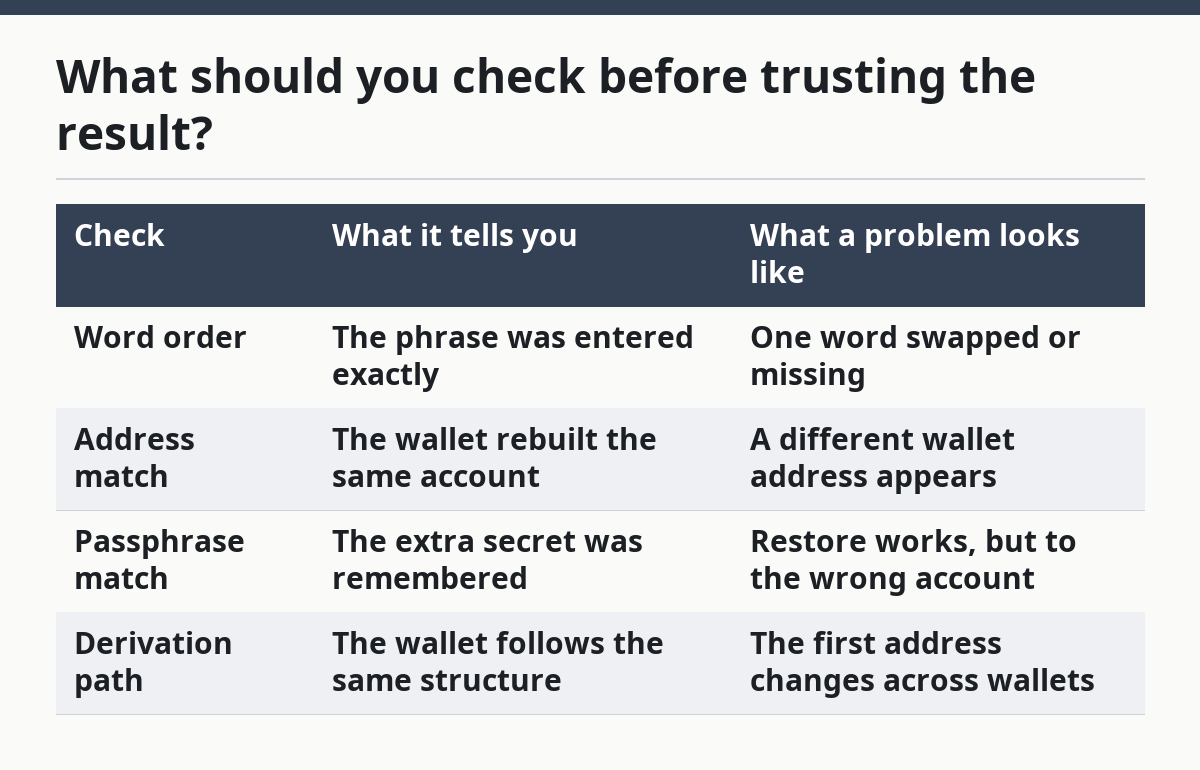
Use a short comparison table if you are deciding whether the result is strong enough to trust:
| Check | What it tells you | What a problem looks like |
|---|---|---|
| Word order | The phrase was entered exactly | One word swapped or missing |
| Address match | The wallet rebuilt the same account | A different wallet address appears |
| Passphrase match | The extra secret was remembered | Restore works, but to the wrong account |
| Derivation path | The wallet follows the same structure | The first address changes across wallets |
If you can, compare at least one wallet address and one account index. A single match can be a coincidence; a pattern match across addresses is stronger. If the wallet offers a “show recovery phrase” or “verify phrase” function, that can help, but it still does not replace a real restoration test.
When should you stop and get help?
You should stop when the restore produces a mismatch, an error, or a setup that you do not fully understand. On a money topic, the wrong move is to keep guessing.
The wallet asks for a passphrase you do not remember: the backup may be incomplete — stop and review the original setup before you keep trying.
The restored address does not match the known address: the backup may be valid but paired with a different derivation path — do not assume the funds are gone or safe.
The wallet uses a custom path such as m/44’/0’/0’/0/0 and you do not know it: the restore may be structurally correct but functionally wrong — ask for qualified help with the wallet’s settings.
The app shows an invalid checksum or phrase error: the seed phrase may have a wrong word, a typo, or the wrong word count — recheck the original copy before any further attempts.
You are testing a backup for a large balance or a business wallet: the cost of a wrong assumption is high — have a qualified adviser or wallet specialist review the process.
The only copy of the backup is on a device you suspect is compromised: the validation itself may expose the phrase — stop and move to a safer setup before doing anything else.
If the situation is unclear, the correct response is not to “try harder.” It is to reduce the risk of making the only copy worse.
What mistakes cause false confidence?
False confidence usually comes from checking the wrong thing. A wallet opening on screen is not the same as a valid backup, and a matching balance display is not the same as a correct address.
One common mistake is to test only on the original device. That can hide problems because the wallet app may already have cached the account. The better alternative is a fresh restore in a separate wallet profile or on a clean device.
Another mistake is to skip the address match. The phrase may restore a wallet, but if the wallet address is different, the backup does not prove what you think it proves. The correct alternative is to compare the first receiving address, then at least one more if the wallet supports more than one account.
A third mistake is to ignore passphrases. Some wallets add an extra secret beyond the seed phrase, and that changes the result completely. The correct alternative is to confirm whether a passphrase was used before you call the backup valid.
A fourth mistake is to trust a photo of the phrase without checking the order. A clear picture can still contain the wrong sequence of 12 or 24 words. The correct alternative is a direct word order check against the original record.
A fifth mistake is to keep entering the phrase into random apps after a failed restore. That spreads the backup across more places and makes the problem harder to isolate. The correct alternative is to stop after the first clear failure and review the wallet standard, the address, and the derivation path.
When does the standard check not apply?
The standard check needs adjustment when the wallet uses more than a plain BIP39 phrase or when the address format changes across networks. A restore that works in one app may not map cleanly to another app.
Hardware wallets, multisig wallets, and wallets with account-based recovery often need extra care. A multisig setup may require more than one key, so a single seed phrase does not prove full access. A wallet with multiple accounts may also show a valid first account while the important funds sit under another index.
Cross-chain wallets can also confuse the result. A seed phrase may restore both Bitcoin and Ethereum-style accounts, but the wallet address you care about may belong to only one chain. If the restored wallet looks right on one network and wrong on another, the backup can still be valid for one chain and useless for the other.
If the wallet was created years ago, the standards may still be the same, but the app labels may not be. In that case, trust the address match and the derivation path more than the app’s name for the account.
Should I test my backup before I need it?
Yes, you should test it before you need it. A backup that has never been restored is only a promise, not proof.
A quick restoration test can show problems while you still have time to fix them. If the phrase is 12 words or 24 words, the test also tells you whether the wallet app, the address, and the derivation path line up as expected.
What does a valid backup look like?
A valid backup is one that restores the same wallet address and account structure from the same seed phrase. The phrase may be 12 words, 18 words, or 24 words, but the count alone does not prove anything.
The strongest sign is a matching address after restore. A second good sign is that the wallet opens without checksum errors or missing-word warnings.
How can I verify a recovery phrase without exposing it?
You can verify it by using a private restoration test on a device you control and by avoiding screenshots, cloud notes, or shared chats. The phrase should stay offline during the check.
If the wallet supports a built-in verify or restore flow, use that first. If not, do the test in a fresh wallet profile, compare the address, and then delete the temporary setup if the result is only for validation.
Drafted with AI; not yet reviewed by a person.