Last updated: November 19, 2026
Quick answer: to spot a crypto scam before you lose money, check the sender, the link, and the request. In many cases, a fake message can be ruled out in under 5 minutes.
Key Takeaways
- Check sender, link, and requested action in that order.
- Impersonation, urgency, and off-platform requests are the main red flags.
- Verify the destination, permissions, and business model before acting.
- Stop if a message asks for a secret, moves you off-platform, or demands an approval you do not understand.
A crypto scam usually gives you a reason to act fast, sends you off-platform, and asks for money, seed words, or a wallet connection. This guide on how to spot a crypto scam before you lose shows the checks that catch fake support, phishing, impersonation scams, fake giveaways, rug pulls, and wallet drainers before the loss happens.
What follows breaks the decision down into steps, warning signs, and the moments when you should stop and get help. It’s information, not financial advice; your own situation can differ, so speak with a qualified adviser if the money involved is meaningful for you.
What this guide assumes, and who should use it
This applies if you’re seeing crypto messages in email, DMs, Telegram, X, Discord, or comment threads and you need to decide if a link, offer, or “support” reply is real. It assumes you already know the basic terms like wallet, exchange, and seed phrase, but you do not need to be technical.
Picture this: you get a message saying your account has been flagged, or you’ve “won” tokens, and the clock is running. That urgency is the trap. The guide below is built for the moments people actually face in chat, not for theory, and it helps you separate a real platform notice from a scam in under a few minutes.
The truth is, some messages are easy to dismiss. The hard ones look normal, use the right logos, and copy the language of a real exchange or project.
- A fake support account can answer in the same tone as the real one.
- A phishing page can copy the login screen well enough to fool you on a phone.
- A rug pull can look like a real launch until the exit begins.
For faster checking, use the official help pages of the platform itself and the FTC’s advice on imposter scams: the U.S. Federal Trade Commission’s consumer guidance on impersonation scams and the CISA guidance on phishing are both useful reference points. If you’re outside the U.S., the same pattern still applies, but local rules and complaint paths differ.
How do I tell if a crypto message is a scam?
A crypto message is suspicious when it creates urgency, asks you to move off the platform, or pushes you to connect a wallet, share a code, or approve a transaction you don’t understand. Start by checking the sender, then the link, then the action it wants from you.
Picture this: you’re staring at a DM that says your funds will be frozen in 10 minutes unless you “verify now.” That’s a classic pressure move. The next steps help you test the message in the right order so you don’t click first and think later.
- Check the sender name and handle exactly. Compare every character, not just the logo. A scam account often swaps one letter, adds a number, or uses a display name that looks official while the handle is wrong. What worked: the handle matches the real account on the platform’s own site; what signals a problem: the account is newly created, lightly followed, or replying under a popular post.
- Open the official site or app yourself. Type the address or use a bookmark you already trust; don’t use the link in the message. Look for the same notice inside the platform after you log in normally. What worked: the alert appears in the app or account dashboard; what signals a problem: the warning exists only in the DM or email.
- Inspect the link before touching it. On desktop, hover; on mobile, long-press and preview the domain. Watch for extra words, strange spelling, or a domain that ends in something unrelated to the real brand. What worked: the domain matches the official one exactly; what signals a problem: the site name is off by one letter or uses a lookalike domain.
- Ask what the message wants you to reveal. Seed phrase, private key, one-time code, password, or remote access are all red flags. No real support team needs those. What worked: the request is limited to normal account details you already entered on the official site; what signals a problem: it asks for any secret that grants control.
- Check for pressure and reward together. Scams often mix a deadline with a prize: “claim now,” “last chance,” or “open your bonus.” Real notices can be urgent, but they do not usually require instant action through a random link. What worked: the notice gives time and points you to a known channel; what signals a problem: it pushes action in the next few minutes.
- Separate a promise from proof. If the message promises fixed gains, guaranteed returns, or “no risk,” treat it as a major warning sign. Crypto prices move, and no honest message can remove that fact. What worked: the message explains a process; what signals a problem: it sells profit, not information.
- Check the transaction before you approve it. On a wallet connection request, read the permissions, token names, and spending approvals. A drainer often asks for broad permissions rather than a simple view-only connection. What worked: the request is narrow and expected for the service you chose; what signals a problem: it asks for unlimited access, a blind signature, or a strange approval you don’t need.
- Verify with a second channel. Go to the project’s official site or support portal from a known source and ask there, not in the same chat. What worked: the real channel confirms the notice; what signals a problem: the “support” account is the only place repeating the claim.
What are the biggest warning signs in impersonation scams and phishing?
The strongest warning signs are impersonation, urgency, and a request to move money or credentials off-platform. Those three show up in phishing links, fake giveaways, impersonation scams, fake support, and wallet drainers far more often than in legitimate messages.
Picture this: a post says a famous exchange will double any transfer sent to a “promotion” address. The account looks polished, the comments are full of bots, and the link goes to a page that copies the brand colors. Big mistake.
- Phishing links try to steal your login or seed phrase through a fake page.
- Fake giveaways often ask you to send crypto first to “activate” the reward.
- Impersonation scams copy a known brand, influencer, or support agent.
- Wallet drainers trick you into signing a permission that lets assets move out later.
A real giveaway does not need you to send funds to claim a prize. A real support team does not ask for your recovery phrase in a 1:1 chat. A real project announcement usually lives on its official site, verified social account, or in-app notice before it spreads elsewhere. The FTC’s impersonation scam guidance and CISA’s phishing guidance both stress this same pattern.
The truth is, scammers rely on social proof. They seed a thread with fake winners, fake replies, and fake urgency so the post looks crowded with trust. If the message says “only 50 spots left,” “support is busy,” or “claim before block,” treat the wording as a warning sign, and if you are unsure, consult the official help desk or a qualified professional before acting.
What should I check before I click, connect, or sign?
You should check the destination, the permissions, and the business model before you do anything. A few seconds spent on those three checks can expose a scam that looks polished on the surface.
Picture this: you’re on your phone, the message looks real, and the “Connect wallet” button is right there. That is exactly when the usual habits fail, because mobile screens hide details that matter. Use this order instead.
- Read the domain twice. A real platform domain is exact; a scam often uses a lookalike with one swapped letter or extra word. If the address looks odd, stop.
- Look for HTTPS, but do not stop there. A padlock only means the connection is encrypted; it does not prove the site is honest. If the name is wrong, the padlock does not save you.
- Check the request type. View-only access is different from spending approval or blind signing. If a page wants broad permissions, ask why it needs them.
- Open the official announcement channel yourself. Use the known site, app, or verified profile. If the notice is real, it should appear there too.
- Search the exact wording. Scams often reuse the same pitch across many accounts. If the phrase appears in scam reports or warning posts, that’s a bad sign.
- Compare the timing. New token launches, airdrops, support tickets, and “limited” offers are prime bait during busy market periods. If the message arrived during a spike, be extra strict.
- Check whether the action makes sense for the relationship. A project account should not DM you from nowhere asking for a code, a transfer, or remote access. If the relationship is one-way and the ask is personal, the fit is wrong.
On the flip side, a real platform message usually fits the context you already have: an account you signed into, a ticket you opened, or an event you joined. A random DM with a deadline does not.
When should you stop and treat it as unsafe?
You should stop immediately if the message asks for a secret, tries to move the conversation off the official platform, or pushes you to approve something you do not understand. Those are the lines that matter most. If you are unsure, pause and consult the official support channel or a qualified professional before proceeding.
Picture this: a “support” agent says they can fix your issue if you share your recovery phrase or confirm a code they just sent. That is not support. That is the start of the loss.
- Secret requested: Seed phrase, private key, or one-time code means the contact is unsafe. What to do: close the chat and use the official help page only.
- Money requested first: Any “send to receive” giveaway or bonus is a scam shape. What to do: do not send anything and report the account.
- Off-platform move: If they push you to Telegram, WhatsApp, email, or a cloned site after the first contact, stop. What to do: verify the claim from the official source you already know.
- Impossible promise: Guaranteed profit, fixed return, or “risk-free” language does not fit real crypto markets. What to do: treat the offer as unsafe and ignore the pitch.
- Permission you don’t need: Unlimited approval, blind signature, or “connect to continue” on a strange page is a bad sign. What to do: do not approve it; close the page.
- Pressure to act now: A deadline of minutes, not hours, is a control tactic. What to do: wait, because a legitimate notice will still survive a pause.
If you already clicked and the page is asking for wallet access, the safest move is to stop interacting with it at once. If funds or personal details are already involved, use the platform’s official support route and, where appropriate, local consumer protection or fraud reporting channels. A qualified adviser can help with financial fallout that depends on your country and account setup.
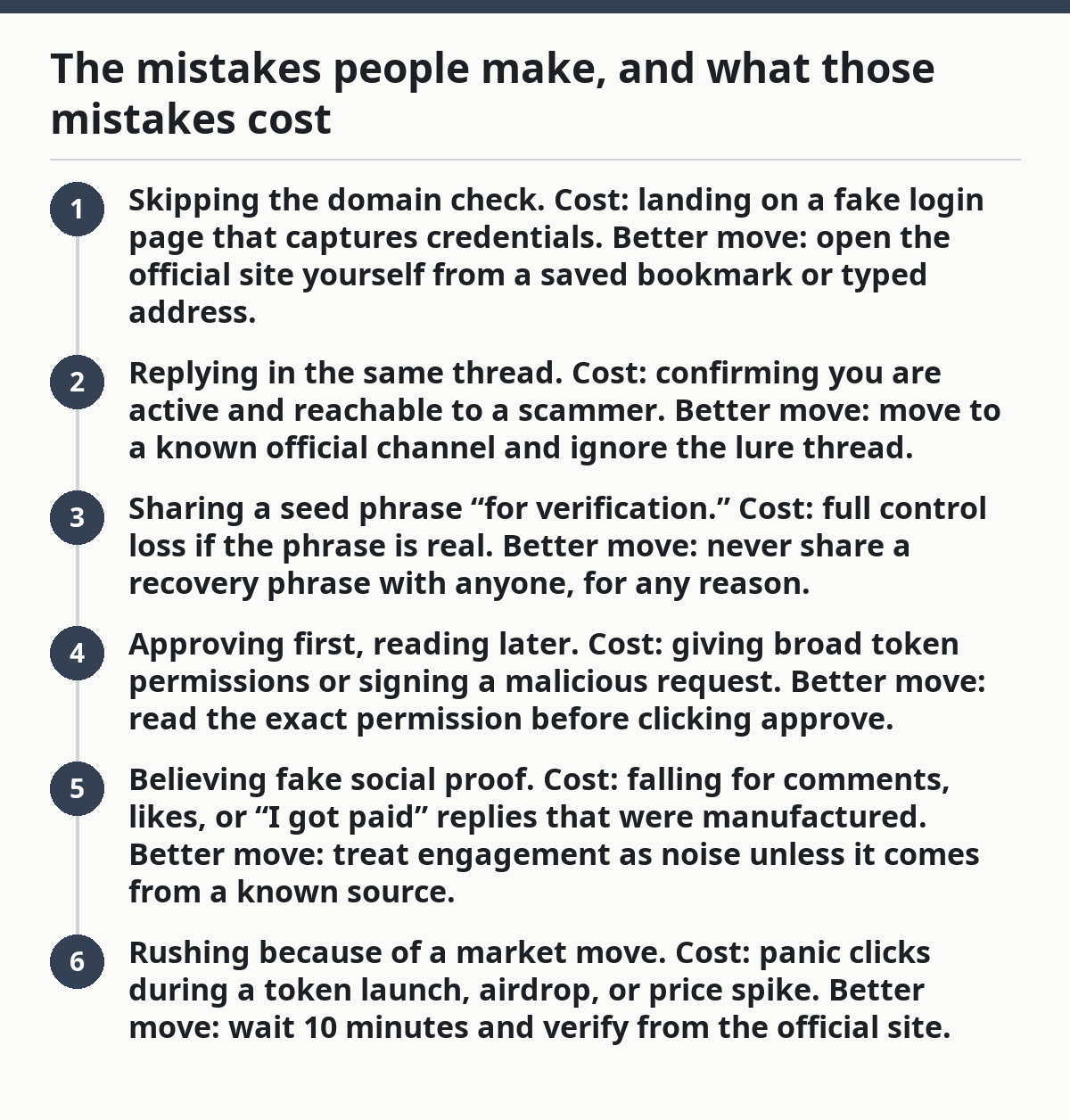
The mistakes people make, and what those mistakes cost
The most common mistake is trusting the message because it looks official. That error costs people access to accounts, tokens, or approval rights they never meant to hand over.
Picture this: you spot the logo, skim the first line, and click before checking the address. That’s all a scam needs. The rest of the loss can happen in one approval or one reply.
- Skipping the domain check. Cost: landing on a fake login page that captures credentials. Better move: open the official site yourself from a saved bookmark or typed address.
- Replying in the same thread. Cost: confirming you are active and reachable to a scammer. Better move: move to a known official channel and ignore the lure thread.
- Sharing a seed phrase “for verification.” Cost: full control loss if the phrase is real. Better move: never share a recovery phrase with anyone, for any reason.
- Approving first, reading later. Cost: giving broad token permissions or signing a malicious request. Better move: read the exact permission before clicking approve.
- Believing fake social proof. Cost: falling for comments, likes, or “I got paid” replies that were manufactured. Better move: treat engagement as noise unless it comes from a known source.
- Rushing because of a market move. Cost: panic clicks during a token launch, airdrop, or price spike. Better move: wait 10 minutes and verify from the official site.
The fix is plain. Slow down, check the source, and refuse any request that needs a secret or a rushed approval.
What about rug pulls and wallet drainers?
A rug pull is a project that looks live and promising, then the team drains liquidity or abandons the token. A wallet drainer is a malicious setup that tricks you into approving a transaction or connection that later lets assets move out.
Picture this: the project has a slick site, a fast-growing social following, and a token page full of excitement. Then the liquidity vanishes or the contract behavior turns ugly. That is why the warning signs matter before you buy in or connect anything.
A rug pull often shows up with no real team transparency, aggressive hype, and a launch that depends on fast crowd action. A drainer often shows up as a fake mint, a fake airdrop, or a fake claim page that asks you to sign a transaction. The problem is not just the page; it is the permission hidden in the approval.
The first check is simple: ask whether the project can be verified outside its own marketing. Look for a known company trail, real contact paths, and a history that is more than a few days old. The SEC’s investor alerts and the FTC’s crypto fraud guidance are useful starting points for checking claims like this.
How can you compare real notices with fake ones?
However the message arrives, a real notice usually matches the official channel you already use, while a fake one often depends on pressure and mismatch. That contrast makes how to spot a crypto scam before you lose easier in practice than in theory.
Next, compare the details rather than the tone. Real notices usually have a case number, account context, or a clear reason for contact. Fake ones often lean on urgency, generic language, and a link that sends you somewhere else.
For example, a genuine exchange warning should appear in the app, on the website, or through a confirmed support route. A fake one often appears only in chat, uses a lookalike domain, or asks for a secret within the first few lines. If you are still unsure, stop and confirm through the official site before you reply.
Drafted with AI; not yet reviewed by a person.