Last updated: November 19, 2026
Quick answer: in this guide to Crypto security and scam prevention — The Complete Guide, the most common losses usually come from social engineering, not from blockchain failures. If you want to avoid the most common losses, treat every unexpected message, signature request, recovery phrase prompt, and “support” call as hostile until proven otherwise, and if the money is large or the legal/tax consequences matter, consult a qualified professional.
This is information, not financial advice; for your own situation, especially if the money is large or the tax/legal consequences matter, speak with a qualified adviser. I write on personal finance and fraud prevention, so I can explain how the attack patterns work, where people usually slip, and which safeguards matter most in Crypto security and scam prevention — The Complete Guide.
Key takeaways
- The biggest crypto losses usually come from social engineering, not from “hacking” in the movie sense.
- A recovery phrase is the master key; anyone who gets it can usually move your assets.
- Hardware isolation helps, but it does not protect you from approving a bad transaction.
- The safest practical habit is to verify every address, URL, app, and signature twice, then wait before you act.
- If a message creates urgency, secrecy, or pressure to “act now,” assume it is a scam until a separate channel proves otherwise.
What actually keeps crypto safe?
Crypto security is mostly about reducing three risks: theft of your private keys, tricking you into signing something harmful, and sending assets to the wrong place. The core defense is simple in principle: separate storage, separate verification, and separate spending. In practice, that means a process you can repeat every time.
A lot of generic advice gets this wrong by pretending “use a wallet” is enough. A wallet is only a tool. Security depends on where the keys live, who can see the recovery phrase, and how transactions are checked before you sign them. A cold-storage device, a mobile app, and an exchange account all have different failure modes. An exchange may be convenient for price tracking and quick trades, but it also adds custodial risk because you do not control the keys. A self-custody setup gives you more control, but it shifts responsibility onto you.
The best way to think about this is by layers:
- Account layer: email, phone number, exchange login, and 2FA.
- Key layer: private keys, seed phrases, passphrases, and device backups.
- Transaction layer: the destination address, network, token approval, and signature prompt.
- Behavior layer: phishing, impersonation, fake support, fake airdrops, romance scams, and “investment” traps.
That last layer matters most. Chainalysis and similar blockchain crime reports have repeatedly shown that social engineering remains a major source of losses because it bypasses technical controls and targets the person behind the screen. That is why the main task is not “learn one trick.” It is building a process that makes rushed mistakes harder.
Which parts of your setup deserve the most protection?

The recovery phrase deserves the highest protection, then the device that signs transactions, then the email tied to the account. If one of those falls, the rest becomes easier to break. For large balances, that ranking is the difference between a recoverable mistake and a permanent loss.
The recovery phrase is the one item that should never be typed into a website, messaged to a “helper,” photographed in cloud backup, or stored in a notes app. If someone gets that phrase, they often do not need your phone, your email, or your password. A passphrase can add another layer, but it also adds a new failure point if you forget it. That trade-off is real: stronger protection can mean a higher chance of self-inflicted lockout. If your backup system is confusing, it is not secure in practice, so if the setup is complicated, consult a qualified security professional and review the device maker’s support documentation.
The signing device matters because many scams do not ask for a phrase; they ask for a signature. A signature can authorize token approvals, transfers, or permissions you did not mean to grant. This is why reading a prompt carefully matters more than people expect. The exact wording changes by app and chain, but the danger is the same: you may be approving more than a simple login. For additional guidance on authorization risks, see the WalletConnect security guidance and the Ethereum Foundation’s user-safety materials.
Your email account is often the bridge to everything else. If an attacker resets your exchange password, intercepts alerts, or takes over your phone number for SMS-based verification, the rest of your stack weakens fast. Government and consumer-protection bodies such as the U.S. Federal Trade Commission and the UK’s Action Fraud regularly warn that account recovery channels are common weak points. In 2023, the FTC said U.S. consumers reported losing more than $10 billion to fraud overall, which is why the weakest account usually becomes the entry point.
A practical hierarchy looks like this:
- Protect the recovery phrase offline.
- Use a dedicated device or at least a separate profile for crypto-related logins.
- Use app-based 2FA or a hardware security key where available, not SMS alone.
- Put transaction verification ahead of speed.
This section is the one most beginners skip. That is a mistake, because scams often do not need to defeat the blockchain. They only need to defeat your routine. When the routine is clear, the attack surface gets much smaller.
How do phishing scams in crypto actually work?
Phishing works by making a fake request look routine, urgent, and familiar. In crypto, that usually means a fake exchange login page, a fake wallet support page, a fake airdrop claim page, or a message that pushes you to connect a wallet and sign “verification” or “recovery” transactions.
The mechanics are usually boring, which is what makes them effective. A message arrives through email, direct message, Telegram, Discord, X, a browser popup, or a search ad. The language says your account is at risk, your funds are frozen, your NFT is about to expire, or a reward will be lost unless you act within minutes. Then the link goes to a convincing clone of a real service. If you enter your password, the attacker collects it. If you connect a wallet, the site may ask for a signature that does something entirely different from what the page claims.
The strongest defense is to ignore the path the attacker gives you and use a known-good path instead. That means typing the real site yourself, using a bookmark you created earlier, or opening the app from your device rather than from a message. It also means checking the domain carefully. One extra letter, a hyphen, a different top-level domain, or a lookalike character can be enough to create a fake destination. Google’s Safe Browsing documentation and the FTC both recommend this “go direct” habit for suspicious links.
Two common mistakes cause real damage:
- Mistaking a login prompt for a harmless check. A login page can be fake even if it has the right logo.
- Treating “connect wallet” as low risk. Connection itself may be harmless in one app, but the follow-up signature can be the problem, so if you are unsure, consult a qualified adviser or wallet specialist before approving anything.
If you use a browser extension wallet, be especially cautious with popups and fresh tabs. If you use a mobile app, be cautious with deep links from messages. A scammer does not need to know your key if you willingly approve the transaction. In 2024, the FBI’s Internet Crime Complaint Center again listed phishing among the most frequently reported cyber-enabled crimes, which is why this old attack still works.
What makes a message or website suspicious?

A suspicious message creates pressure, asks for secrecy, or shifts you away from your normal process. A suspicious website often has a slightly wrong domain, a login form that appears through a link you did not seek out, or a request to re-enter a recovery phrase or seed words.
The best fraud filters are usually simple, not clever. Look for these signs:
- The sender is pushing urgency: “now,” “final notice,” “last chance,” “account disabled.”
- The request comes from an unexpected channel.
- The message asks for a secret, a code, or a seed phrase.
- The URL does not match the service you expected.
- The page asks you to download software to “fix” a crypto issue.
- The support agent refuses to let you verify through official channels.
A real service can still send a real warning, so the issue is not the existence of a message. The issue is whether you independently verify it. For exchanges and payment apps, the safest habit is to close the message, open the official app or site yourself, and check the account status there. For hardware devices and browser extensions, update only through the manufacturer’s official path. For example, major hardware-wallet brands publish support and update instructions on their own domains rather than through random links.
This is also where newer scams get more dangerous. Some fraudsters copy legitimate login flows so well that they only expose themselves at the final step: the address you are asked to send to, the permission you are asked to grant, or the seed phrase they ask you to “confirm.” That is why a perfect-looking page is not enough. The question is always: what is this page asking me to do?
A good rule is to treat any request for a recovery phrase, private key, or remote-access code as a red alert. No reputable service needs that information to help you.
Hardware wallet, exchange account, or mobile app: which layer fits which user?
The hardware wallet wins for people who want the strongest separation between key storage and an internet-connected device, but it is the worst fit for anyone who cannot tolerate backup mistakes. An exchange account is simpler and can be appropriate for people who need convenience or are still learning the basics, but it concentrates risk in the platform’s login and custody controls. A mobile app sits in the middle: easier than cold storage, less exposed than some browser-based habits, but still vulnerable to device compromise and malicious approvals.
Here is the honest side-by-side:
| Criteria | Hardware wallet | Exchange account | Winner for [condition] |
|---|---|---|---|
| Key custody | Keys stay off the online device | Platform often holds keys for you | Hardware wallet for self-custody |
| Recovery risk | Backup phrase becomes critical | Password recovery exists, but account takeover is still possible | Exchange account for simpler recovery |
| Scam resistance | Better against remote theft of keys | Better only if login hardening is strong | Hardware wallet for key theft risk |
| Ease of use | Slower, more steps | Fastest for everyday access | Exchange account for frequent convenience |
| Transaction safety | Better if you verify addresses on-device | Depends on platform controls | Hardware wallet for large transfers |
| Loss from bad backups | High if seed phrase is mishandled | Lower if account recovery is well protected | Exchange account for backup simplicity |
| Exposure to fake approvals | Still possible if you sign blindly | Still possible through malicious links | Neither wins; user behavior matters |
| Device compromise impact | Lower if seed stays offline | Higher if account/session is stolen | Hardware wallet for compromised PCs |
| Reversibility of mistakes | Usually low once sent | Limited and platform-dependent | Exchange account for support workflow |
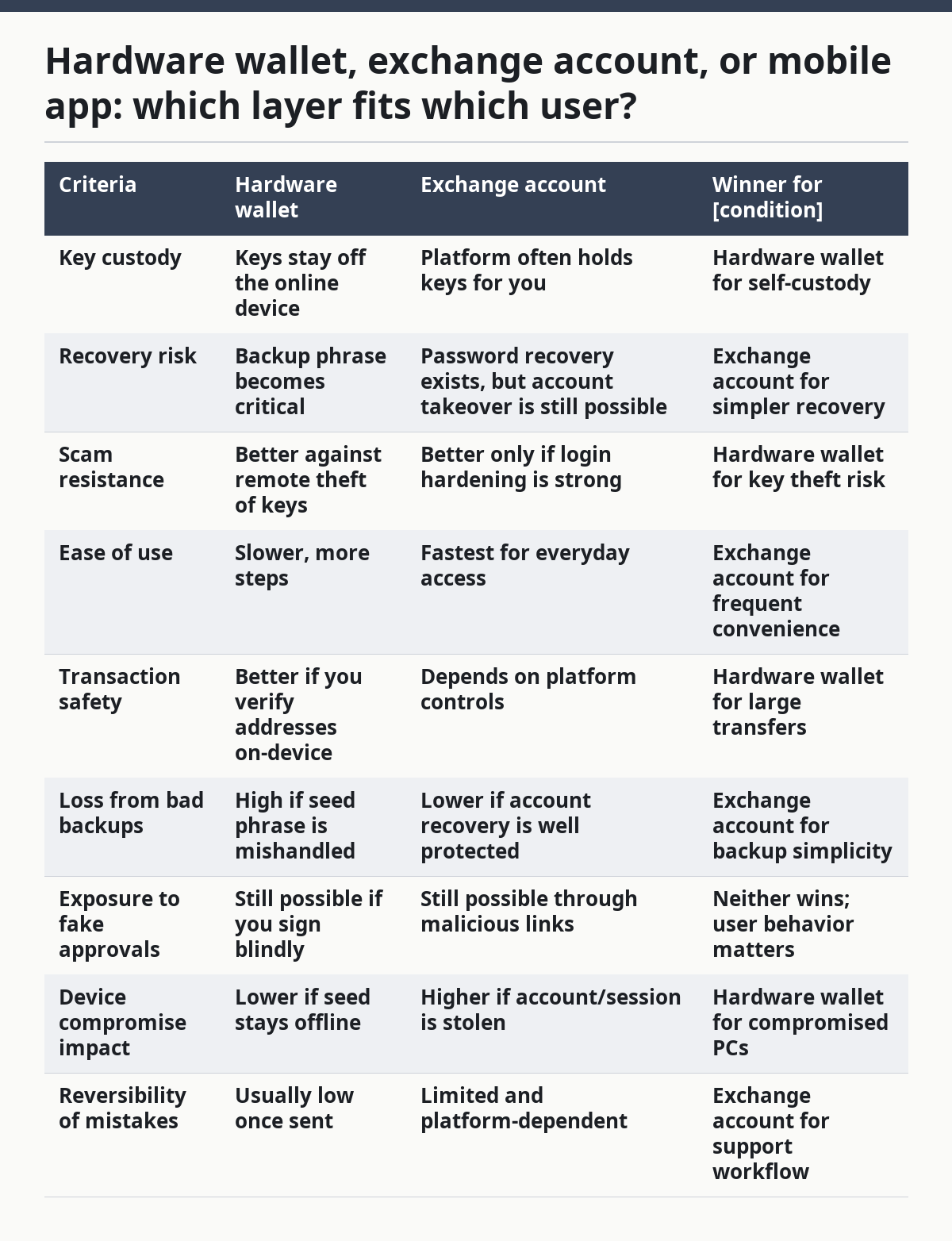
The hardware wallet is strongest when the main fear is theft of keys from a compromised computer or phishing page. It is weaker when the main fear is the user losing the backup phrase, making a poor passphrase choice, or confusing addresses across networks. A platform account can be easier to recover if you forget a password, but that convenience comes with custodial dependence and the risk that an attacker targets your email, SIM, or support channel instead.
A generic article often says one option is “best” and leaves it there. That is wrong for the person who is still learning. If you only hold a small amount or you need a simple workflow, a platform account may reduce self-inflicted mistakes. If you hold more than you can comfortably lose and can manage offline backups, a hardware wallet reduces the blast radius of phishing and device compromise.
Both options still fail if you click the wrong link or approve the wrong signature. No storage choice fixes bad verification habits.
How do you actually prevent scams without making crypto unusable?
You prevent scams by making a few checks non-negotiable and keeping the rest of the workflow simple. Security that is too complicated gets skipped. The goal is not paranoia; it is friction in the right places. After you pick the right custody model, the next step is a repeatable process.
Start with a short routine:
- Open the official app or type the official URL yourself.
- Confirm the domain or app publisher before logging in.
- Use a second factor that is not SMS if the service supports it.
- Check the destination address on the signing device or in a separate trusted source.
- Send a tiny test transfer if the amount is meaningful and the network is unfamiliar.
- Pause before every signature request and read what the approval actually does.
A test transfer is not a magic shield, but it can reduce the damage of a wrong network or typo. The drawback is obvious: it adds time and sometimes an extra network fee. For people moving value across chains, that cost is often worth paying. For tiny amounts, the extra step may not be worth the hassle. That is the trade-off, and it is why the same routine does not fit every user.
Some prevention habits are less glamorous but matter just as much:
- Use unique passwords for exchange and email accounts.
- Store recovery codes offline, not in the same place as the phrase.
- Keep software updated through official channels.
- Separate your long-term storage from everyday spending.
- Treat browser extensions as part of your attack surface.
- Review token approvals periodically where the chain and app make that possible.
This is also where people need to be honest about their own habits. If you know you click quickly, do not rely on “being careful next time.” Build a slower flow. If you manage assets for family or a small business, document the process so one person’s memory is not the only control. For organizations, that documentation belongs in the same category as a backup plan, not as an optional note.
The point is not to make crypto impossible to use. The point is to make common scam paths expensive for the attacker and annoying for you. That balance is what keeps the system usable.
What should you do after a suspected compromise?
If you suspect compromise, move first on containment, then on recovery. Do not spend the first hour investigating every possibility while the attacker still has access. A fast, orderly response usually beats a perfect one that starts too late.
The first steps are practical:
- Disconnect the affected device from the internet if you think malware or remote access is involved.
- Change passwords from a clean device, starting with email and then financial accounts.
- Revoke active sessions where the service supports it.
- Move remaining assets only after you understand what keys or approvals may already be exposed.
- Check for unexpected token approvals or suspicious connected apps where the chain and wallet interface allow it.
If a seed phrase or private key is exposed, the assumption should be that the corresponding assets are no longer safe on that key. That is why a compromised key is such a serious event. It is not like a stolen card number that can be replaced with a new card and the same account. In self-custody, the attacker can move assets directly if they control the signing authority.
If an exchange account is the problem, the platform’s recovery flow becomes important. That can include identity checks, account holds, support tickets, and device reauthentication. The drawback is that recovery can be slow, and policies vary by country and platform. If you face a real incident, contact the platform through its official support channel and consider local consumer-protection or cybercrime reporting channels such as Action Fraud in the UK or the FTC’s fraud reporting pathways in the U.S. If the loss is large, consult a qualified lawyer or forensic specialist as well.
Do not let embarrassment delay the report. Delays help the attacker more than they help you.
When do the usual rules flip?
The usual rules flip in a few specific situations, and ignoring those exceptions causes real mistakes. The broad advice still holds, but the priority changes.
1. You are moving funds on a deadline.
A rushed transfer is more dangerous than a slightly inefficient one. If a market event, settlement window, or bill payment creates time pressure, slow down long enough to verify the address and network. A 10-minute delay can save a full loss.
2. You are helping a family member or a client.
Shared access changes the risk. If more than one person can log in, write down who controls email, who controls the device, and who controls recovery codes. Shared setups often fail because nobody owns the process.
3. You are dealing with a chain, app, or bridge you do not know well.
New networks and bridges increase the chance of sending to the wrong format, the wrong chain, or the wrong contract. If you cannot explain the destination in plain terms, stop and verify the workflow from official documentation before you proceed.
4. You think “small amount means low risk.”
Small transfers are where people get careless, and scammers know that. A tiny loss can still reveal credentials, approvals, or habits that lead to larger losses later.
The overall verdict changes only when the operational risk changes. If you are a high-volume user, your process has to be tighter. If you are a beginner, simplicity matters more than sophisticated features you may not understand yet. If you are under pressure, slow down; if you are confused, stop.
The honest verdict: what choice makes sense here?
Choose a hardware wallet if you want stronger protection against phishing, device compromise, and remote key theft, and you can handle offline backup discipline. Choose an exchange account if you need simplicity, expect to make frequent moves, or are still at the stage where a complicated self-custody setup would create more risk than it removes. Neither is right if you cannot protect your email, ignore urgent messages, or keep a recovery phrase offline and private.
That is the cleanest answer. Security is not a product badge. It is a set of habits plus the right custody model for your tolerance for mistakes.
The common mistake is to chase “maximum security” while ignoring your own behavior. A difficult setup that you handle badly can be less safe than a simpler one you use consistently. The common opposite mistake is to choose convenience and then trust every link, popup, and direct message that reaches you. Both paths end the same way: with a bad signature, a stolen login, or a transfer to the wrong place.
Which scams catch people most often?
Phishing, fake support, fake investment opportunities, and wallet-draining approvals catch people most often because they use urgency and familiar branding. The scam rarely looks like a scam at first glance.
Fake support is especially effective because it exploits trust in help channels. Someone pretends to be an official agent, asks for a “verification” step, and then pushes the victim toward a seed phrase or a malicious download. Fake investment schemes work differently: they flatter the victim, promise easy outcomes, and create the feeling that missing out is more expensive than checking carefully. That is how people ignore obvious warning signs. Chainalysis has repeatedly documented that scams and social-engineering schemes remain a major source of crypto crime losses.
A useful rule is to distrust any offer that combines all three of these:
- urgency,
- secrecy,
- and unusually simple profit or rescue language.
If the pitch says you can recover lost funds, multiply returns quickly, or fix an account by sharing secret data, the default answer should be no.
What does a strong crypto security routine look like?
A strong routine is short enough to repeat and strict enough to matter. It usually includes a separate email account, app-based 2FA or a hardware security key, offline backup of the recovery phrase, verified app downloads, and a habit of checking every address before sending.
The routine should also include a rule for abnormal moments. If you are tired, distracted, or receiving an urgent request, do not complete the transfer immediately. If the transfer is large, use a test amount first and wait for confirmation on the right chain. If the request comes from chat or email, switch to an official channel before taking action.
A good routine is not fancy. It is boring, written down, and repeatable. That is what makes it work, and that is why it scales from a single wallet to a full personal or business setup.
FAQ
Can a wallet be hacked if I never give out my recovery phrase?
Yes. A recovery phrase is only one attack surface. You can still lose funds through a bad signature, a fake site, malware on your device, or a compromised exchange account tied to the same email and phone number. The safer habit is to verify every approval and keep your login channels hard to hijack.
Is SMS two-factor authentication enough?
No, SMS alone is weaker than app-based authentication or a hardware security key because phone-number takeover and SIM-swap style attacks can defeat it. If a service offers a stronger second factor, use it. If it does not, compensate by hardening your email, device, and password hygiene.
Should I keep crypto on an exchange or move it off?
It depends on how much control, convenience, and recovery support you need, and on how disciplined you are with backups. Exchange custody can be simpler, but you rely on the platform’s security and support processes. Self-custody gives more control, but mistakes with backups and signatures become your responsibility.
What is the single biggest scam warning sign?
Urgency is the biggest warning sign. If a message says you must act now, keep it secret, or verify something through an unexpected link, stop and verify through a channel you opened yourself. Real services can be urgent, but scammers use urgency because it short-circuits judgment.
What should I do if I already signed something suspicious?
Act quickly on containment. Revoke sessions where possible, move remaining assets only after you understand what was approved, and secure your email and phone number from a clean device. If a seed phrase or private key may be exposed, treat that key as compromised and seek help through the service’s official support and, if needed, local fraud-reporting channels.
Drafted with AI; not yet reviewed by a person.