Last updated: November 19, 2026
Quick Answer: In Exchange account actions and trading workflows — The Complete Guide, the safest practical sequence is usually 7 steps: verify, fund, confirm wallet, choose market, select order type, review, and submit. Exchange account actions are the steps that change your account state—deposit, withdraw, verify, set security, place orders, cancel orders, transfer assets, and fix mistakes—and the trading workflow is the order you do them in so you don’t create avoidable errors. The right workflow is the one that matches your exchange’s rules, your order type, and your risk controls. The steps below will settle what to do first, what to double-check, and where beginners usually trip.
I write on crypto and brokerage operations, so I care about the part people skip: account status, permissions, and order handling in Exchange account actions and trading workflows — The Complete Guide. This is information, not financial advice; your own tax, legal, and investing questions deserve a qualified adviser, and you should consult the exchange’s rules and a professional adviser when the action affects money, taxes, or legal status.
Key Takeaways
- Account actions are not the same as trades. Verification, deposits, withdrawals, and security settings can block a trade before it starts.
- A clean workflow starts with account status, then funding, then market checks, then order entry, then review.
- The order ticket matters. Market, limit, stop, and stop-limit orders behave differently, and that difference changes execution.
- Many mistakes come from timing, not strategy: wrong market, wrong side, wrong quantity, or forgetting open orders.
- Rules differ by country and exchange, so limits, identity checks, and transfer steps can change without warning.
- If your exchange offers subaccounts, API keys, or separate spot and derivatives wallets, each one needs its own checklist.
What “exchange account actions” really means
Exchange account actions are the controls that change what your account can do, not just what you can trade. Picture this: you’re signed in and ready to place an order, but your withdrawal address is unapproved, your identity check is still pending, or your trading pair sits in the wrong wallet. The account blocks the workflow before the order even reaches the market.
That’s why the sequence matters. Verification, deposits, withdrawals, security, and permissions can all affect whether a trade goes through, settles, or gets stuck. Some exchanges also split balances by account type—spot, margin, futures, funding, or custodial subaccounts—which means moving money is part of the trade path, not an afterthought.
A beginner usually thinks in one lane: buy, sell, done. The platform rarely works that way. The exchange may require identity checks for higher limits, extra confirmation for withdrawals, travel-rule data in some regions, or device approval for logins and API use. In the U.S., for example, broker-dealer and exchange workflows are not the same as on a crypto venue, and local rules differ by country. Check the exchange’s own help pages and your regulator’s site for the exact process that applies to your account.
Two sources worth keeping open while you learn are the U.S. Securities and Exchange Commission and FINRA, both of which explain order handling and account protections in plain language. The exact rules on your platform can differ, but the workflow pattern is the same: authenticate first, fund correctly, trade with the right order type, then confirm the result. For additional guidance, see the SEC’s order-type glossary and FINRA’s trade-confirmation resources in the sources below.
Which account actions matter before you place a trade?
The actions that matter most are the ones that change permission, balance, or settlement. Picture this: you want to buy something quickly, but your cash isn’t in the right wallet, your two-factor app is off, or your withdrawal whitelist is still waiting for approval. The trade may still be possible later, but not now.
The most common pre-trade actions are below:
- Identity verification: may raise limits or open withdrawals.
- Security setup: password, two-factor authentication, passkeys, device approvals, anti-phishing codes.
- Funding: bank transfer, card deposit, stablecoin transfer, or internal wallet move.
- Balance allocation: moving assets between spot, margin, derivatives, or funding wallets.
- Order permissions: enabling margin, futures, or options access if the venue offers them.
- Address management: withdrawal whitelists, address books, network selection, and memo/tag fields.
- Risk settings: leverage caps, liquidation alerts, max order size, or trading restrictions.
The truth is, these are not side tasks. On a busy platform, each one can be the difference between a completed order and a failed attempt. A bank transfer can take hours or longer. A blockchain transfer can be fast or slow depending on the network and the exchange’s required confirmations. A withdrawal can be delayed by a compliance review or a security hold.
One practical rule helps: never treat funding and trading as the same step; first confirm the wallet, then place the order, and if the platform or situation is unclear, consult the exchange’s help pages or a qualified professional before moving funds. If you skip the check, you may end up with assets in the wrong wallet or a trade that can’t settle the way you expected.
How does the trading workflow usually work on an exchange?
The trading workflow usually runs in a fixed order: sign in, confirm account status, fund the right wallet, choose the market, pick an order type, review size and price, then submit and monitor. Picture this: you’re staring at a pair page and the chart is moving, but the real task is not the chart. It’s the sequence that keeps you from hitting the wrong button in the wrong account.
A clean workflow looks like this:
-
Check account status
Make sure your account is verified enough for the action you want. Some venues block withdrawals, derivatives, or large orders until checks are complete. -
Confirm balances and wallet location
A balance in a funding wallet may need an internal transfer before spot trading. A spot balance may need to be moved before margin use. -
Choose the market
Pick the correct pair, contract, or instrument. BTC/USD, BTC/USDT, and BTC futures are not the same thing. -
Select the order type
Market, limit, stop, and stop-limit each behave differently. The order type is not a cosmetic choice; it changes how the exchange matches your order. -
Set quantity and limit price
Double-check decimals, base currency, quote currency, and whether fees are deducted from the asset or the quote balance. -
Review before submitting
Look at side, size, price, fee estimate, and any advanced conditions. -
Track open orders and fills
A filled order closes fast. A partially filled order or open stop can sit in the book and surprise you later. -
Close the loop
Confirm the position, transfer proceeds if needed, then record the trade for tax and reconciliation purposes.
Every step above exists because exchanges process intent, not assumptions. A limit order can rest without filling. A stop order can trigger but not guarantee a fill at the stop price. A market order can execute quickly but may do so at a worse price than you expected if the book is thin. FINRA’s investor materials and exchange education pages both stress that order type affects execution. That’s not theory. That’s the workflow.
Order types change the workflow more than most people expect
Order types change the workflow because they decide when and how your order meets the market. Picture this: you know what you want to trade, but not how you want the platform to execute it. That choice changes the path from button-click to fill, and it changes the mistakes you need to avoid.
Here’s the practical version:
- Market order: asks the exchange to fill now at the best available prices.
- Limit order: sets the worst price you’ll accept.
- Stop order: activates when a trigger price is reached.
- Stop-limit order: triggers at one price and posts a limit order at another.
- Good-til-canceled or day order: determines how long the order stays active, depending on the exchange.
The consequences are real. A market order can move through the book quickly, but in a thin market it may fill at multiple prices. A limit order gives you price control, but it may never fill. A stop-limit order protects against chasing too far, but it can fail to fill in a fast move if the market jumps past your limit. That is the trade-off. No order type is magic.
A lot of beginners confuse trigger price with fill price. They are not the same. A stop order can activate at the trigger and still execute at a different price. On volatile assets, that gap can be wide. If the exchange offers only basic order tickets, you may need to use them more carefully than you would on a more advanced venue.
One good habit helps across all order types: read the order preview line by line. If the exchange shows estimated fees, post-only flags, time-in-force, or reduce-only settings, check those details carefully and consult the exchange’s help page or a qualified professional if you are unsure how they apply. That one minute can save a bad fill or an accidental position increase.
The honest side-by-side: spot trading vs margin or derivatives
Spot trading wins for simplicity; margin or derivatives win for flexibility, but they add more ways to get the workflow wrong. Picture this: you want exposure to a price move, but one path uses cash you already have and the other path layers in borrowed funds, contracts, or liquidation risk. The workflow changes fast.
| Criteria | Spot Trading | Margin / Derivatives | Winner for [condition] |
|---|---|---|---|
| Account setup | Usually simpler; often fewer permissions. | Often needs extra approval, risk checks, or wallet setup. | Spot, if you want the shortest setup path. |
| Balance management | Usually one main wallet or a small number of transfer steps. | Often requires moving funds between wallets or margin modes. | Spot, if you want fewer internal transfers. |
| Order risk | No borrowed exposure by default. | Liquidation and leverage settings can change the outcome fast. | Spot, if you want a simpler risk picture. |
| Execution complexity | Basic order types are usually enough for many users. | Needs more checks: leverage, funding rates, reduce-only, and collateral. | Spot, for straightforward buy/sell workflows. |
| Monitoring needs | Watch fills, but the position logic is simpler. | Must watch margin, liquidation levels, and contract settings. | Spot, if you want less monitoring burden. |
| Transfer timing | Often easier to keep funds in place for the trade. | Transfers may be required before opening or closing a position. | Spot, if speed through the interface matters. |
| Account permissions | Usually fewer toggles and fewer gated features. | Commonly gated by region, KYC status, and risk disclosures. | Spot, if you want fewer permission gates. |
| Who it fits | Readers who want a plain trade-and-hold workflow. | Readers who understand extra controls and the consequences. | Depends on experience and tolerance for workflow complexity. |
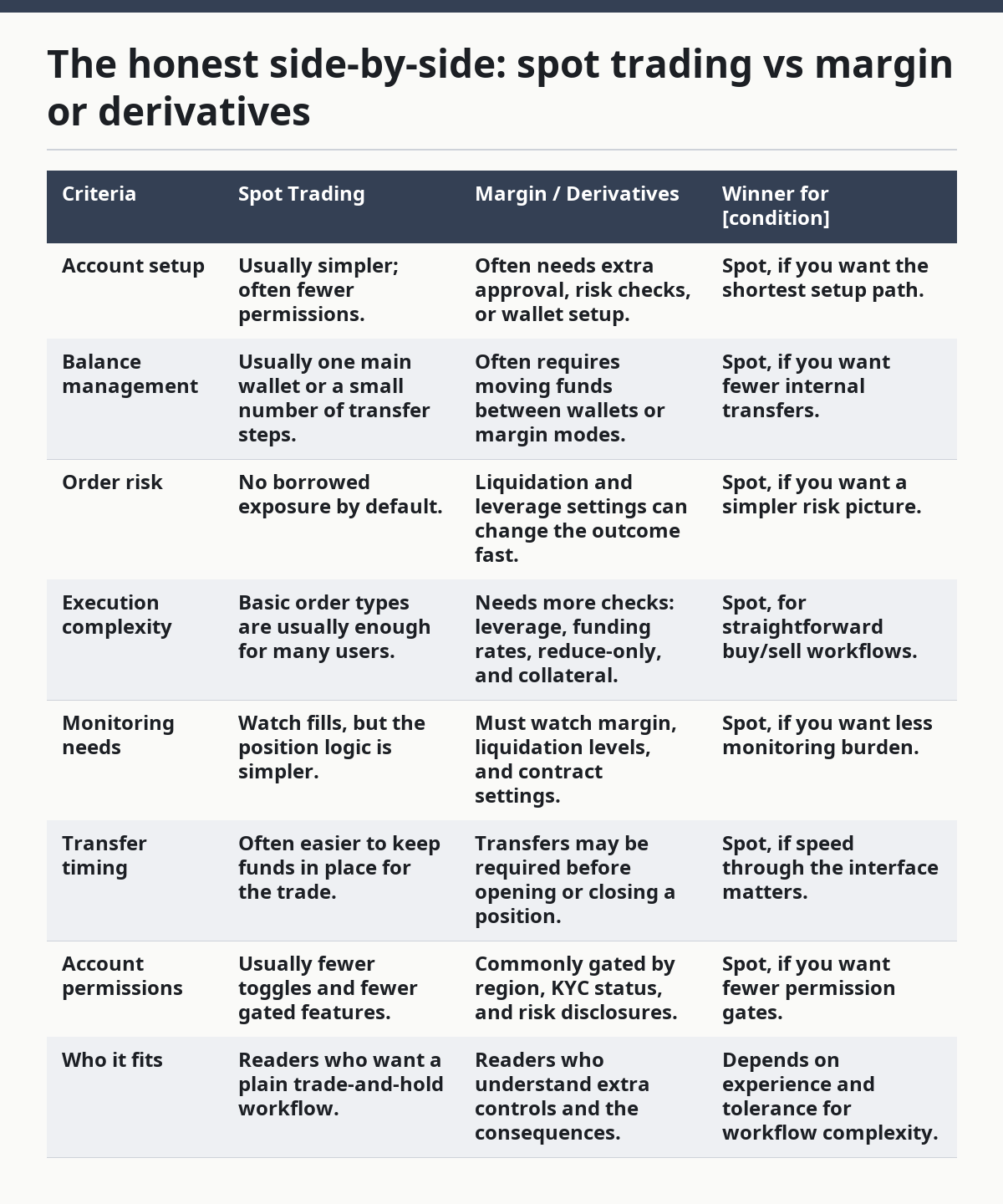
Spot trading wins here because the workflow is easier to keep straight. You can still make mistakes, but there are fewer moving parts. Margin and derivatives are not “better”; they are simply different tools with different controls, and the controls matter as much as the trade idea itself.
The catch is that easy does not mean incomplete. Spot still needs good order discipline, wallet checks, and withdrawal care. Margin and derivatives need all of that plus collateral checks, contract rules, and liquidation awareness. If the reader wants one clear path into exchange workflows, spot is the cleaner starting point.
How do deposits, withdrawals, and transfers fit into the workflow?
Deposits, withdrawals, and internal transfers sit between account actions and trading, and they can slow or break the workflow if you miss the platform’s rules. Picture this: you send funds to the right exchange but the wrong network, or you leave assets in the wrong wallet and wonder why the trade screen says insufficient balance. The trade isn’t the problem. The movement path is.
The main questions are:
-
Where does the asset need to land?
Some exchanges separate deposit wallets, spot wallets, funding wallets, and contract wallets. -
Which network is required?
On crypto venues, the network matters. A token on one chain is not the same operationally as the same token on another chain. -
Is there a memo or tag field?
Some assets need one. Missing it can delay or complicate crediting. -
Are there holding periods or review steps?
Bank deposits, card deposits, and first-time withdrawals may face extra checks. -
Is the transfer internal or external?
Internal moves inside the same exchange are usually different from blockchain withdrawals to an outside address.
This is where many people lose time. They focus on market timing and ignore movement timing. An exchange can let you trade only after funds settle, or it can show a balance in one wallet that is not ready for another action. Read the deposit note, network note, and confirmation note every single time. The same asset name can hide different operational steps.
A solid workflow treats movement as a separate checklist. Confirm asset, network, address, memo, and wallet destination before you commit. If the exchange offers a withdrawal whitelist or address book, use it. If it offers a hold or delay before changing withdrawal settings, respect it. That delay is there to reduce account takeover damage, and it can save you from one bad click.
What mistakes break exchange workflows the fastest?
The fastest workflow breaks come from wrong account state, wrong market, wrong wallet, or wrong order type. Picture this: you’ve done most of the steps right, but one field is off by a click or one wallet is empty. Small errors cause outsized problems because exchanges execute exactly what the form says, not what you meant.
The most common mistakes are:
-
Trading before verification is complete
Some actions stay locked until identity or risk checks finish. -
Using the wrong wallet
Spot funds, futures collateral, and funding balances are not always interchangeable. -
Entering the wrong pair or contract
Similar tickers can point to different markets. -
Confusing amount with quote value
Buying “10” of the base asset is not the same as spending “10” units of the quote currency. -
Skipping order preview
One wrong decimal can turn a small trade into a large one. -
Leaving stale open orders in place
An old limit or stop can fill later and change your position unexpectedly. -
Ignoring fees and funding effects
The trade result may differ from the ticket because fees, spreads, or funding rules apply. -
Using the wrong chain for a transfer
Crypto transfers are unforgiving when the network doesn’t match.
The best protection is a boring routine. Check account status, check wallet, check pair, check order type, check quantity, check preview. Then submit. That sequence is not fancy, but it prevents the kind of errors that cost time and money.
When does the workflow change because the exchange itself is different?
The workflow changes when the exchange changes the account structure, the order controls, or the compliance steps. Picture this: one venue uses a simple buy/sell screen, another splits everything across spot, margin, and earn accounts, and a third asks for more identity steps before you can move funds. Same idea, different path.
A workflow can change because of:
- Platform design: Some exchanges keep the trade screen minimal; others bury important controls behind tabs.
- Region: Verification, access, and available products differ by country.
- Asset type: Stablecoins, securities-like products, derivatives, and tokenized assets can each have different rules.
- Settlement model: Some products settle instantly in the platform ledger; others depend on blockchain confirmations or contract settlement.
- Account tier: Lower tiers may have smaller limits or fewer features than higher tiers.
The truth is, a generic tutorial only gets you halfway. The rest depends on the venue’s own account model. A centralized exchange can let you move funds internally in seconds, while an on-chain venue may require external wallet steps that are much more manual. A broker with exchange access can route orders differently from a pure crypto venue. The names change; the workflow principle does not.
This is also why platform help centers matter. The exchange’s support pages, terms, and fee schedules explain the exact workflow the platform wants you to follow. For account handling, the SEC and FINRA are useful references in the U.S., and your local regulator or standards body may have similar resources elsewhere. Those sources won’t tell you the button sequence for every platform, but they will tell you what the process is supposed to protect.
The verdict: which workflow is better for beginners?
Choose spot trading if you want the simplest account-and-order workflow and you do not need borrowed exposure. Choose margin or derivatives if you already understand wallet moves, order types, and the extra risk controls that come with them. Neither if you have not finished verification, do not understand where your funds sit, or cannot explain the order type you’re about to place.
That is the clean call. Spot is the better learning path because it keeps the number of moving parts lower. Margin and derivatives are not a shortcut; they are a more complex workflow with more failure points. If your goal is to learn exchange account actions, start with the path that makes the fewest assumptions.
What should you check before every order?
You should check account status, wallet location, order type, quantity, and the preview screen before every order. Picture this: the market is moving, your cursor is already over the button, and the safest move is still one more scan of the ticket. That pause is not hesitation. It’s control.
Use this last-minute checklist:
- Is the account fully enabled for this action?
- Is the balance in the correct wallet?
- Is the market or contract the one you meant to use?
- Is the order type correct for how fast you want to trade?
- Is the quantity entered in the right unit?
- Does the preview show the price, side, and fee you expect?
- Are there open orders that could conflict with this trade?
- Will the next step be a transfer, withdrawal, or tax record entry?
A workflow that survives contact with the exchange is one you can repeat. The more often you trade, the more valuable that repetition becomes. Not because the market gets easier, but because the process gets cleaner.
FAQ
Do I need identity verification before trading on an exchange?
You often do, but the exact threshold depends on the exchange and your country. Some venues allow limited activity before full verification, while others lock most actions until checks are complete. If you plan to deposit, withdraw, or use advanced order types, read the platform’s rules first.
Why can’t I see my funds in the trading screen?
Your funds may be in the wrong wallet, still settling, or tied to a deposit that has not cleared. Many exchanges separate funding, spot, margin, and derivatives balances, so the trading screen only sees the wallet that applies to that product. Check the internal transfer page before assuming the deposit failed.
What’s the safest order type for a beginner?
There isn’t a universal “safe” order type, because each one solves a different problem and carries a different trade-off. A market order fills fast but can move through the book at different prices; a limit order gives price control but may not fill at all. Choose the order that matches your purpose, then read the preview carefully.
Why did my withdrawal get delayed?
Withdrawals can be delayed by identity checks, security holds, network congestion, memo errors, or exchange compliance review. Some platforms also use whitelists or waiting periods after you change security settings. If the transfer is on a blockchain, the network itself can add delay.
Do all exchanges use the same workflow?
No, and that is where beginners get caught. The broad sequence is similar—verify, fund, trade, settle—but the exact screens, wallet names, and permissions vary by platform and country. Read the exchange’s own help pages before you move money or place a first order.
Sources and further reading
- U.S. Securities and Exchange Commission — Investor Bulletin: Understanding Order Types: https://www.investor.gov/introduction-investing/investing-basics/glossary/order-types
- FINRA — Understanding Brokerage Account Statements and Trade Confirmations: https://www.finra.org/investors/insights/brokerage-account-statements-trade-confirmations
- FINRA — Limit Orders: https://www.finra.org/investors/insights/limit-orders
Drafted with AI; not yet reviewed by a person.