Last updated: November 20, 2026
On-chain transaction troubleshooting and confirmations
Quick answer: In most cases, give an on-chain transaction 1 to 3 confirmations before you treat it as settled, but follow the receiving service’s published policy and consult a professional for high-value transfers or unclear wallet behavior. In On-chain transaction troubleshooting and confirmations — The Complete Guide, the first move is still to check the hash, fee, and status in a block explorer, then decide whether to wait, replace, or restart. For background, see Ethereum.org’s transaction guide and Bitcoin Core’s transaction documentation.
An on-chain transaction is confirmed when the network includes it in a block, and the main fix for a stuck payment is usually to check whether the fee was too low, the nonce or input was wrong, or the chain is still waiting on more confirmations. If the transaction is still unconfirmed, the right move is not to guess; it is to inspect the hash on a block explorer, compare the fee and status against the chain’s current conditions, and then decide whether to wait, replace, or restart. For related troubleshooting, see What does “confirmed” actually mean? and How do I troubleshoot a stuck on-chain transaction?
Key takeaways
- A transaction hash tells you where to look, but the block explorer tells you whether the network has seen it, mined it, or dropped it.
- One confirmation is not the same as final settlement; some systems want several confirmations before they treat funds as usable, so check the receiving service’s policy and, if the amount is large, consult a professional.
- Low fees, wrong nonces, and chain congestion are the most common reasons a transaction sits pending.
- A stuck transaction is not always broken, but it is not safe to assume it will resolve on its own. Sometimes it is only waiting for the next block, which can take about 12 seconds on Ethereum or about 10 minutes on Bitcoin.
- The best fix often depends on the wallet and the chain. A replace-by-fee style resend works in some cases, but not all.
What does “confirmed” actually mean?
A transaction is confirmed when a miner or validator includes it in a block, and each new block that follows makes that confirmation stronger. On Bitcoin, a common rule of thumb is to wait for several confirmations before treating a payment as settled, but you should follow the receiving service’s published policy and consult a professional for high-value transfers; on Ethereum, the network also measures confirmations by blocks, but wallet and app policies can differ. For reference, see Bitcoin.org and Ethereum.org’s block documentation.
That simple definition hides the part that confuses most beginners: “confirmed” is not a single switch. A transaction can be pending, included in one block, and still considered risky by the app that received it. Some services wait for 3, 6, or more confirmations before they release funds, while others act after the first block appears. The chain does not change the meaning of that policy for you.
Next, a block explorer is usually the quickest practical way to check the real state. Enter the transaction hash, and look for the status line, the block number, the time, and the confirmation count. If the hash is missing, the wallet may not have broadcast the transaction yet, or the network may have dropped it before inclusion.
The standards and docs that matter here are the chain rules, not a wallet’s marketing page. Ethereum documents its transaction flow in the Ethereum.org developer guide, and Bitcoin Core documents transaction replacement behavior through replace-by-fee and mempool rules. Those are the references that explain why two wallets can show the same transaction in different ways.
Why is my transaction still pending?

A transaction is still pending because the network has not yet put it in a block, and the usual reason is that the fee is not competitive enough for current congestion. On Ethereum, post-EIP-1559 fee fields matter, and on Bitcoin, fee rate and mempool pressure matter more than the raw amount sent.
Specifically, the most common trouble spots are easy to separate. A low fee can leave the transaction sitting in the mempool while other, higher-fee transactions go first. A wrong nonce can block later Ethereum transactions behind it because the chain expects them in order. A wallet can also show “pending” after it has broadcast the transaction, even though the network has not accepted it yet.
Therefore, the first check is often the hash. If the explorer shows the transaction in the mempool, the chain has seen it but not mined it. If the explorer shows nothing, the wallet may not have sent it, or it may have failed before broadcast. If the explorer shows “dropped,” the mempool likely evicted it because it was too cheap relative to current demand.
The timing matters too. Bitcoin targets roughly 10 minutes per block, so a short wait is normal. Ethereum targets roughly 12 seconds per block, but real-world waits can stretch much longer when fees are low or traffic spikes. A beginner often treats “not confirmed yet” as a failure when it is only a queue problem.
How do I troubleshoot a stuck on-chain transaction?
A stuck on-chain transaction is usually fixed by checking the hash, confirming the fee setup, and deciding whether the wallet supports replacement or cancellation. Start with the explorer, not with a second send, because sending more funds before you know the status can create a second problem.
Use this order:
- Find the transaction hash. If the wallet shows one, copy it into a block explorer for the correct chain.
- Check the status. Look for pending, confirmed, failed, replaced, or dropped.
- Check the fee details. On Ethereum, look for the max fee and priority fee under EIP-1559. On Bitcoin, look at the fee rate, not just the total fee.
- Check the nonce if you are on Ethereum. A lower nonce transaction that is still pending can block later ones.
- Check whether the wallet allows speed-up, cancel, or replace. Some wallets expose these actions; others do not.
Because the explorer says what the chain has seen, the best fix often depends on that status. If the transaction is pending and the chain supports replacement in the wallet, a higher-fee resend can work. If it is already confirmed, you do not need to “fix” it. If it failed, the state change did not go through, and the real task is to figure out whether the failure was caused by gas, contract logic, or a wrong destination.
A generic guide often skips one needed point: a failed transaction can still cost fees. On Ethereum, a transaction that reverts still consumes gas used before the revert, which is why “failed” does not mean “free.” That detail matters when you are deciding whether to try again with the same contract call.
Should I wait, speed it up, or cancel it?
You should wait if the fee is only slightly low, speed it up if the wallet and chain support replacement, and cancel it only when you know the wallet’s nonce handling, because a bad cancel attempt can leave you with the same problem and one more fee. That is the decision tree that fits most cases.
Here is the practical comparison:
| Criteria | Wait | Speed up / replace | Cancel | Winner for which condition |
|---|---|---|---|---|
| Best use case | The transaction is pending but the fee is still near current levels | The wallet supports replacement and the tx is stuck behind competing traffic | The transaction is still pending and the wallet lets you replace the nonce | Wait when the fee gap is small |
| Speed of result | Depends on the next block | Usually faster if the new fee is high enough | Fast if the replacement is accepted | Speed up when time matters |
| Risk of making things worse | Low | Medium, because a bad replacement can still stay stuck | Medium, because a cancel is still a transaction | Wait when you can tolerate delay |
| Wallet support needed | None beyond viewing status | Yes, and not all wallets support it | Yes, and nonce control must work | Wait when support is limited |
| Works after confirmation | No | No, because confirmed transactions are already settled | No | None; confirmed means stop |
| Good for Ethereum nonce issues | Only if nothing later is blocked | Yes, often the cleanest fix | Yes, if the wallet supports it | Replace for nonce blockage |
| Good for Bitcoin mempool congestion | Sometimes | Yes, if RBF is available | Sometimes, if the wallet supports the replacement path | Replace when RBF exists |
| Main drawback | Time can keep stretching | Extra fee can be higher than expected | Can confuse the next step if done wrong | Wait if the amount is small |
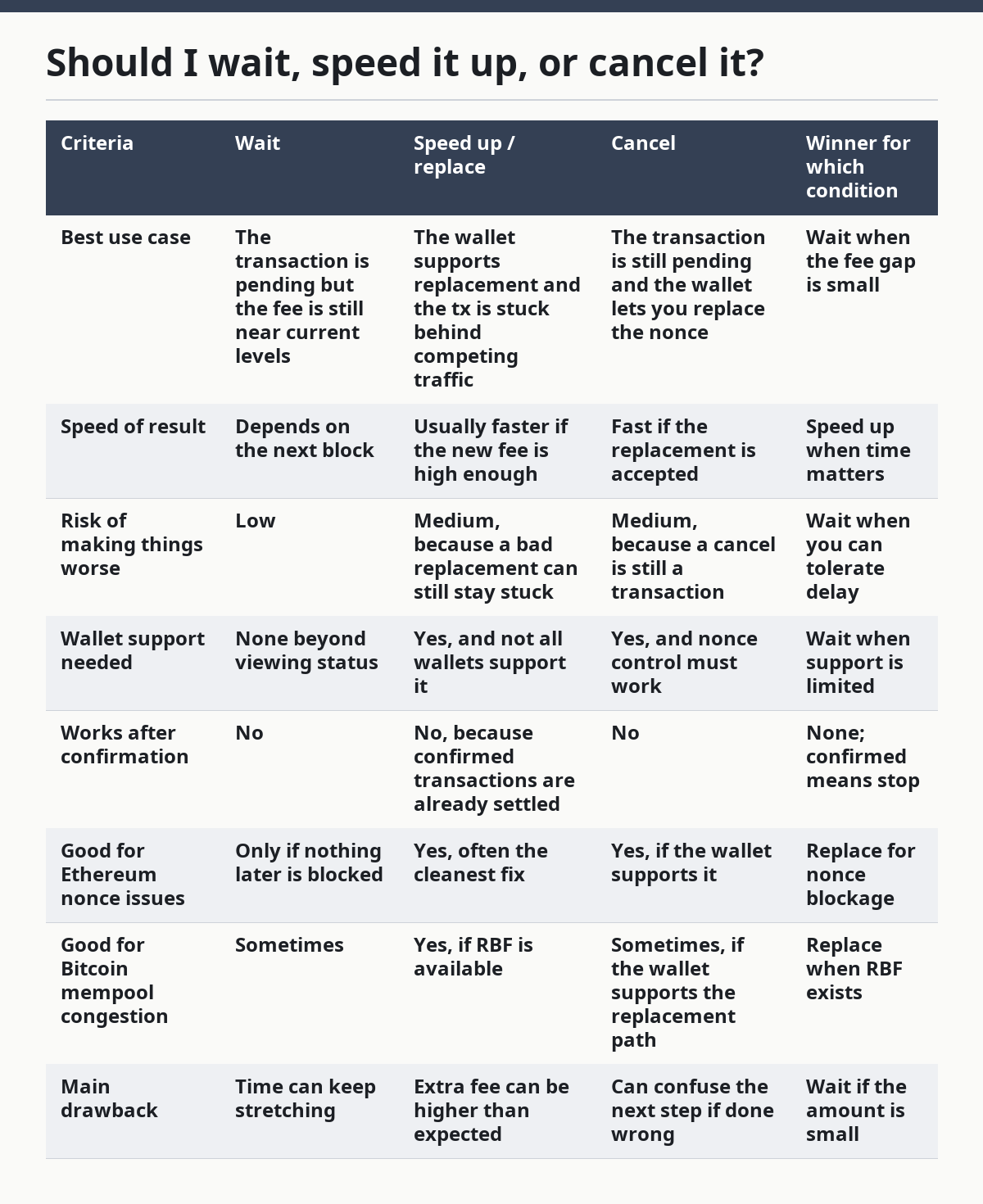
So the cleanest recommendation is this: wait when the transaction is close to normal network conditions and the amount is not urgent. Use replacement when the fee is clearly out of step with current congestion, because the stuck transaction will not fix itself by willpower. Cancel only when you know the wallet’s nonce logic, because a bad cancel attempt can leave you with the same problem and one more fee.
Bitcoin users should care about replace-by-fee support, which Bitcoin Core documents. Ethereum users should care about nonce order and the EIP-1559 fee fields, which matter more than the old-style single gas price. These are not cosmetic differences; they determine whether a resend can override the old transaction.
What if the transaction says failed?
A failed transaction means the chain processed it far enough to know it did not complete, and that is different from a transaction that never got mined at all. The fix is not “wait longer”; the fix is to find out why the execution failed.
On Ethereum, a transaction can fail because the contract call reverted, the gas limit was too low, the destination contract rejected the call, or the account balance could not cover both the value and the fee. On Bitcoin, a transaction more often fails before inclusion because it is invalid, not signed correctly, or not accepted by the mempool. In both cases, the failure path is different from the pending path.
The explorer usually gives the clue. If it shows “reverted,” the call reached the contract and then stopped. If it shows “out of gas,” the gas limit was not enough for execution. If it shows “replaced,” a newer transaction with the same nonce took its place. Those labels matter because they tell you whether the problem is fee, logic, or order.
This is the point where many beginner guides go wrong: they treat “failed” as a single category. It is not. A reverted token transfer, a nonce collision, and a rejected mempool entry need different remedies. If you send the same call again without reading the failure label, you may repeat the same error and pay for it twice.
The safest next move is to read the exact failure status in the explorer and match it to the wallet’s transaction log. That sounds basic, but it is the difference between a fix and another guess.
Which chain rules change the fix?
The chain rules change the fix because Bitcoin and Ethereum do not treat pending transactions the same way, and not every wallet exposes the same controls. The fee model, the mempool policy, and the confirmation habit all affect what you can do next.
Bitcoin
Bitcoin is the easier case for finality logic and the harder case for fee timing. The block interval is about 10 minutes, so a pending transaction can sit longer without being unusual. If the wallet supports replace-by-fee, a higher-fee replacement can move the transaction into the next block more quickly.
Ethereum
Ethereum is the easier case for faster block inclusion and the harder case for nonce management. The network targets roughly 12-second blocks, but the wallet must keep the nonce sequence clean or later transactions can stall. EIP-1559 fee fields also mean that the old habit of looking only at one gas price is not enough.
Confirmation policy in apps
Apps and exchanges set their own confirmation thresholds. One service may treat a deposit as usable after one confirmation, while another may wait for several. That policy is not a chain error; it is the service’s risk rule.
Here is the short version: if the problem is fee competition, Bitcoin replacement or Ethereum fee bumping may help. If the problem is nonce order, Ethereum needs nonce-aware repair. If the problem is a service waiting for more confirmations, the transaction may already be fine and only the app is still counting.
When does the advice change completely?
The advice changes completely in four cases, and these are the ones a generic guide often misses.
Before anything else, if the transaction is already confirmed in a block, do not try to “resend” it. The network has already accepted it, and sending again can create a second payment or a duplicate action in a contract. Confirmation ends the troubleshooting stage and starts the receipt-check stage.
Second, if the destination is a custodial service, the chain may be fine while the service still shows no credit. In that case, the explorer is not enough by itself; the deposit policy on the receiving side still controls when the balance appears. The issue is then a service policy problem, not an on-chain failure.
Third, if the transaction is a smart contract call, the visible status may hide the real cause. A swap, mint, or approval can fail because of slippage limits, token behavior, or contract rules that are not obvious from the wallet summary. The explorer and the contract’s event log become more useful than the wallet screen.
Finally, if the wallet does not expose nonce controls or replacement controls, the usual “speed it up” answer may not exist inside that app. In that case, the right answer is often to wait, move to a wallet that can manage nonce order more clearly, or get help from the wallet’s own support material. A fix that depends on a feature the wallet does not have is not a real fix.
The honest rule is simple: do not force a solution the wallet or chain does not support. A good troubleshooting step matches the transaction state, the chain, and the wallet features at the same time.
What should I check before I try again?
You should check the hash, the status, the fee fields, the nonce, and the receiving policy before you try again. That five-point check prevents most repeat mistakes and takes less time than guessing.
- Hash present? If not, the wallet may not have broadcast the transaction.
- Explorer status clear? Look for pending, confirmed, failed, replaced, or dropped.
- Fee competitive? On Ethereum, review the EIP-1559 fee fields. On Bitcoin, review the fee rate.
- Nonce clean? A stuck lower nonce can block later Ethereum sends.
- Receiver policy known? Exchanges, bridges, and apps can wait for different confirmation counts.
If one of those answers is unknown, stop there and gather that detail first. A second send without the first diagnosis can make the ledger harder to read, not easier.
The most useful habit is to keep the transaction hash until the payment is fully settled. That one string is the fastest route through the explorer, the wallet history, and the receiving service’s support queue. Without it, every question takes longer.
FAQ
Why does my transaction show pending for so long?
A transaction can stay pending when the fee is too low for the current mempool or when the chain is busy. On Bitcoin, a 10-minute block target means waiting is sometimes normal; on Ethereum, about 12 seconds per block is the target, but a low-fee transaction can still sit for longer. The hash and explorer status tell you whether it is still in the queue or has been dropped.
How many confirmations are enough?
The number depends on the app or service that receives the funds, not just on the chain itself. Some services accept one confirmation, while others want several before they treat the payment as settled. If the receiving side has a published policy, follow that policy rather than guessing, and consult a professional for high-value transfers.
Can I cancel an on-chain transaction?
Sometimes, but only if the wallet and chain support replacement with the same nonce. A cancel is still a transaction, so it can fail if the replacement does not outbid the original or if the wallet cannot manage nonces properly. If the transaction is already confirmed, it cannot be canceled.
Why did my transaction fail but still cost fees?
Because the network still used resources to process it before it reverted or ran out of gas. On Ethereum, a failed contract call can still consume gas used up to the failure point. That is why the transaction can show failed in the explorer and still leave a fee charge.
What if the blockchain shows confirmed but the app does not?
The chain may be fine and the app may still be waiting for its own confirmation threshold. Check the receiving service’s deposit policy and the transaction hash in a block explorer. If the service is custodial, its internal crediting step can lag behind the chain by several blocks.
Drafted with AI; not yet reviewed by a person.