Last updated: November 20, 2026
Quick answer: there are 3 common Ethereum transaction status labels—pending, success, and failed. In How to Find the Status of an Ethereum Transaction, you check the transaction hash in a block explorer or your wallet, then read the status line.
Key takeaways
- The transaction hash is the ID you copy from your wallet, not the wallet address itself.
- A block explorer such as Etherscan shows whether a transaction is pending, successful, or failed.
- A pending result means the network has not finished confirming the transaction yet.
- A failed result can still use gas, so “failed” does not always mean “free.”
- If the hash is wrong, the explorer cannot find the transaction at all.
What is the status of an Ethereum transaction?
The status of an Ethereum transaction is the result you see after the network processes it: pending, success, or failed. That result usually appears beside the transaction hash in a wallet or block explorer, and it is the quickest way to tell whether the transfer went through.
Ethereum users usually check status in one of two places: the wallet that sent the transaction or a block explorer such as Etherscan. A wallet may show a simple label and a timestamp, while the explorer often shows more detail, including gas used, block number, and confirmations. That extra detail matters when a transaction sits in limbo for a few minutes.
This page is about How to Find the Status of an Ethereum Transaction specifically, not Bitcoin or other chains. That matters because the labels, the explorer layout, and the meaning of gas are tied to Ethereum’s own transaction model.
If you only want the shortest answer, find the transaction hash, paste it into a block explorer, and read the status line.
How do I check it with a transaction hash?
You check it by pasting the transaction hash into a block explorer or opening the transaction in your wallet. The hash is the 66-character identifier that usually starts with 0x, and it points to one exact transaction on Ethereum.
- Open your wallet and find the sent transaction, then copy the transaction hash from the details view.
- Paste the hash into a block explorer such as Etherscan, then load the transaction page.
- Read the status line at the top of the page, where it should say pending, success, or failed.
- Check the block number and confirmations, which tell you whether the transaction has been included in a block.
- Review the gas used field if the transaction failed or used more gas than expected.
A block explorer is often the clearer tool when the wallet display is vague. Wallets sometimes show only a spinner, a “processing” message, or a bare status label. Etherscan-style pages expose the transaction hash, block number, timestamp, gas used, and the from and to addresses in one place.
The hash is the key piece here. A wallet address identifies an account; a transaction hash identifies one action. If you paste a wallet address into a transaction page, you get account history, not the status of one specific transfer.
For a deeper chain-level view of confirmations and troubleshooting, the hub article on on-chain transaction troubleshooting and confirmations fits next to this one.
What do pending, success, and failed mean?
Pending means the transaction has been broadcast but not yet finalized in a block, success means Ethereum accepted it into a block, and failed means the network processed it but the call or transfer did not complete as intended. Those 3 labels are the core status values a reader needs to recognize.
| Status | What it means | What to look for |
|---|---|---|
| Pending | The transaction is waiting to be included in a block | No final block number yet, or a low confirmation count |
| Success | The transaction landed in a block and completed | Status shows success, plus a block number |
| Failed | The transaction was included but did not complete as intended | Status shows failed, and gas used may still appear |
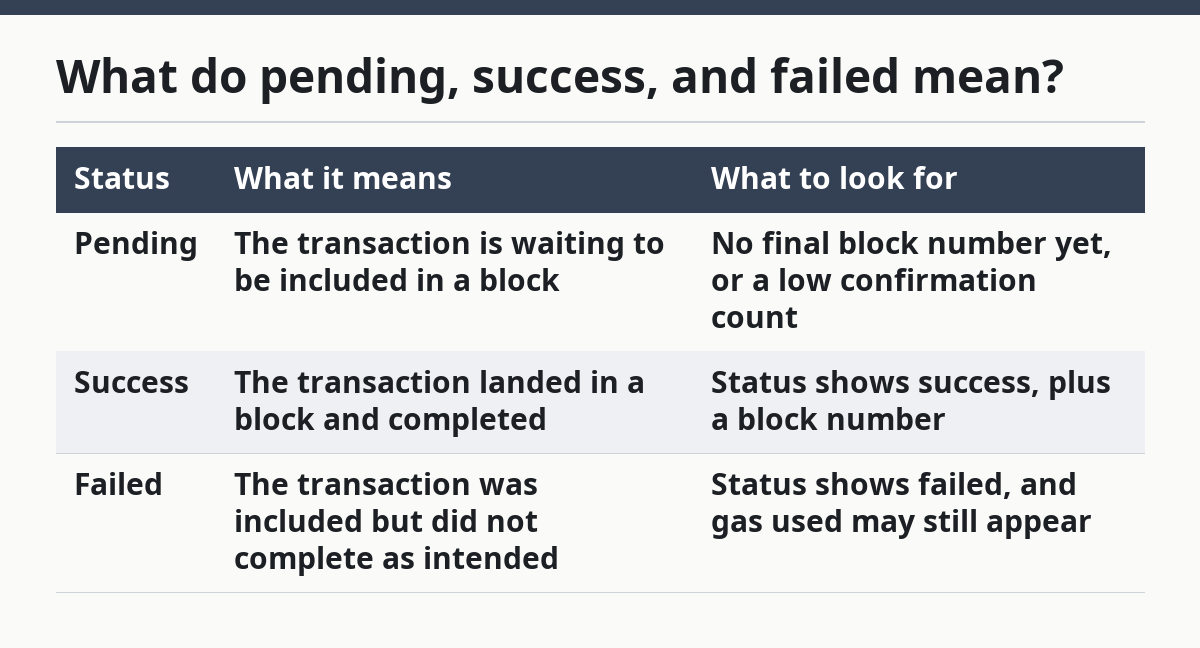
Pending is the one that causes the most uncertainty. It can stay pending for a short time while the network handles other transactions, and the wallet may show no more than a spinning icon or “pending” label. If the explorer page has no block number yet, that is another clue that it is still waiting.
Success is the cleanest result. You should see a status label that clearly says success, along with a block number and a gas used field. If the transfer moved ETH or interacted with a contract, the explorer may also show logs or token transfer details.
Failed means the transaction did not complete the intended action, but it does not mean it vanished. The record still exists on-chain, and gas used may still be visible because the network still had to process the attempt. That is why a failed transaction can still have a cost in gas terms, even though the action itself did not finish.
Where should I look first, the wallet or a block explorer?
The block explorer is often the first stop when you need the exact status, while the wallet is the fastest place to find the transaction hash. That split saves time: the wallet gives you the ID, and the explorer gives you the detail.
A wallet is convenient for quick checks, especially if it already labels the transaction as pending or success. It is less useful when you need the reason for a failure, the block number, or gas used. A block explorer gives you a broader record and is usually the better source when a transfer seems stuck for more than a few minutes.
Here is the practical difference:
| Tool | What it is good for | Main limit |
|---|---|---|
| Wallet | Fast status glance and easy access to the hash | May show very little detail |
| Block explorer | Full transaction page with block data and gas used | Needs the correct hash |
If the wallet hides the hash, look for a details panel or activity history. If the wallet shows the hash but the status looks unclear, copy that hash into the explorer. The explorer is the more precise record because it shows the transaction on the chain itself.
This is one of those cases where a simple 2-step habit helps: wallet first for the hash, explorer second for the truth. For related background, see the internal guide on Ethereum gas fees and the explainer on Ethereum transaction confirmation.
Why does gas used matter?
Gas used matters because it helps explain what happened when a transaction succeeds, stalls, or fails. On Ethereum, gas used is the amount of gas consumed by that transaction, and it often appears on the explorer page next to the status and block number.
If a transaction succeeds, gas used gives you a clue about how much work the network had to do. If it fails, gas used still matters because it shows that the network processed the attempt. That is why a failed transaction can still show a gas figure even though the main action did not finish.
This field is easy to overlook, but it is one of the clearest clues on the page. A reader who sees a failed status and a gas used value should not assume the transaction was erased. The chain still records the attempt, and the explorer still tracks the work the network performed.
Gas used is not the same thing as the status label. The label tells you the outcome; the gas field tells you something about the effort the network spent to reach that outcome. That distinction matters when you are trying to figure out whether a transaction is simply slow or truly failed. For another explainer on transaction costs, see how Ethereum gas works.
What mistakes make the status look wrong?
The biggest mistake is checking the wrong hash, and it usually leads to the wrong page or no page at all. A single copied character error can make the explorer show nothing, which looks like a missing transaction when the real problem is a bad ID.
Another mistake is using the wallet address instead of the transaction hash. A wallet address can show a history of many actions, but it does not point to one transaction status. If you want to know the state of one transfer, the hash is the most reliable shortcut.
A third mistake is assuming pending means broken. Pending can last for a short time while Ethereum reaches a block, and a wallet may not refresh as quickly as the explorer. If the status is still pending, the safe move is to wait and recheck the same hash rather than copying a new address or opening a different transaction.
A fourth mistake is reading failed as if it means no record exists. The record still exists, and the explorer can still show the hash, status, and gas used. The mistake costs time because the reader starts looking for a missing transaction when the real answer is already on the page.
If the explorer cannot find the hash at all, check the copy again. If the hash is correct and the page still does not resolve, the transaction may not have been broadcast the way the wallet showed it, or the wallet may be displaying a draft rather than a mined transaction. Either way, the hash is still the first thing to verify.
How can I tell if a transaction really finished?
A transaction really finished when the explorer shows success and a block number. That combination is stronger than a wallet spinner or a vague “processed” label, because it ties the transaction to a confirmed block on Ethereum.
Look for three signs on the explorer page: the status label, the block number, and the confirmations. If those are present, the transaction has moved beyond the waiting stage. If the status is still pending and the block number is blank, it has not finished yet.
The wallet may lag behind the chain by a little while, so the explorer is the better source for the final answer. A wallet can be useful for convenience, but it should not be the only place you check if the transfer matters.
For readers who like official references, the Ethereum documentation on transactions and the Etherscan transaction page explain the same core pattern: use the hash, read the status, and inspect the block details. Ethereum’s own docs are the better starting point for the chain rules, while Etherscan is the practical lookup tool.
- Ethereum documentation: https://ethereum.org/en/developers/docs/transactions/
- Etherscan transaction lookup: https://etherscan.io/tx/
- Ethereum.org gas explainer: https://ethereum.org/en/developers/docs/gas/
Where do I check an Ethereum transaction?
Check it in your wallet first if you need the transaction hash, then paste that hash into a block explorer such as Etherscan. The explorer is usually the clearer source because it shows the status, block number, and gas used on one page.
What does failed mean on Ethereum?
Failed means the transaction was processed but did not complete the intended action. The record still exists on-chain, and you may still see gas used on the explorer page.
Why is my Ethereum transaction pending?
Your Ethereum transaction is pending because it has not yet been included in a block. The wallet may show that state for a short time, while the block explorer will usually give the clearest view of whether it is still waiting or has already finished.
Drafted with AI; not yet reviewed by a person.