Last updated: November 20, 2026
Verify the wallet address against the network, the seed phrase, and the first and last characters before any restore or send. That is the safest way to catch a wrong wallet, a wrong chain, or a copied address that changed on the way to the screen.
Key takeaways
- Check the wallet address on the same network it was meant for, not just in the same app.
- Compare the first and last characters, then confirm the full string if the wallet shows it.
- Use the restore process only with the seed phrase you expect, and make sure the derived address matches your record.
- A test receive is safer than moving all funds at once.
- If the restored address is different, stop and trace the wallet, the network, and the seed phrase before sending anything.
What should match before you restore funds?
The wallet address, the network, and the seed phrase should line up before you move any funds. If one of those three is off, the address you see after restore may be valid but still wrong for the wallet you meant to open.
Start with the address itself. A copied address can be one character off, or it can belong to a different chain that looks similar in the app. Then check the network name in the wallet, because the same address format can mean different things on different networks.
This is where wallet address verification matters most. It is not just a visual check; it is a match check across the restore process, the address format, and the chain the funds live on. If the wallet uses a seed phrase under BIP-39 or an address path under BIP-32, the restore result should make sense against those recovery details, not just against memory.
Do not use this page to learn how to set up a wallet from scratch or how to recover one that is lost. It is for the narrow job of checking that the restored address is the one you expected before you restore funds or send anything to it.
How do I verify the wallet address?
You verify the wallet address by comparing the restored address to the original record, the network, and the seed phrase in that order. The safest check is simple and boring, which is exactly what you want here.
-
Open the wallet app and go to the account or receive screen where the address is shown.
Look for the network label at the top or near the address. If the wallet is on the wrong network, stop here. -
Compare the first and last characters of the address with the saved version.
This catches many copy errors fast, especially when a long address is hard to read on a phone. -
Check the full address string against the record if the wallet shows it cleanly.
A full match is the goal, not a close match. -
Confirm the seed phrase used in the restore process is the one tied to that wallet.
A different phrase can create a different wallet even when the app looks the same. -
Match the network name to the chain where the funds were held.
A correct address on the wrong network is still the wrong destination. -
Send a small test receive before restoring larger funds or relying on the address for a bigger move.
This gives you a live check without exposing the full balance. -
Review the transaction history after the test receive appears.
The history should show the expected network and the expected address pattern.
A good restore is not a guess. It is a chain of checks that ends with a result you can explain: same seed phrase, same network, same address pattern, same wallet history.
For a deeper reference on why restore paths and seed phrases matter, the BIP-39 and BIP-32 standards are the right technical starting points:
- BIP-39: https://github.com/bitcoin/bips/blob/master/bip-0039.mediawiki
- BIP-32: https://github.com/bitcoin/bips/blob/master/bip-0032.mediawiki
Why does network matching matter?
Network matching matters because the same wallet app can show more than one chain, and the wrong chain can make a correct address useless for the funds you want to restore. A wallet address is only useful inside the network it belongs to.
A common mistake is checking only the text of the address and ignoring the chain label. That can lead to sending funds to an address that looks right but sits on the wrong network. The cost is not just confusion; it can be time lost while you sort out whether the wallet is wrong, the network is wrong, or both.
The fix is to treat the network as part of the address check. If the wallet shows a chain name, token network, or account type, compare that against the record you saved before the restore process. If the app lets you switch networks, check again after the switch. A clean address on the wrong chain is still a bad target.
This is also why a seed phrase alone is not the whole story. The same phrase can restore access in more than one wallet app, but the derived address may not appear where you expect unless the wallet uses the same path and network setup. That is a BIP-32 and BIP-39 issue, not just an app issue.
What should I look for in transaction history?
Transaction history should show the same wallet address pattern, the same network, and the same timing you expect from the restore or test receive. It is the easiest live record to compare after the address appears on screen.
Look at the latest incoming transaction first. If the amount is a test receive, the point is not the size of the transfer; it is whether the address and network match the one you verified. If the wallet displays a transaction ID, keep it with your record so you can compare it later.
A wallet with the right address but the wrong history is a warning sign. For example, if the restored wallet shows no past activity when you expected a known account, the issue may be the seed phrase, a different derivation path, or the wrong wallet import method. The address can still look fine while the history tells a different story.
Do not use transaction history as a substitute for address matching. History helps confirm the check, but it does not replace the check itself. A missing or empty history is useful information, especially when the wallet app restores a new account view instead of the one you expected.
What are the most common mistakes?
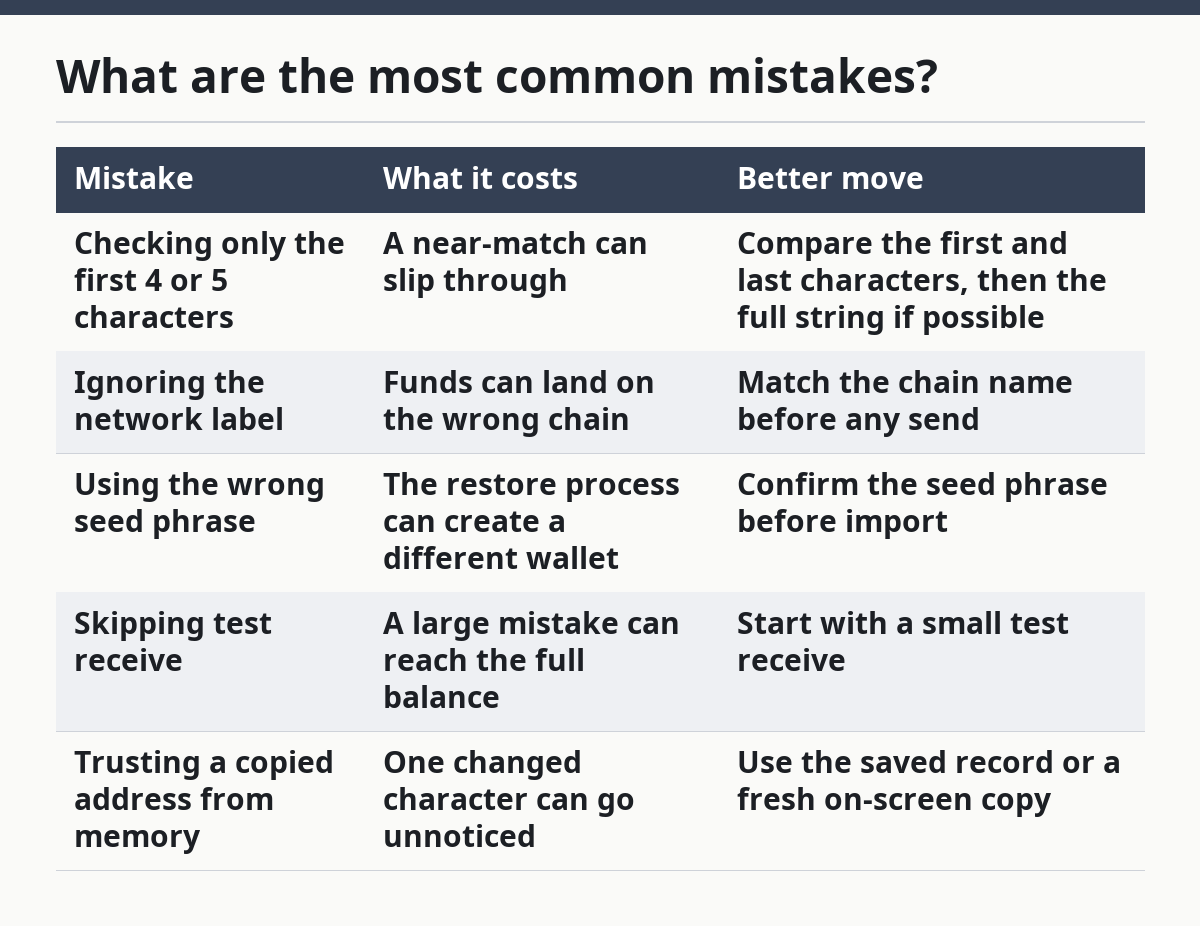
The most common mistakes are skipping the network check, trusting only the first few characters, and restoring with the wrong seed phrase. Each one can send you to a wallet that looks close but is not the wallet you meant to open.
| Mistake | What it costs | Better move |
|---|---|---|
| Checking only the first 4 or 5 characters | A near-match can slip through | Compare the first and last characters, then the full string if possible |
| Ignoring the network label | Funds can land on the wrong chain | Match the chain name before any send |
| Using the wrong seed phrase | The restore process can create a different wallet | Confirm the seed phrase before import |
| Skipping test receive | A large mistake can reach the full balance | Start with a small test receive |
| Trusting a copied address from memory | One changed character can go unnoticed | Use the saved record or a fresh on-screen copy |
One more mistake is assuming the wallet app will warn you. Sometimes it will not. A wallet can restore cleanly and still show an address that is not the one you intended if the phrase, path, or network differs. That is why the check has to happen before the funds move.
This is also the point where wrong address prevention matters most. If you are tired, in a hurry, or switching between apps, pause and re-check. A 30-second review is cheaper than trying to untangle a bad restore later.
When is a test receive the right call?
A test receive is the right call when the wallet is new to you, the network is easy to mix up, or the restore process changed anything you did not expect. It is the most practical way to confirm that the address really belongs to the wallet you restored.
Use a test receive before moving a larger balance. That small transfer gives you a live signal: the address accepts funds, the network is correct, and the wallet history updates the way you expect. If anything looks off, stop there instead of pushing a full transfer through.
A test receive is not free of trade-offs. It takes extra time, and it creates one more transaction to review. It also does not protect you if the first wallet is already wrong because of a bad seed phrase. It is a check, not a cure.
Still, for post-restore verification, it is often the cleanest check available. If you are verifying a wallet address after a restore, a small receive is better than relying on a screenshot, a memory, or a copied address that may have been altered by clipboard software or simple human error.
What should I do if the restored address is different?
If the restored address is different, stop and check the seed phrase, the network, and the restore method before you move any funds. Do not send anything to a wallet just because it opened successfully.
First, compare the new address with the record you saved. If only the last few characters differ, treat it as wrong until proven otherwise. Then check whether the wallet restored a different account index or a different chain path. That can happen even when the phrase is correct.
Next, review the seed phrase entry itself. A missing word, a swapped word, or the wrong word order can create a different wallet. The app may still restore something that looks normal, which is why the address check has to come after the restore and before the funds move.
If the address still does not match, do not force the result. The right next step is to re-check the restore process against the wallet you expected, not to guess. That is especially true if the wallet held funds on a network with a history view or a known address record you can compare against.
Why should I verify the address after restoring?
You should verify the address after restoring because the restore process can succeed without restoring the wallet you meant. A wallet may open, show a valid address, and still point to the wrong account, network, or derivation path.
That check protects you from sending funds to the wrong place after a clean-looking restore. It is the difference between “the app opened” and “the right wallet is back.”
Can the wrong address mean a wrong wallet?
Yes, the wrong address can mean the wrong wallet, even if the app restored without an error. A different seed phrase, a different network, or a different account path can all lead to a different address.
Treat that difference as a warning, not a small mismatch. Compare the restore details before you move anything.
What if the restored address is different?
If the restored address is different, pause and re-check the seed phrase and network before you send funds. The wallet may be correct in format but wrong in identity.
The safest response is to verify the first and last characters, confirm the chain label, and review the wallet history. If the result still does not match, do not guess your way forward.
Drafted with AI; not yet reviewed by a person.