Last updated: November 20, 2026
Quick answer: use 3 checks to tell whether you are dealing with How to Check Whether a Crypto Wallet Is Custodial or Self-Custody. A crypto wallet is custodial if someone else controls the private keys; it is self-custody if you control the private key or seed phrase. If you cannot move funds without logging in to an account that the provider can freeze or recover for you, treat it as custodial until you confirm the terms or ask a qualified professional.
Key takeaways
- The key question is control, not the app’s name or design.
- A seed phrase usually points to self-custody, but that is not enough by itself.
- An exchange account is often custodial even when it shows a “wallet” balance.
- Recovery help from the provider can mean the provider holds the keys, or at least has control over access.
- If the answer still feels unclear after checking the product docs, stop and ask the provider directly before you send funds.
Who this applies to
This applies to anyone who has a crypto wallet app, an exchange account, or a wallet link inside a trading platform and wants to know who actually controls the coins. It assumes you already have the wallet name, the app or website, and access to the account or device.
This is information, not financial advice. For your own situation, especially if the wallet holds a large balance, speak with a qualified adviser before you move funds or rely on any recovery feature.
The check is about control, not branding. A product can call itself a wallet and still be custodial, and an exchange can offer a wallet-like screen without giving you the private key. The difference matters because access rules, recovery steps, and account freezes work very differently.
If you need a broader map of backups, access, and recovery, the hub on wallet access, backups, and recovery is the right place to start.
How do I tell who controls the private keys?
You tell by checking where the private key or seed phrase lives, who can sign transactions, and whether the provider can recover the account for you. That is the core test for the custody model.
-
Open the wallet app and look for a seed phrase screen. A self-custody wallet usually shows a seed phrase during setup or in a backup section, often 12 or 24 words. Verify that the app lets you write it down and store it yourself. If the app never shows a seed phrase and only offers email login, that is a warning sign.
-
Check the settings for private key export. A self-custody wallet often gives an option to export a private key, derive an address, or reveal recovery words after re-authentication. Verify that the export stays on your device and is not sent to support. If the app says support must reset access for you, the provider may control the keys or the recovery path.
-
Review the sign-in method. A wallet that opens with an email, phone number, or exchange username is often tied to account access, not direct key control. Verify whether signing in is only a portal to a wallet you own or whether it is the main path the provider uses to manage access. If the account can be disabled by the provider, that points toward custody.
-
Inspect the withdrawal flow. A self-custody wallet usually asks you to approve each transaction from your device. Verify that you can send funds without asking a company for permission. If withdrawals require a separate approval, queue time, or manual review, that suggests custodial control.
-
Look for “backup,” “recovery,” or “restore access” language. A self-custody wallet expects you to restore with a seed phrase on a new device. Verify that recovery depends on those words, not on a support ticket. If the provider says it can reset the wallet for you after identity checks, the provider may be holding the keys or managing the account.
-
Check the address ownership model on the product page. Some apps create an address for you but still hold the keys on your behalf. Verify whether the provider says it is a custodian, trustee, or exchange operator. If the product terms say the provider can act on your behalf, it is not a plain self-custody setup.
-
Compare the wallet docs with the account terms. The docs often say whether the service is “non-custodial,” “self-custodial,” or “custodial.” Verify that the terms match what the app does. If the marketing page says one thing and the legal terms say another, trust the terms.
-
Test the ownership question with one simple fact. Ask: “Can I recover the wallet on a new device with only the seed phrase?” Verify that the answer is yes for self-custody. If the answer depends on the provider’s login system, the wallet is custodial or partly custodial.
The practical shortcut is this: if you hold the seed phrase and can restore on your own, that points to self-custody. If a company can reset access without your seed phrase, that points away from self-custody.
What clues point to a custodial wallet?
A custodial wallet is usually tied to an exchange account, support desk, or recovery system that the provider controls. The clue is not the app icon; it is who can keep you in or out of the funds.
A common sign is that the balance sits inside an exchange account and you log in with a password, email, and sometimes a code from your phone. Another sign is that withdrawals can be paused for review, compliance, or account security. Those are normal features on many exchange platforms, but they are not signs of direct key control. For context, the SEC’s Investor Bulletin on crypto assets and the FTC’s crypto scam guidance both stress the risks of account access and recovery.
Another clue is the absence of a seed phrase. If the service never asks you to write down 12 or 24 words, that is a strong signal that the provider may be holding the keys. Some custodial services hide the chain complexity from the user, which is convenient but changes who is responsible for access.
What clues point to a self-custody wallet?
A self-custody wallet is the one where you hold the seed phrase or private key and can restore the wallet yourself. The app should act like a tool, not like a gatekeeper.
You usually see a seed phrase during setup, and the wallet warns you to store it safely because anyone with those words can control the funds. You may also be able to sign transactions directly from the device without asking a company for permission. That is the basic shape of self-custody.
The trade-off is plain: if you lose the seed phrase and no other recovery path exists, the provider may not be able to restore access. That is why self-custody gives more control but also more responsibility. A wallet app can be self-custody even if it looks simple, and a simple look does not make it safer by itself.
Custodial vs self-custody: the quickest comparison
| Check | Custodial wallet | Self-custody wallet |
|---|---|---|
| Seed phrase | Often not shown to you | Shown to you for backup |
| Private key | Held by provider | Held by you |
| Login | Email, password, exchange account | May exist, but does not replace key control |
| Recovery | Provider may reset access | You restore with your seed phrase |
| Withdrawals | Can be reviewed or paused | You approve them from your wallet |
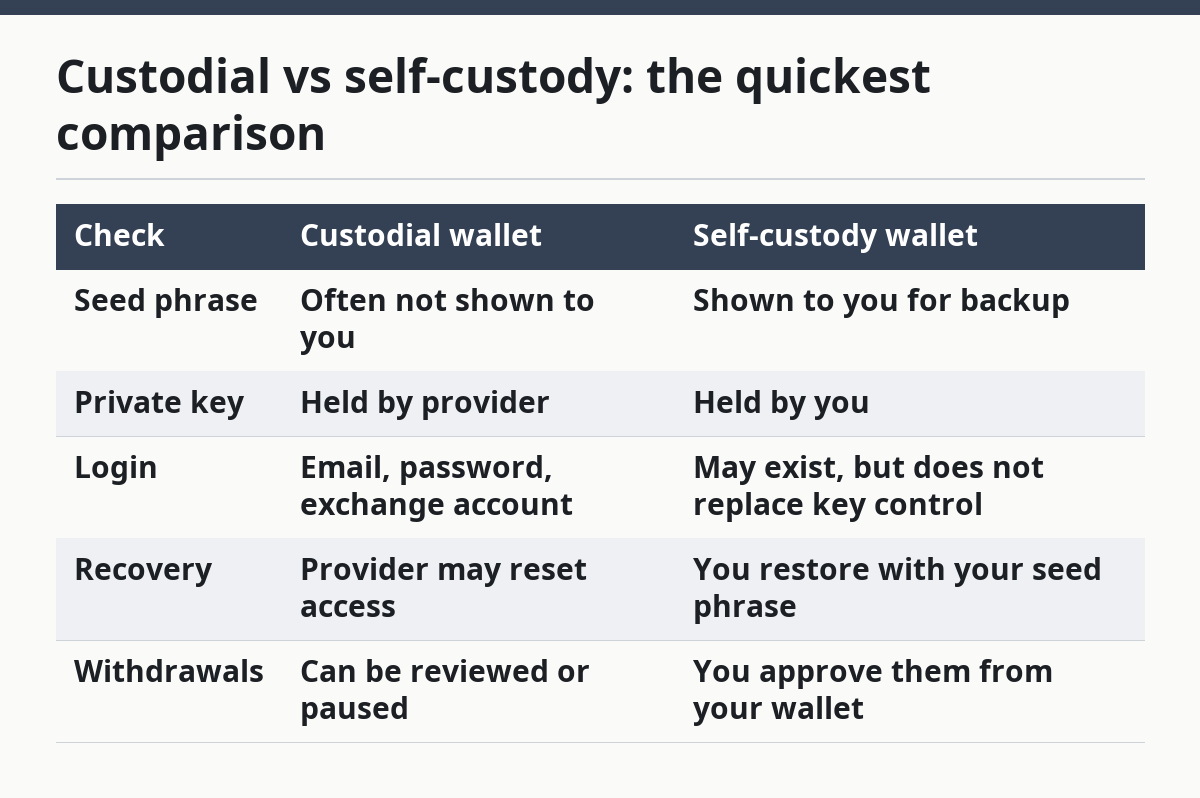
The table is only a shortcut. Some services mix the two models, so one clue alone is not enough. A wallet can feel self-custody on the surface and still depend on a provider for some recovery or account control.
When should I stop and ask more questions?
Since the usual “look for the seed phrase” check is not enough on its own, stop when any of these situations applies.
The provider can reset access for you: That usually means the provider has real control over the account or keys — ask the provider what happens to the private key and whether it can move funds without your approval, and consider a qualified professional if the balance is material.
You only sign in with an exchange login: That often means the wallet is part of an exchange account, not a wallet you fully control — check the account terms before you assume ownership.
No seed phrase appears anywhere: That can mean custodial custody, a hidden backup system, or a restricted wallet flow — look for official docs before you deposit anything.
The app says “self-custodial” but support can freeze or restore balances: That is a mismatch — read the legal terms, not only the marketing page.
The wallet is shared, business-managed, or tied to a team account: That can change the control model completely — confirm who can approve transactions and who can recover the wallet, and ask a qualified professional if the structure is not straightforward.
You cannot find a private key or recovery word export path: That may mean the provider designed the product to keep keys away from users — treat it as custodial until the provider explains otherwise, and seek professional advice if you are unsure.
If the answer still matters after that, ask the provider in writing before you send funds. For a high-value account, that is safer than guessing. For a broader control checklist, see wallet recovery and backup basics.
What mistakes do people make?
People most often mistake convenience for ownership. A polished app with instant login can still be custodial, and a wallet that feels technical can still be self-custody. The mistake costs control, not just time.
Another mistake is trusting the label “non-custodial” without checking the terms. That can lead to false confidence if the provider still runs the recovery flow or can limit withdrawals. The better move is to check the seed phrase, the private key, and the account terms together.
A third mistake is assuming that seeing an address means self-custody. An address alone does not prove who holds the key. The correct alternative is to verify whether you can restore that address on a new device with your own recovery words.
People also ignore recovery language. If the provider offers password resets, identity checks, or support-led restores, that changes the model. The correct alternative is to treat those as custody clues, not just customer service features, and to compare them with the provider’s legal terms.
A final mistake is using the exchange account like a wallet without reading the account rules. On many platforms, the exchange can freeze or delay withdrawals. If that is a problem for your use case, you need to know before funds are inside the account. For more on account rules, see exchange account custody basics.
When does the standard check not apply?
The standard check needs extra care when the wallet is tied to a company account, a multi-signature setup, or a wallet service that mixes login access with on-chain control. In those cases, a single yes-or-no label is too simple.
Multi-signature wallets use more than one key to approve a transfer. That can mean shared control among several people or systems, so one private key alone does not tell the whole story. You need to know who holds each signing key and what the recovery rules are.
Some services also use social recovery or managed backup features. Those can help if a device is lost, but they can also mean the provider or a recovery group has a role in access. The exact terms matter more than the product category name.
If the wallet is for a business, trust, or group account, treat the control question as a policy issue, not just a tech question. Who can move funds, who can restore access, and who can lock the account are the facts that decide custody.
What should I check on the product page?
The product page should tell you whether the wallet is custodial, self-custody, or mixed, and the wording should match the legal terms. Start with the phrases “private keys,” “seed phrase,” “non-custodial,” and “account recovery.”
If the page only talks about “easy login,” “instant recovery,” or “password reset,” that is not enough. Those phrases say little about who controls the wallet. If the product page is clear, the answer is usually there in a few lines. For a second source, compare the page with the provider’s terms and the SEC’s Investor Bulletin on crypto assets.
Two public sources worth reading on the broader risk of crypto accounts and scams are the U.S. Securities and Exchange Commission and the U.S. Federal Trade Commission. Their guidance does not replace the wallet’s own terms, but it helps explain why account control and recovery matter.
FAQ
What makes a wallet custodial?
A wallet is custodial when the provider controls the private keys or can restore access without your seed phrase. The user may still see a balance and send requests, but the provider has the deciding role in access and recovery. Exchange accounts often work this way.
How do I know who controls the private keys?
The simplest sign is whether you hold the seed phrase or can export the private key yourself. If the app lets you restore the wallet on a new device with only your recovery words, that points to your control. If support can reset the wallet for you, the provider likely has some control too.
Can a wallet app be both custodial and self-custody?
Yes, a wallet app can mix both models in different parts of the product. Some apps offer a self-custody wallet alongside a custodial account, or they keep one feature self-custody while using provider-managed recovery for another. Read the terms for the exact feature you are using, not the app as a whole.
Drafted with AI; not yet reviewed by a person.